
2.3.5 Oval Cut 'Move' Direction — V/H, H only, V only, or None
2.3.5 oval
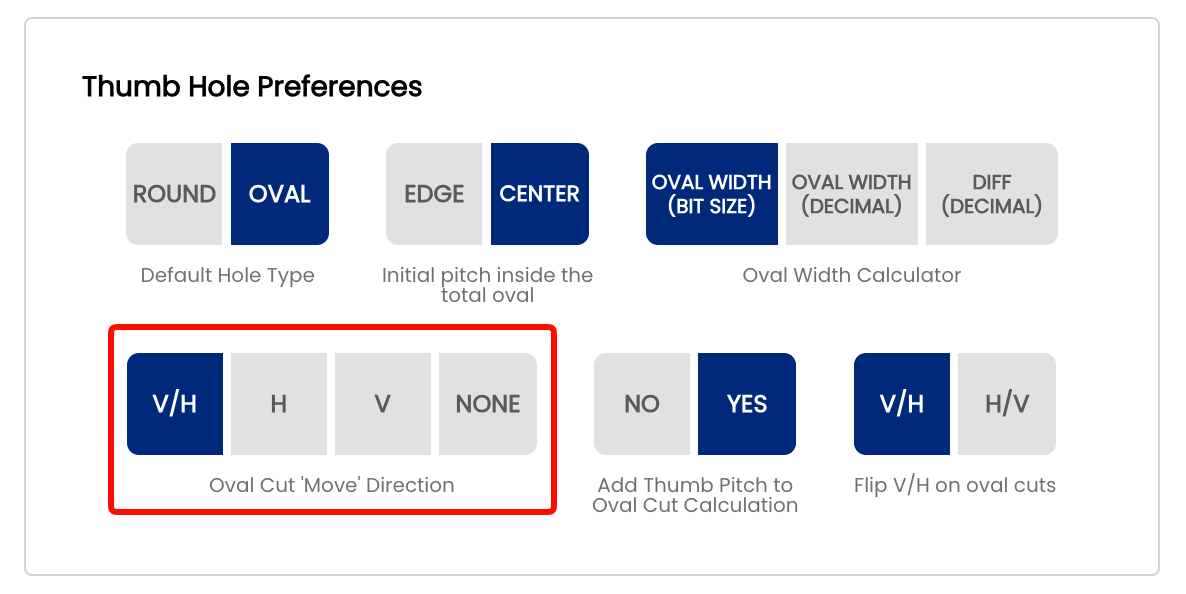
The Oval Cut Move Direction setting controls which directional components Spectre Cloud calculates and displays when outputting oval cut values. Depending on your drill press type and how you cut ovals, you may work with both vertical and horizontal movement, one direction only, or prefer to enter the values manually without the calculator's guidance. This setting ensures the oval calculator output matches exactly what your press needs.
🔄 The Four Options Explained
V/H — Vertical and Horizontal
Spectre Cloud calculates and displays both the vertical (V) and horizontal (H) movement values needed to cut the oval along the hypotenuse of the desired triangle. This is the standard method for most drill presses with independent X/Y axis digital readouts. The V and H values are the two sides of the right triangle formed by the oval cut path — together they define the full shape and direction of the cut.
- ✅ The most common setting for standard drill presses with digital readouts
- ✅ Full oval specification — both axes displayed for every cut
- ✅ Required when your press needs both figures to execute the cut sequence
- ✅ Matches the cut tables shown in the four scenarios on page 2.3.2
H — Horizontal only
Spectre Cloud calculates and displays both values, but only the horizontal (H) axis will have movement calculated. The vertical (V) value will display as 0.000 — or as the pitch value if Add Thumb Pitch to Oval Cut Calculation is set to Yes — since no vertical movement is needed. Used mostly when you have an Ovalmatic press, VISE Ferrari Jig or similar equipment where you can swing the ball to a desired degree on the vertical axis. From there, you cut in one direction only — horizontal — and the oval shape is achieved through the combination of the swing angle and the single-axis cut.
- ✅ Designed for Ovalmatic-style presses that swing the ball to set the vertical component
- ✅ V value still displays — shows
0.000or the pitch offset if pitch is included - ✅ No vertical movement is calculated — only horizontal cuts are needed at the press
V — Vertical only
Spectre Cloud calculates and displays both values, but only the vertical (V) axis will have movement calculated. The horizontal (H) value will display as 0.000 — or as the pitch value if Add Thumb Pitch to Oval Cut Calculation is set to Yes — since no horizontal movement is needed. The mirror of H only — used for presses that cut ovals on a single vertical axis where the horizontal component is handled by swinging or rotating the ball.
- ✅ For presses that cut ovals on a single vertical axis
- ✅ H value still displays — shows
0.000or the pitch offset if pitch is included - ✅ No horizontal movement is calculated — only vertical cuts are needed at the press
None — Manual input
No directional movement values are displayed by the oval calculator. This option allows you to manually input your cuts and bypass the oval calculator's directional output entirely. The oval width and degree are still used for reference, but Spectre Cloud does not output V or H values — you determine and enter the cuts yourself.
- ✅ For experienced drillers who prefer to work from their own calculated values
- ✅ Useful for shops using external reference charts or custom cut tables
- ❌ You do not benefit from Spectre's automatic V/H calculation in this mode
Note: Even if you calculate an oval, you can always add manual cuts to the calculated math by pressing the + button.
📊 Quick Reference
| Press Type / Workflow | Recommended Setting | Reason |
|---|---|---|
| Standard drill press with X/Y digital readouts | V/H | Both axes needed — Spectre calculates the full V and H move sequence |
| Ovalmatic or swing-style press | H or V | Ball is swung to set one axis — only one directional value needs movement calculated |
| Manual entry, external charts, or custom cut tables | None | Bypass the calculator output and enter your own values |
📐 The Math Behind the Cut Directions
Spectre Cloud uses the oval difference (Oval Width – Starting Bit) as the hypotenuse of a right triangle, and the oval degree as the angle. It then applies trigonometry to determine the precise V and H displacement for each cut:
- The V value is calculated using the
sinof the oval degree applied to the difference. - The H value is calculated using the
cosof the oval degree applied to the difference. - Spectre displays cuts in 32nds at most — cutting in 32nd increments produces a smooth oval hole with minimal chatter on the ball surface.
- No matter which direction setting you use, Spectre always cuts in a linear direction from the top of the oval moving toward the bottom, minimizing table movement for greater time savings and consistency.
Note: All four direction settings produce the exact same physical oval hole. The setting only controls what is displayed on screen — the underlying calculation is always performed in full.
⚙️ Changing This Setting
- Open Spectre Cloud at
cloud.spectrebowling.comand log in. - Select Settings from the menu.
- Navigate to the Thumb Hole Preferences section.
- Locate the Oval Cut 'Move' Direction field and select V/H, H, V, or None.
- Changes are saved automatically.
Note: Like all system defaults, this setting controls only the pre-selection on new spec sheets. It can always be changed on a per-sheet basis without affecting your shop default.
🎬 See It in Action
Watch Mark Buffa walk through the full oval cutting process including how V and H cut values are used at the press: How to Cut an Oval Thumb! | Full Pro Shop Tutorial!
For the complete tapering process and a deeper look at how the oval calculator generates cut values: Oval Calculator — Tapering Process
A full reference presentation covering all four oval cut scenarios, the math behind the calculator, and detailed cut direction diagrams is attached to page 2.3.2: Cutting Ovals — Spectre Pro Shop Software.
Related Sections
Tip: Not sure which option your press needs? Start with V/H — it gives you the full picture. Once you have confirmed which axis or axes your press uses for oval cuts, you can narrow the display to keep the calculator output clean and unambiguous at the press.