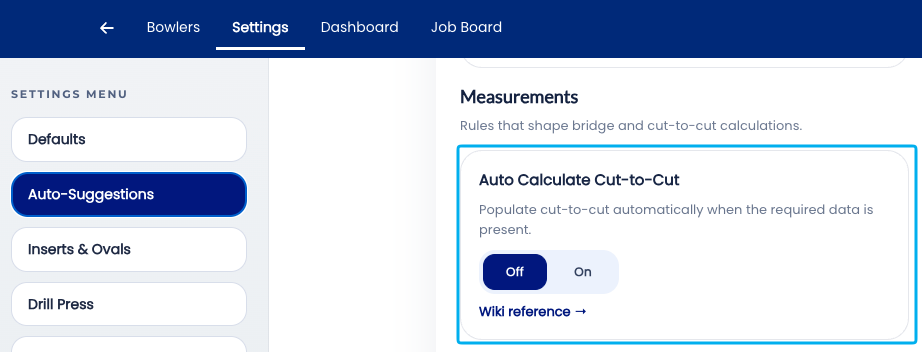
2.6.9 Autofill Cut to Cut measurement based on insert type/size
Autofill Cut to Cut measurement based on insert type/size
2.6.9 auto
The Autofill Cut to Cut setting controls whether Spectre Cloud automatically calculates and populates the Cut to Cut (C) measurement based on the bowler's recorded insert type and insert size. The Cut to Cut measurement defines the distance between the near edges of the finger holes — a value that is directly influenced by insert dimensions. When enabled, entering the insert details is sufficient for Spectre Cloud to derive this measurement automatically, removing a manual calculation step that varies with every insert combination.
📐 What Is the Cut to Cut Measurement?
The Cut to Cut measurement is the distance between the nearest edges of the middle and ring finger holes, measured across the bridge. It is one of three span reference types supported in Spectre Cloud alongside Full Span (F) and Center (C), and it is particularly relevant when inserts are in use — because the physical edge of the drilled hole and the edge of the seated insert are related but not identical dimensions.
- ✅ Cut to Cut is a precise reference for the physical gap between holes as drilled — useful for verifying drilling accuracy and for communicating specs to a drill press operator.
- ✅ When inserts are used, the effective finger position is influenced by the insert's inner diameter — the Cut to Cut measurement anchors the span calculation to the drilled hole geometry rather than the insert's grip surface.
- ✅ Spectre Cloud can derive Cut to Cut automatically because the insert type and size together define the hole edge positions relative to the grip center.
- ❌ Cut to Cut is a derived measurement — if the underlying insert type or size is entered incorrectly, the auto-calculated Cut to Cut will also be incorrect. Always verify insert details before relying on the autofill result.
Note: ⚠️ Verify with your Spectre team: confirm the exact formula Spectre Cloud uses to derive Cut to Cut from insert type and size, and whether any additional spec sheet values — such as bridge width or hole diameter — are also factored into the calculation.
📊 How Insert Type and Size Drive the Cut to Cut Value
Each insert has a defined Outside Diameter (OD) — the dimension of the hole it requires. Combined with the bridge measurement and the bowler's span, this gives Spectre Cloud everything it needs to calculate the Cut to Cut distance.
| Input | Role in Cut to Cut Calculation |
|---|---|
| Insert OD | Defines the diameter of each finger hole — determines where the hole edges sit relative to the hole centers |
| Bridge | The gap between hole edges — directly part of the Cut to Cut geometry |
| Span (middle finger) | The reference distance from which hole center positions are derived |
Note: ⚠️ Verify with your Spectre team: confirm the complete input set used for the Cut to Cut autofill calculation — specifically whether all three inputs above are required, and whether the Autofill Cut to Cut setting is dependent on Autofill Insert OD (2.6.6) and Autofill Bridge (2.6.5) also being enabled, or whether it can operate independently using manually entered values for those fields.
🛠️ Enabling or Disabling Autofill Cut to Cut
🔗 Relationship to Other Auto-Suggestion Settings
Autofill Cut to Cut sits at the end of a chain of related auto-suggestion settings in chapter 2.6. Each upstream autofill contributes a value that the Cut to Cut calculation depends on:
| Setting | Contributes To Cut to Cut Via |
|---|---|
| 2.6.6 — Autofill Insert OD | Provides the hole diameter used to locate hole edges |
| 2.6.5 — Autofill Bridge | Provides the edge-to-edge gap between holes |
| 2.6.8 — Auto-Calculate Ring Span | Provides the ring finger span used in hole center positioning |
| 2.6.9 — Autofill Cut to Cut | Assembles the upstream values into a final Cut to Cut figure |
When all four settings are enabled, the insert section and span section of the spec sheet require minimal manual input — the fitter enters the insert type, middle finger span, and grip style, and Spectre Cloud derives the remaining values in sequence.
- ✅ Autofill Cut to Cut can still operate if upstream values were entered manually rather than autofilled — it reads the field values, not their source.
- ✅ If any upstream value is missing or blank, the Cut to Cut field will not autofill — Spectre Cloud will not calculate from incomplete data. ⚠️ Verify with your Spectre team: confirm whether a warning or indicator is shown when the Cut to Cut autofill cannot fire due to a missing upstream value.
🔄 Overriding the Auto-Calculated Value
As with all autofill settings in chapter 2.6, the Cut to Cut value can be overridden manually on any individual spec sheet without affecting the account setting or the bowler's history.
- ✅ Enter a different value directly — the override is saved to the spec sheet as entered.
- ✅ Overrides are stored in the bowler's spec sheet history and visible in future sessions.
- ✅ If an upstream value — such as insert OD or bridge — is changed after Cut to Cut has been autofilled, confirm whether the Cut to Cut field updates automatically or retains the previously calculated value. ⚠️ Verify with your Spectre team: confirm whether changing an upstream value on an in-progress spec sheet re-triggers the Cut to Cut autofill, consistent with the live-update questions raised in 2.6.5 and 2.6.6.
⚙️ When to Consider Turning Autofill Cut to Cut Off
- ✅ Training new staff — disabling this setting requires trainees to calculate Cut to Cut manually from insert dimensions and span values, building genuine understanding of the geometric relationship between these measurements.
- ✅ Shops that do not use inserts — if your shop primarily drills bare holes, the insert-driven Cut to Cut calculation is not relevant and the field should be entered directly from measurement.
- ✅ Verification workflows — some shops calculate Cut to Cut independently as a cross-check against the spec sheet before drilling. Turning off the autofill ensures the fitter performs this calculation themselves rather than accepting a system-generated value.
- ❌ Turning Autofill Cut to Cut off in a standard insert-using shop adds a manual geometric calculation to every fitting — one that is entirely deterministic and has no fitting judgment component. This is precisely the kind of task the autofill system is designed to eliminate.
☁️ Scope of This Setting
This setting is stored at the account level and applies to all new spec sheets across all devices. ⚠️ Verify with your Spectre team: confirm per-user vs. per-account/shop scope — this question has now persisted from 2.3.5 through 2.6.9 across more than twenty pages. It must be resolved and documented before any of the affected pages in chapters 2.3 through 2.6 are published.
Related Sections
- 2.6.8 — Auto-Calculate Ring Span: based on 5/16" rule
- 2.6.6 — Autofill Insert OD: auto drill bit size per insert type and grip
- 2.6.5 — Autofill Bridge: auto standard bridge (1/4" fingertip, 3/8" conventional)
- 2.6.1 — Overview: why leaving all auto-suggestions on saves time
- 2.6.10 — Next auto-suggestion setting (if applicable)
- 2.3.2 — Span type configuration: Full Span, Edge, Center
- 4.x — Spec Sheet: entering span and Cut to Cut measurements
- 4.x — Spec Sheet: working with inserts
Tip: Autofill Cut to Cut is the downstream beneficiary of the auto-suggestion chain — it is most powerful when 2.6.5, 2.6.6, and 2.6.8 are also enabled. If you are enabling auto-suggestions selectively, enabling all four of these settings together gives you the greatest reduction in manual calculation steps for insert-based fittings with the lowest risk of any individual value being incorrectly derived.
```