
2.2.6 Vacu Installation Increment from O.D. (1/32, 1/16…)
2.2.6 default
When fitting a bowler with VACU Grip inserts, Spectre Cloud calculates the two hole sizes required for the two-tier drill based on the insert's outer diameter (O.D.). The lower hole matches the insert O.D. so the insert seats and glues at the base. The upper hole is drilled larger than the insert O.D. — this is what gives the rubber room to expand when the bowler's finger is inserted. This setting controls the increment used when selecting how much larger that upper hole is drilled above the insert O.D.
Note: This setting only applies if your shop uses VACU Grip installation. If your shop drills exclusively STD (glued) inserts, this setting has no effect on your workflow.
Important: This setting requires the Auto Insert OD auto-suggestion to be enabled in order to work correctly. If Auto Insert OD is turned off, Spectre Cloud will not automatically calculate the upper hole size and this increment setting will have no effect. See Settings → Auto-Suggestions to confirm it is enabled.
📐 What Is the O.D. Increment?
The O.D. increment is the step size used when selecting how much larger the upper hole is drilled relative to the insert O.D. — the amount by which that value increases or decreases with each click or tap. Spectre Cloud offers four options:
- ✅ 1/16" — the standard increment for VACU installation. Gives the insert a full 1/16" of expansion room per side — for example, a
31/32"insert O.D. produces a1 1/32"upper hole. This is the correct starting point for most bowlers and the increment most shops will use day-to-day. - ✅ 3/64" — slightly less expansion room than the standard 1/16". Used for bowlers who want a more controlled feel with less rubber springiness.
- ✅ 1/32" — reduced expansion room. The insert rubber has less room to flex, producing a firmer, tighter feel when the finger is inserted.
- ✅ 1/64" — the tightest fit. Minimal expansion room — suited to bowlers who prefer very little springiness from their insert rubber.
⚙️ Changing the VACU O.D. Increment
- Open Spectre Cloud at
cloud.spectrebowling.comand log in. - Select Settings from the menu.
- Navigate to the System Defaults section.
- Locate the Vacu Installation Increment from O.D. field and select 1/16", 3/64", 1/32", or 1/64".
- Changes are saved automatically.
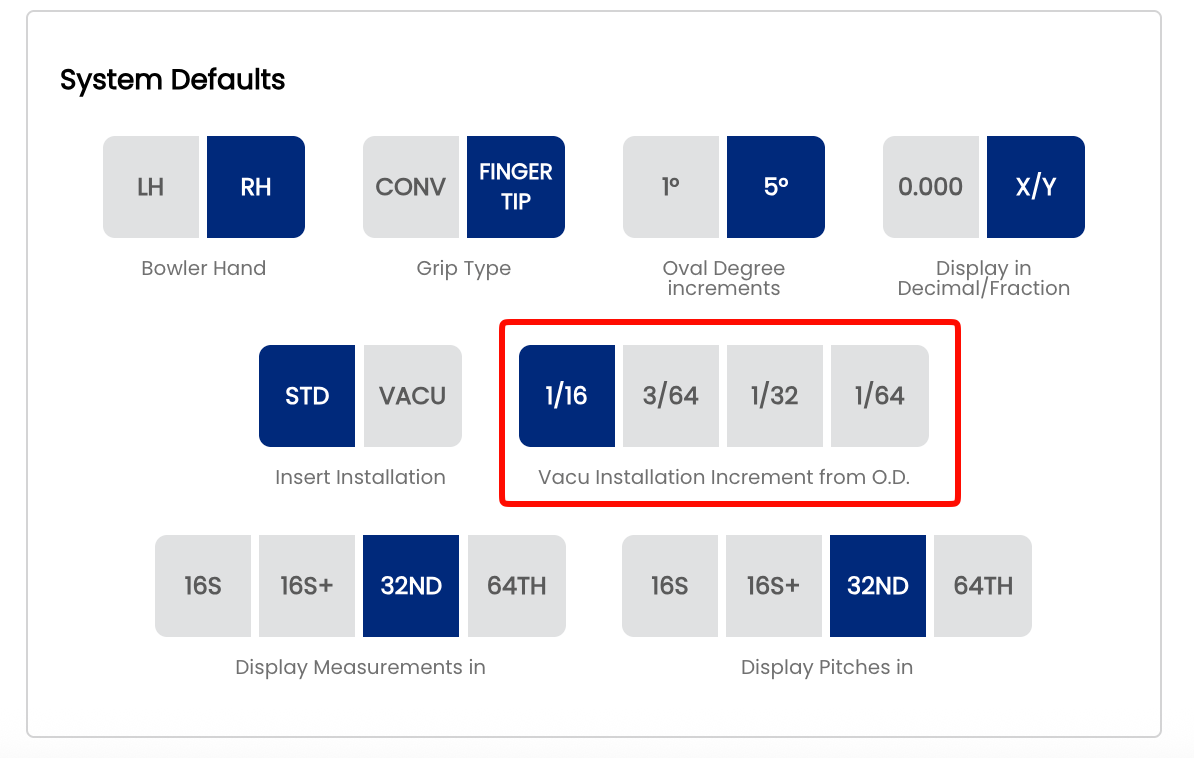
Note: Like all system defaults, this setting controls only the pre-selection on new spec sheets. The increment — and the resulting upper hole size — can always be adjusted on a per-bowler, per-sheet basis directly on the spec sheet, the same way auto-suggestion values can be overridden after they populate.
🎳 Which Increment Should You Choose?
| Situation | Recommended Increment | Reason |
|---|---|---|
| Most bowlers — standard VACU fitting | 1/16" | The industry standard for VACU installation — full expansion room, natural rubber feel |
| Bowler wants slightly less springiness | 3/64" | Marginally tighter fit with a more controlled feel |
| Bowler prefers a firmer insert feel | 1/32" | Reduced expansion room, noticeably less rubber flex |
| Bowler wants minimal rubber springiness | 1/64" | Tightest fit — the insert has very little room to expand |
📌 Important: O.D. vs. Hole Size
The insert O.D. and the two drilled hole sizes work together in a VACU fitting:
- The insert O.D. is the published outer diameter of the VACU insert — a fixed measurement from the manufacturer.
- The lower hole is drilled to match the insert O.D. — this is where the insert seats and is glued at the base.
- The upper hole is drilled larger than the insert O.D. by the selected increment — this gives the rubber body room to expand outward when the bowler's finger is inserted.
- The O.D. increment setting controls how finely you can step through that upper hole size in Spectre Cloud.
- ❌ Do not confuse the O.D. increment with the finger hole size itself — they are different measurements.
Tip: If you switch insert brands, check the new brand's recommended upper hole size specification. Some brands require more or less expansion room than others — switching brands is a good time to revisit this increment setting.
Related Sections
- 2.2.5 — Insert Installation: STD vs. VACU Grip as the Default
- 2.2.3 — Display in Decimal vs. Fractional
- 4.4 — Insert Fields on a Spec Sheet
- 6.1 — Drilling Your First Ball: Step-by-Step Overview