
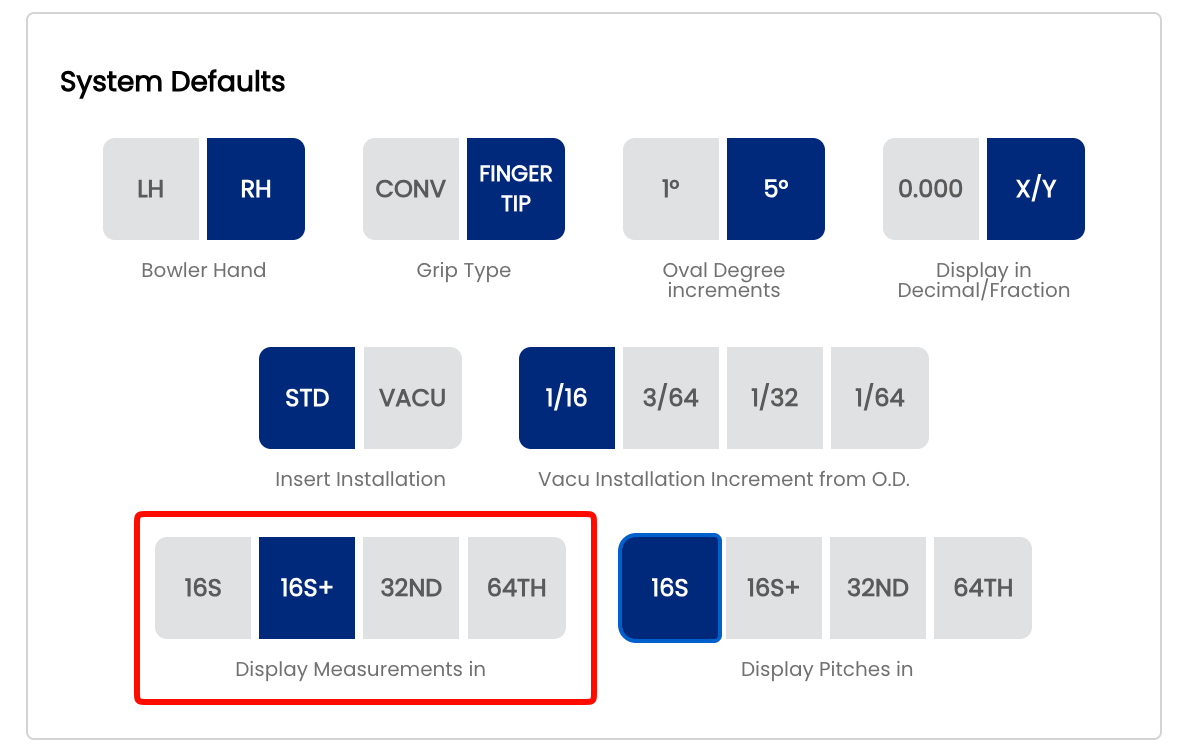
2.2.7 Display Measurements in — 16S+, 32ND, Decimal options
2.2.7 display
When entering a span measurement on a spec sheet, Spectre Cloud presents a dropdown list of selectable values. This setting controls the spacing and precision of the values in that list — coarser settings show fewer values and less scrolling, finer settings show more values with greater precision. The available options are 16S, 16S+, 32ND, and 64TH.
Note: This setting applies specifically to span measurements. It controls what appears in the span dropdown list on a spec sheet — it does not affect how other measurements such as bridge width, oval dimensions, or hole sizes are displayed.
📏 Understanding the Four Options
16S — Sixteenths
The dropdown lists span values spaced in sixteenth-inch increments (e.g. 4", 4 1/16", 4 1/8", 4 3/16", 4 1/4"…). Values are displayed as simplified fractions. The fewest values in the list — fastest to scroll through. Suitable for shops that measure and record spans to sixteenth precision.
16S+ — Sixteenths with half-sixteenth notation
The dropdown lists the same sixteenth-inch values as 16S, but adds a + value between each pair — representing a half-sixteenth (one thirty-second). For example: 4 1/16", 4 1/16+", 4 1/8" — where 4 1/16+ is a shorthand way of expressing 4 3/32". This gives 32nd-level precision in a format that is easier to read and say out loud than a thirty-second fraction.
32ND — Thirty-seconds
The dropdown lists pitch values spaced in thirty-second-inch increments — the same resolution as 16S+, but displayed as simplified fractions throughout rather than using the + shorthand notation. The list will contain the same number of values as 16S+, just expressed differently. Choose this option if your drillers prefer to read standard 32nd fractions over the + notation.
64TH — Sixty-fourths
The dropdown lists span values spaced in sixty-fourth-inch increments, again displayed as simplified fractions. The most values in the list, requiring the most scrolling. Best suited to shops that fit to sixty-fourth precision or work with bowlers who require very fine span adjustments.
⚙️ Changing the Span Display Format
- Open Spectre Cloud at
cloud.spectrebowling.comand log in. - Select Settings from the menu.
- Navigate to the System Defaults section.
- Locate the Display Measurements in field and select 16S, 16S+, 32ND, or 64TH.
- Changes are saved automatically.
🎳 Which Format Should You Use?
| Situation | Recommended Format | Reason |
|---|---|---|
| Shop measuring to sixteenth precision, minimal scrolling preferred | 16S | Fewest values in the list — fast to navigate |
| Shop wanting 32nd precision in a readable format | 16S+ | 32nd-level precision expressed in a shorthand that is easier to read and communicate than thirty-second fractions |
| Shop recording spans in thirty-seconds, prefer standard fractions | 32ND | 32nd increment with values shown as simplified fractions — familiar and clean |
| Precision fitting, competitive bowlers, very fine adjustments | 64TH | Maximum precision — use when sixty-fourth resolution is needed |
🔄 Relationship to the Global Measurement Format Setting
This setting works alongside the global Decimal vs. Fractional display preference set in 2.2.3. The option you choose here controls the spacing and values in the span dropdown list. If your global format in 2.2.3 is set to Decimal, span values will be shown in decimal form regardless of which option is selected here.
- ❌ There is no per-sheet override for this setting — it applies shop-wide to all span dropdowns.
- ✅ Changing this setting is non-destructive — stored span values do not change, only the dropdown list presentation.
Tip: If your drillers find the span dropdown list too long to scroll through comfortably, switch to a coarser setting. You can always fine-tune an individual span value on the spec sheet after selecting the nearest available value from the list.