
4.1.4 Pitch terminology
4.1.4 concept
Pitch is the angle at which a finger or thumb hole is drilled relative to the ball's center. It affects grip comfort, how securely the ball is held through the swing, and how cleanly it releases. In Spectre Cloud, you set pitch for each hole using the pitch tiles on the spec sheet — the boxes framed by directional arrows around each hole. This page explains how those tiles work and defines the four pitch terms: Forward, Reverse, Lateral, and Zero.
Note: For the display and sign settings referenced here, see chapter 2.4. For the auto-suggestions that propose pitch values, see 2.6.2 and 2.6.3.
🛠️ Setting Pitch with the Pitch Tiles
On a Spectre Cloud spec sheet, each hole — thumb, middle finger, and ring finger — has its own pitch tile. Each tile is surrounded by arrows that represent the two pitch axes:
- ✅ Forward / Reverse — the arrows pointing toward and away from the ball's center. Forward tilts the hole toward the center of the ball; reverse tilts it toward the outside.
- ✅ Lateral — the sideways arrows, tilting the hole toward or away from the adjacent hole.
You enter the pitch amount in the tile in the chosen direction. Forward/reverse and lateral are independent, so a single hole can carry both at once (for example, a small forward pitch and a small lateral pitch together).
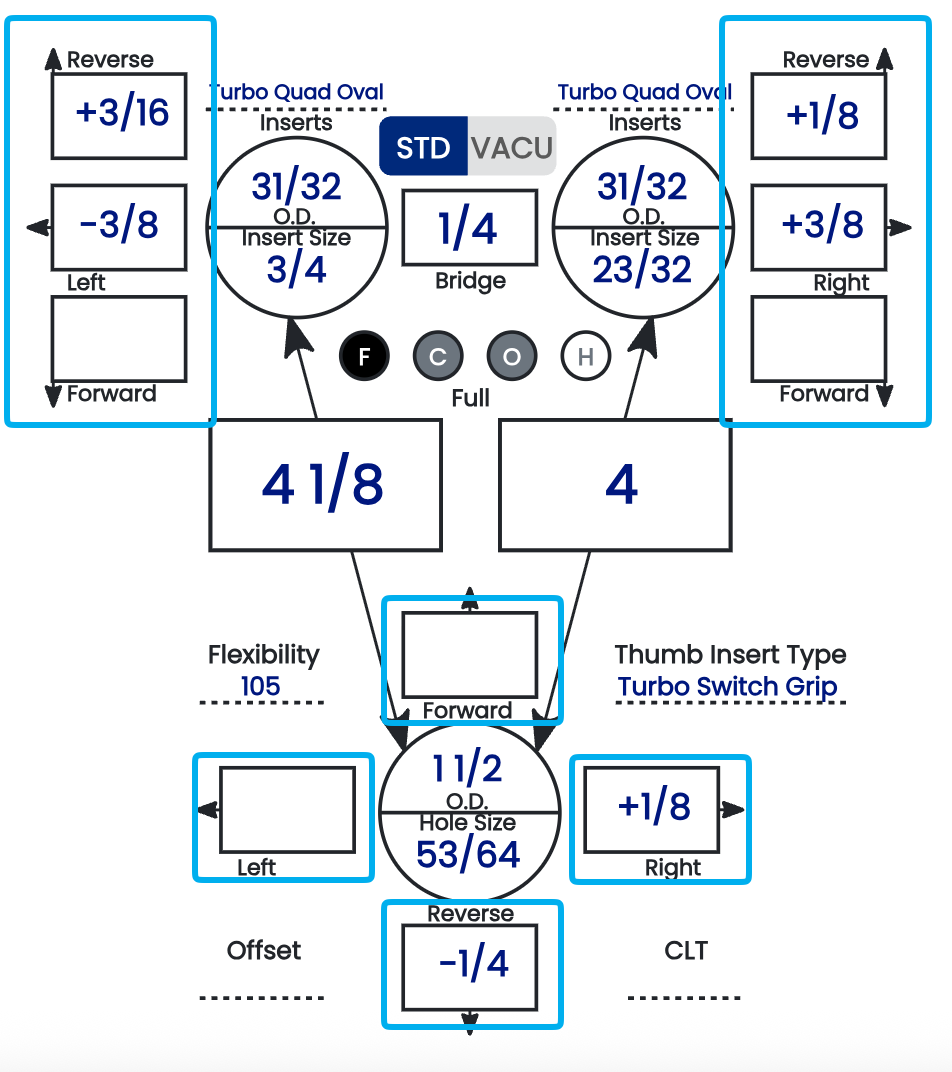
🔢 Fractions or Thousandths of an Inch
Pitch values in the tiles can be displayed two ways, controlled by a Spectre Cloud setting:
- ✅ Fractions — e.g.
1/4",1/8",3/16". - ✅ Thousandths of an inch — the same values shown in decimal, e.g.
1/4"as.250"and1/8"as.125".
The value is identical either way — only the notation changes. Choose whichever matches how your drill press readout and your shop's habits express pitch, so there's no conversion in your head at the press.
⚠️ Verify with your Spectre team: confirm the exact name and location of the fractions-vs-thousandths display setting so it can be linked precisely from this page.
➕➖ Pitch Polarity (+/-)
By default the arrows around each tile carry the direction. You can also turn on polarity so a + or − sign appears in the pitch tiles, giving you the direction as a sign in addition to the arrows. This is set in chapter 2.4 and is worth aligning to your specific machine:
- ✅ Whether right lateral pitch reads as positive or negative — 2.4.1.
- ✅ Whether forward thumb pitch reads as positive or negative — 2.4.2.
- ✅ Whether the +/- signs display in the pitch tiles at all — 2.4.3.
Matching these to how your drill press signs its pitch is the single best way to avoid drilling a hole in the wrong direction.
📐 The Four Pitch Terms
Forward pitch angles the hole toward the center of the ball. It draws the thumb or finger deeper in, increasing grip security and slowing the exit slightly. Common for less flexible thumbs, conventional grips, or a ball that feels loose. Typical range: 0 to 1/2" forward; 1/4" is the common IBPSIA starting point.
Reverse pitch angles the hole toward the outside of the ball, away from center. It assists the thumb's exit for a faster, cleaner release, but reduces grip security if overapplied. Common for higher rev-rate bowlers, very flexible thumbs, or a thumb that hangs. Typical range: 1/16" to 1/4" reverse.
Lateral pitch tilts the hole sideways, toward or away from the adjacent hole, to relieve side pinching and align with the bowler's hand geometry. Direction is described relative to the ring-finger side and flips for left-handed bowlers:
| Direction | Right-Handed | Left-Handed |
|---|---|---|
| Toward ring finger | Tilts opening to the right | Tilts opening to the left |
| Away from ring finger | Tilts opening to the left | Tilts opening to the right |
Typical range: 0 to 3/8"; 1/8" toward the ring finger is among the most common.
Zero pitch — also called manufacturer's or no added pitch — drills the hole straight toward the ball's center with no added tilt on either axis. It's a valid, complete spec (not a placeholder) and a common starting point for a first fitting.
Note: Because lateral direction is physically opposite for RH and LH bowlers, dominant hand is a required field on the bowler profile. The Auto-Invert setting (2.6.4) flips lateral pitch automatically when cloning or templating across handedness.
📊 Pitch Summary Table
| Pitch Type | Direction | Primary Effect |
|---|---|---|
| Forward | Toward center of ball | Increases grip security; slows exit |
| Reverse | Toward outside of ball | Faster, cleaner thumb exit |
| Lateral | Toward/away from ring finger | Relieves side pinch; aligns to hand geometry |
| Zero | Straight toward center | Neutral; no added adjustment |
Related Sections
- 4.1.3 — Grip type definitions: Fingertip vs. Conventional
- 4.1.2 — Span types: Full Span, Cut to Cut, Outer to Cut, Hole to Hole
- 2.4.1 — Does your machine display right pitch as positive? Y/N
- 2.4.2 — Does your machine display forward thumb pitch as positive? Y/N
- 2.4.3 — Display +/- in pitch tiles: showing direction to avoid errors
- 2.6.2 — Pitch suggestion: auto forward pitch based on hand flexibility
- 2.6.3 — Auto-CLT: lateral pitch of fingers based on CLT chart
- 2.6.4 — Auto-invert standard lateral pitches when changing RH to LH
Tip: Before you drill, make sure your fractions-vs-thousandths and +/- polarity settings match how your drill press readout expresses pitch. When the spec sheet and the press speak the same language, you read the tile and drill it directly — no mental conversion, no risk of reversing a direction.