
2.2.7 Display Measurements in — 16S+, 32ND, Decimal options
Display Measurements in — 16S+, 32ND, Decimal options
2.2.7 display
TODOWhen —entering writea thisspan page.
```html
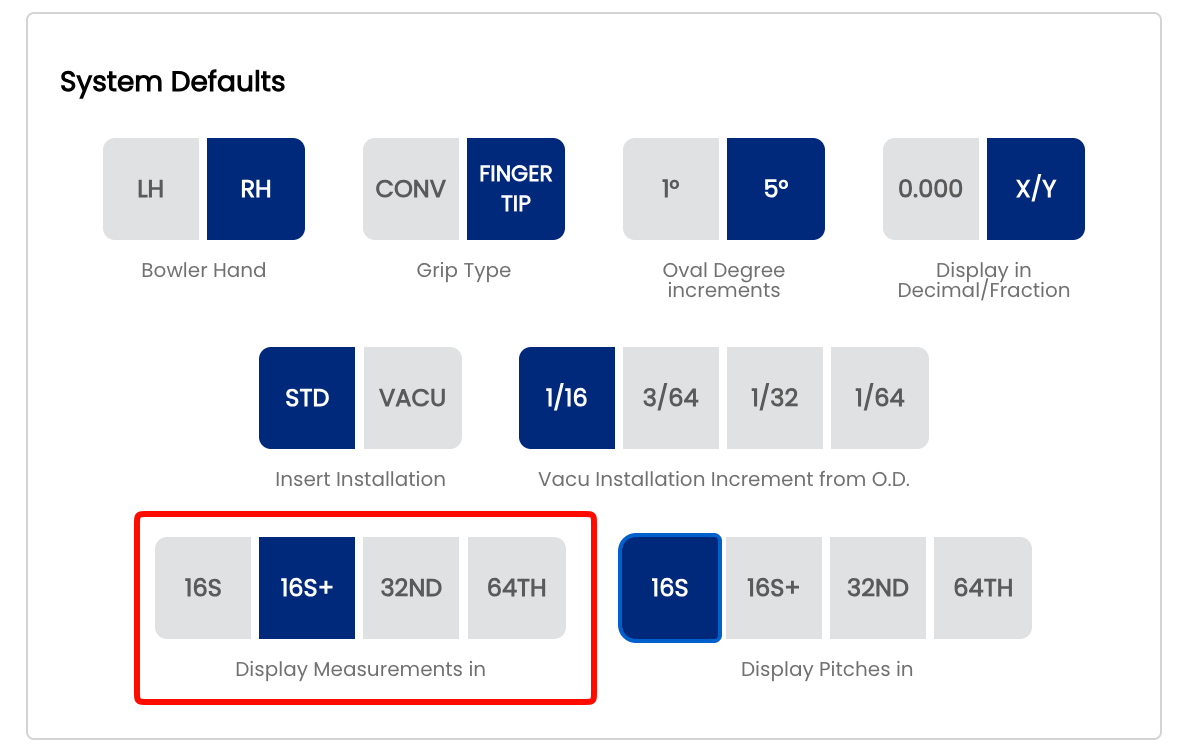
a spec sheet, Spectre Cloud presents a dropdown list of selectable values. This setting controls the precisionspacing and formatprecision usedof tothe displayvalues spanin measurementsthat onlist spec— sheetscoarser settings show fewer values and throughoutless thescrolling, app.finer Wheresettings pageshow 2.2.3more governsvalues whetherwith measurementsgreater appear as fractions or decimals globally, this setting goes one level deeper — specifying exactly how fine the fractional or decimal expression of a span value will be.precision. The threeavailable options are 16ths+16S, 32nds16S+, 32ND, and Decimal64TH.
Note: This setting applies specifically to span measurements (finger to finger, and finger to thumb). OtherIt controls what appears in the span dropdown list on a spec sheet — it does not affect how other measurements such as bridge width, oval dimensions, andor hole sizes mayare follow their own display rules set elsewhere in Settings.displayed.
📏 Understanding the ThreeFour Options
16ths+16S (— Sixteenths and halves)
SpansThe aredropdown expressedlists as whole fractions to the nearest sixteenth of an inch, with half-sixteenthspan values usedspaced wherein thesixteenth-inch measurement falls between two sixteenth boundariesincrements (e.g. 4 ⁵⁄₁₆"4"4 ¹¹⁄₃₂"1/16" where the half-sixteenth is needed). This is the traditional standard used on handwritten and legacy printed spec sheets across most US pro shops. Experienced drillers trained on paper sheets will find this format immediately familiar.
32nds (Thirty-seconds)
Spans are expressed consistently to the nearest thirty-second of an inch (e.g., 4 , ¹⁰⁄₃₂"1/8"4 3/16", 4 1/4"…). ThisValues providesare finerdisplayed resolutionas thansimplified 16ths+fractions. andThe eliminatesfewest values in the mixed-denominator appearance of the 16ths+ formatlist — everyfastest valueto usesscroll thethrough. same denominator. UsefulSuitable for shops that measure and record spans to sixteenth precision.
16S+ — Sixteenths with half-sixteenth notation
The dropdown lists the same sixteenth-inch values as 16S, but adds a + value between each pair — representing a half-sixteenth (one thirty-second). For example: 4 1/16", 4 1/16+", 4 1/8" — where 4 1/16+ is a shorthand way of expressing 4 3/32". This gives 32nd-level precision in a format that is easier to read and say out loud than a thirty-second precisionfraction.
32ND their— drillThirty-seconds
The dropdown lists span values spaced in thirty-second-inch increments. Values are displayed as simplified fractions — so while the increment is in 32nds, the list will show 4 1/8" rather than 4 4/32", 4 3/16" rather than 4 6/32", and so on. More values in the list than 16S or fitting16S+, equipment.but with finer resolution between each step.
Decimal64TH — Sixty-fourths
SpansThe aredropdown expressedlists span values spaced in sixty-fourth-inch increments, again displayed as asimplified decimalfractions. numberThe most values in the list, requiring the most scrolling. Best suited to twoshops that fit to sixty-fourth precision or morework placeswith (e.g. 4.3125"). No fractions are used. This format is preferred by many Canadian and international shops, and by fittersbowlers who enterrequire measurementsvery directly from a digital caliper or digitalfine span gauge that outputs decimal values.adjustments.
⚙️ Changing the Span Display Format
- Open Spectre Cloud at
cloud.spectrebowling.comand log in. Click yourpro shop namein the top-right corner to open the Profile menu.- Select Settings from the
dropdown.menu. - Navigate to the
DisplaySystemPreferencesDefaults section. - Locate the
SpanDisplayMeasurementMeasurementsDisplayin field and select16ths+16S,32nds16S+, 32ND, orDecimal64TH. ClickChangesSave.areThesavedchange takes effect immediately across all spec sheets.automatically.
🎳 Which Format Should You Use?
| Situation | Recommended Format | Reason |
|---|---|---|
| 16S | Fewest values in the list — |
|
| Shop wanting 32nd precision in a readable format | ||
| Shop recording spans in thirty-seconds, prefer standard fractions | 32ND | 32nd increment with values shown as simplified fractions — familiar and clean |
| Precision fitting, competitive |
||
🔄 Relationship to the Global Measurement Format Setting
This setting works alongside — not instead of — the global Decimal vs. Fractional display preference set in page 2.2.3:
- The
- option you choose here controls the spacing and values in the span dropdown list. If your global format
is set toFractional, this setting determines whether spans appearin16ths+or32nds. SelectingDecimalhere overrides the global fractional setting for span fields only. If your global format2.2.3 isalreadyset to Decimal,thisspansetting has no additional effect on spans — theyvalues willalreadybedisplayshown in decimalform.form regardless of which option is selected here.
- ❌ There is no per-sheet override for this setting — it applies shop-wide to all span
display.dropdowns. - ✅ Changing this setting is non-destructive — stored span values do not change, only the dropdown list presentation.
Tip: SwitchingIf thisyour settingdrillers at any time is non-destructive —find the underlyingspan dropdown list too long to scroll through comfortably, switch to a coarser setting. You can always fine-tune an individual span valuesvalue stored in Spectre Cloud do not change. Onlyon the on-screenspec andsheet printedafter representationselecting changes,the sonearest youavailable canvalue switchfrom formatsthe freely without affecting your data.list.
Related Sections
```