
1.2.3 Entering a referral code during sign-up
Spectre Cloud supports referral codes and discount codes that can be applied during the sign-up process to unlock special offers, discounted pricing, or other promotional benefits. If a pro shop owner, distributor, or fellow Spectre user has shared a code with you, this section will walk you through how to apply it correctly.
What is a Referral Code?
A referral code is a unique alphanumeric code typically shared by an existing Spectre Cloud member, a partner organization or the Spectre pro staff team during a promotion. Entering a valid code during sign-up may grant benefits such as:
- A discount on your first month or first year of service.
- Promotional credit applied to your account.
- A free trial period.
- Access to special offers or bundled plug-ins.
Tip: Referral codes are case-sensitive and usually time-limited, so apply your code at sign-up to make sure you don't miss out on the offer.
Step-by-Step: Entering a Referral Code
- Open your web browser and go to
cloud.spectrebowling.com. - Click "NOT A MEMBER" to start the sign-up process.
- Fill out the sign-up form with your pro shop name, email address, password, and other required details.
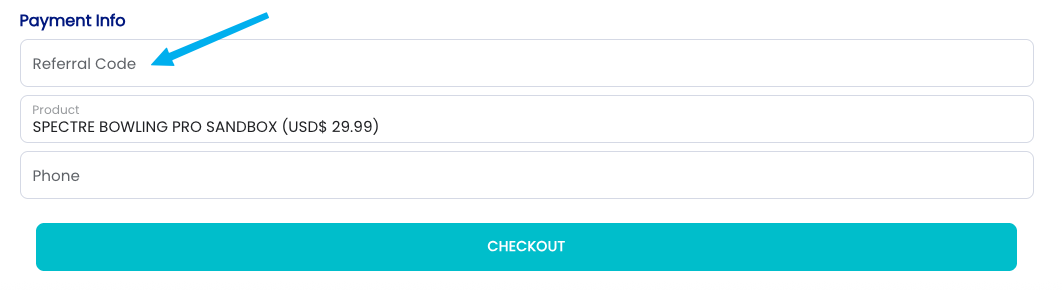
- Locate the "Referral Code" field on the sign-up form. This is at the bottom of the form, just before the submit button.
- Enter your code exactly as provided, including capitalization and any dashes or special characters. Copy-pasting is recommended to avoid typos.
- Confirm the code is accepted. A valid code will usually display a confirmation message, a discount preview, or an updated price.
- Submit the sign-up form to complete account creation.
- Verify your discount by checking the Profile or Billing section after logging in.
Where to Find a Referral Code
You can obtain a Spectre Cloud referral or discount code from several sources:
- 🤝 Existing Spectre Cloud users — many members have a personal referral code to share.
- 🏢 IBPSIA members and partners — Spectre periodically offers exclusive codes through industry partners.
- 📢 Promotional campaigns — codes are sometimes shared via Spectre's website, social media, or email newsletters.
- 🎓 Trade shows and events — Spectre often distributes special codes at bowling industry events.
- 👥 Distributors and ball reps — some product distributors partner with Spectre to offer codes.
Related Sections
- How to Sign Up for Spectre Cloud
- Choosing Your Subscription Plan
- Discount Codes
- Managing Your Subscription
Note: Promotional terms, eligibility, and discount amounts can change over time. Always read the terms attached to your specific referral or discount code, and apply codes before completing checkout for the best chance of having them honored.