
4.3.2 Entering span measurements, F, C, O, H
Entering
4.3.2 span measurements (Full Span and Cut to Cut)
step-by-step
Span measurements define the distance between the thumb hole and each finger hole on a bowling ball.hole. Spectre Cloud supports twofour primaryspan types, and it's important to enter values under the correct one — the number only means what it's supposed to when it's paired with the right span type.
📐 The Four Span Types (Summary)
Spectre Cloud uses four span measurement methodstypes. Each is explained in full — including how it's measured and when to use it — in 4.1.2. In brief:
- ✅ Full Span (F) — the complete measured span, everything included, inserts and all.
- ✅ Cut to Cut (C) —
and it is important to enter the correct type to ensure accurate drilling. Using the wrong method will produce holes that are drilled in the wrong position, even if every number looks correct on screen.📐 Understanding the Two Span TypesFull Span
(F)AFull Spanmeasurement is taken fromminus the insert thickness; used when drilling thumb-first. - ✅
nearOuteredgeto Cut (O) — for interchangeable thumbs; inside of thethumbfemaleholeinterchangeable to thenear edgecut of the fingerholeOD hole. - ✅ Hole to Hole (H) —
thatbiggestis,hole to biggest hole (what thedistancePBAmeasuredtruckalongcalls "Cut-to-Cut").
For the surfacefull detail on each type, see 4.1.2 — Span types. This page covers how to enter the values once you know which type you're working in.
🎳 The Span Fields on the Spec Sheet
The two span boxes sit at the center of the ballspec fromsheet, directly below the edgefinger ofholes. oneFor holea toright-handed the edge of the other, with the bowler's hand in its natural relaxed position over the ball.bowler:
- ✅ The
mostleftcommonboxmeasurementismethodtheusedmiddlein North American pro shops.finger. - ✅
MeasuresThe right box is theactualringgapfinger.
Enter each finger's span in its box. The values are almost always different from one another, so confirm you're entering each in the twocorrect holesfield.
Note: theThe distancemiddle ofand ballring surfacefinger boxes flip when you change the bowler's skindominant bridges.hand.
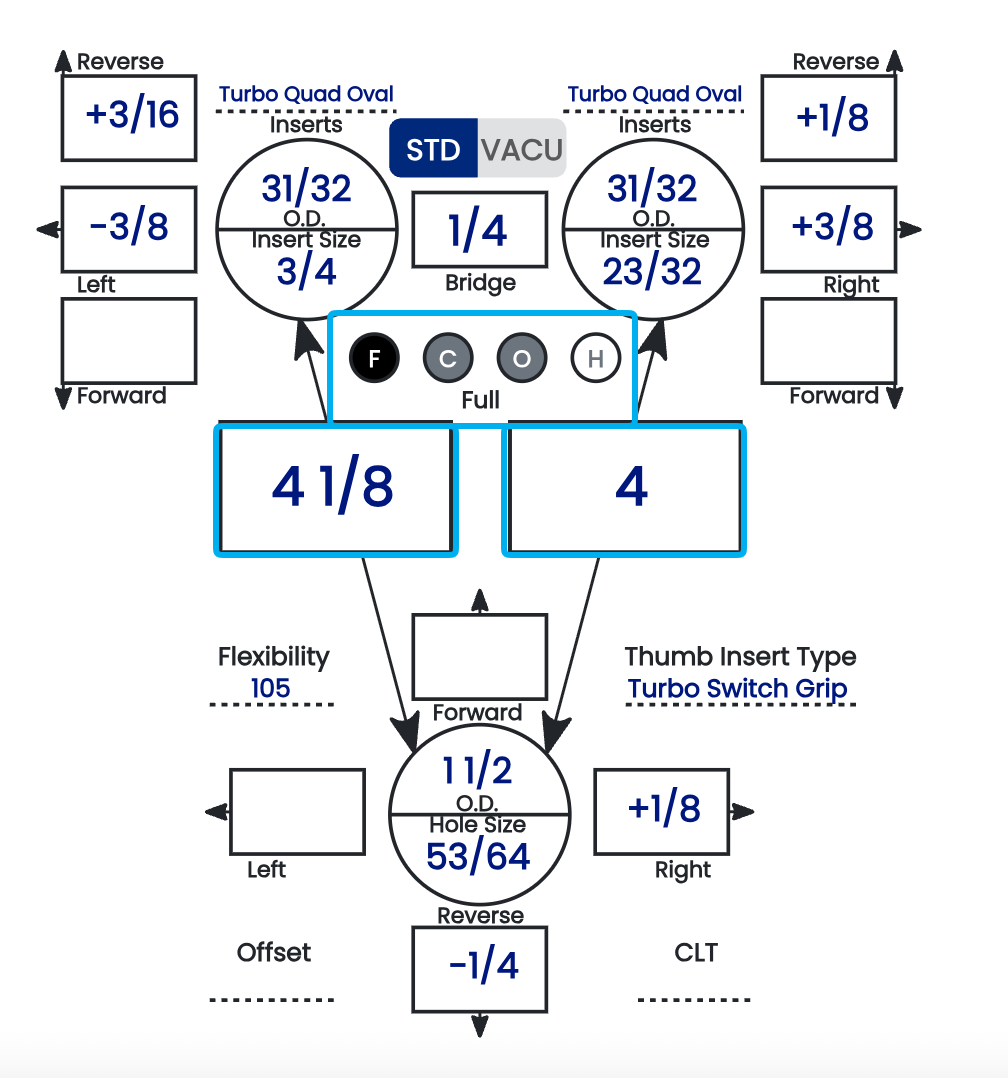
🔘 Reading the F / C / O / H Bubbles
Between the two span boxes is a standardrow of four bubbles — F, C, O, H — one for each span gaugetype. Their shading tells you, at a glance, which span type is currently displayed and which ones already hold a value:

| Bubble state | Meaning |
|---|---|
| Black background | This is the span type currently being displayed in the span boxes. |
| Grey background | A value is present for this span type (but it's not the one currently displayed). |
| White background | Nothing is present — the value for this span type is blank or |
The bubbles let you switch which span type is shown and immediately see which types are already filled in. A grey bubble means that span exists on the ballsheet; blank.
bubble means it doesn't yet.
⚙️ Only Cut to Cut Is Automated
This is the key thing to understand about span entry: Cut to Cut is the only span type with any automation behind it.
- ✅ Cut to Cut (C)
Ahas an automated toggle in the settings — Autofill Cut to Cut (2.6.9)measurement—iswhichtakenderives the value from thecenter of the thumb holeto thecenter of the finger hole. It is a center-to-center measurement rather than an edge-to-edge measurement.✅ Common in some European fitting traditions and in certain legacy pro shop software systems.✅ Produces a consistent reference point regardless of hole diameter — useful when hole sizes vary significantly.❌ Less intuitive to measure directly on a hand — typically calculated or taken from a fitting device rather than measured freehand.
📏 The Relationship BetweenFull Span andCutinsert dimensions. - ❌ Full Span, Outer to
CutBecause Full Span measures edge-to-edgeCut, andCutHole toCutHolemeasuresarecenter-to-center,manualtheentrytwoonly.valuesTheredifferisbynotheautomation behind them — whatever you type is what's recorded. - ❌
radiusNone of thethumbspanholetypes have error validation. Spectre Cloud will not flag a value that's out of range, transposed, or entered under the wrong span type — the entry is taken exactly as given.
Because there's no validation catching mistakes, the responsibility for a correct value sits entirely with the person entering it. Confirm the span type and re-check the numbers before saving.
🔢 Adjusting Span Increments
The values available when entering a span come from a drop-down, and the radiusincrement of that drop-down is adjustable in the finger holesettings combined.(see In2.2.7). practicalIf terms:
- default
Cutsteps are finer or coarser than you like toCutworkisin,alwayslargerthan Full Span forchange thesameincrementbowler.The difference equals halfso thethumbdrop-downhole diameter plus halfoffers thefingervaluesholethatdiameter.match Foryourashop'stypicalhabits.adult📋
fingertip bowler, Cut to Cut runs roughly½"to¾"longer than FullEntering Span —butStepthisbyvaries with hole size.
Important: Never enter a Cut to Cut value into a Full Span field, or vice versa. Even a small mismatch will result in holes drilled in the wrong location. If you are unsure which method was used on a legacy fitting sheet, check the raw numbers against typical ranges for your bowlers — Full Span for an adult fingertip bowler typically falls between 3⅝" and 4⅝"; Cut to Cut values for the same bowler will read higher. When in doubt, re-measure.
🛠️ Entering Span Measurements in Spectre CloudStep
OpenConfirm thespec sheet and confirm thebowler'sSpandominantTypehand is set correctly —FfordeterminesFullwhichSpanbox is the middle finger and which is the ring.- Confirm the span type is set correctly (see 4.2.3) — check that the intended bubble (F, C, O, or
Cfor Cut to Cut — before entering any numbers. The span type selector must matchis themethodoneused to takewith themeasurement.black background. - Enter the middle finger span in
theitsMiddle field.box. - Enter the ring finger span in
theitsRing field.box. - Double-check both values against
theyour fittingsheetsource before movingon — transposing middle and ring span is one of the most common data-entry errors.on.
Verify with Spectre team: confirm the exact field labels and UI layout for span entry — specifically whether Middle and Ring are entered as separate fields or as a combined span with an offset value.
📋 Recording Span from a Hand Measurement
If you are measuring a bowler's hand directly rather than copying from an existing fitting sheet, follow these steps for a Full Span measurement:
Ask the bowler to place their hand flat and relaxed on a flat surface or span gauge.Align the gauge (or ruler) from the crease of the thumb — the point where the thumb meets the palm — toward the middle and ring fingers.For afingertip grip, measure to the first knuckle crease of each finger.For aconventional grip, measure to the second knuckle crease of each finger.Record middle and ring measurements separately — they are almost always different.
Tip: Always measure both hands if the bowler is new to your shop, even if they bowl with only one hand. Hand dimensions can vary between left and right, and having both on file is useful if the bowler ever requests a second opinion or switches equipment.
📊 Typical Span Ranges for Reference
| | ||
| | ||
| | ||
| |
Note: These ranges are general references only — individual hand anatomy varies widely. Never reject a measurement simply because it falls outside a typical range. Flag outliers for a second look, but trust a careful measurement over a table.
✨ Common Mistakes to Avoid
❌Mixing span types— entering a Cut to Cut value in a Full Span field is the single most common span entry error. Always confirm the span type selector before entering numbers.❌Transposing middle and ring— middle span is almost always longer than ring span for the same bowler. If your middle value is shorter than ring, double-check before saving.❌Copying from a worn or faded fitting card without verifying units— some older cards recorded spans in millimeters. Spectre Cloud uses inches.Verify with Spectre team: confirm whether Spectre Cloud supports millimeter entry or inches only.❌Using a tight or forced hand position during measurement— always measure with the hand relaxed. A forced stretch or curl produces a span that will feel uncomfortable once drilled.
Related Sections
- 4.1.2 — Span types explained in detail: Full Span, Cut to Cut, Outer to Cut, Hole to Hole
- 2.2.7 — Adjusting span measurement increments
- 4.2.3 — Selecting span type (F, C,
O)O, H) - 4.2.4 —
How to identifyIdentifying grip type from a measurement sheet - 2.6.9 — Autofill Cut to Cut: the one automated span toggle
- 4.3.3 — Entering pitch values
Book 05 — Oval Calculator (for Oval span type)
Tip: IfGlance a returning bowler says their previous ball always felt slightly stretched or cramped,at the firstbubble thingrow before you save. A black bubble tells you which span you're looking at, and the grey ones tell you which other spans are already on file — an easy way to checkconfirm isnothing whetheryou the original spec sheet used Full Span or Cutmeant to Cutenter —was left white and whether that matches what was actually drilled. A span type mismatch is one of the most common causes of an otherwise correct-looking spec sheet producing an uncomfortable fit.blank.
```