
2.6.10 Layout Suggestions
Auto-Suggest Layouts — AI-based layout suggestion from bowler's profile
2.6.10 auto
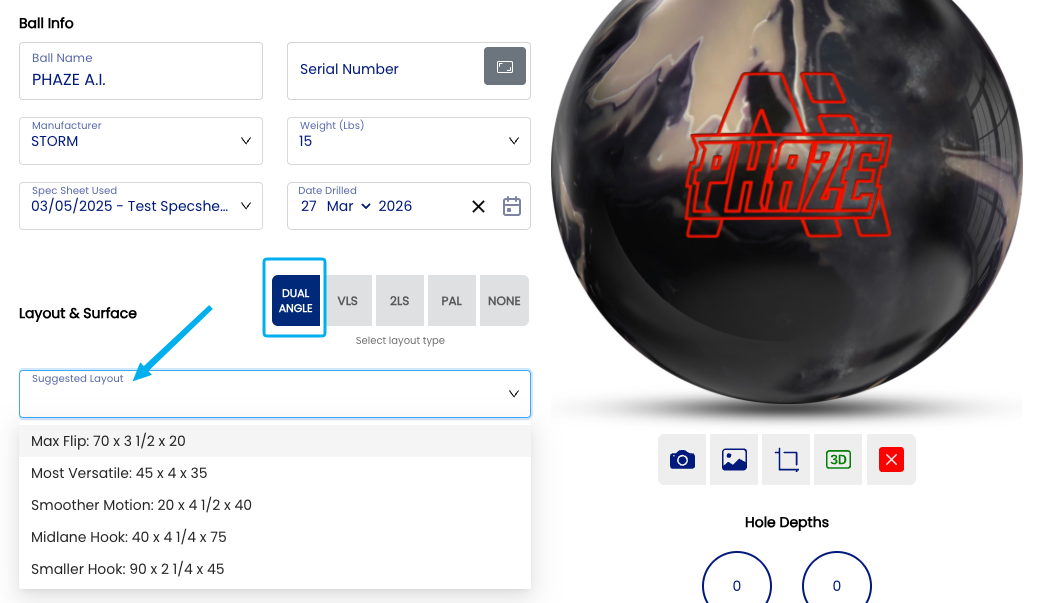
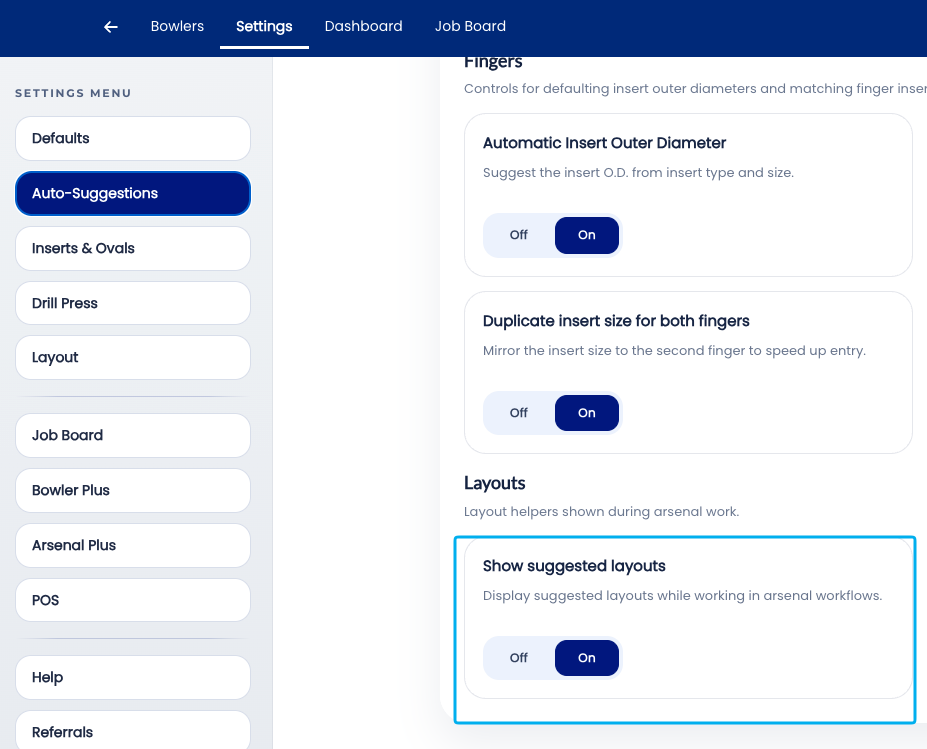
The Auto-Suggest Layouts settingwill controls whether Spectre Cloud usesdisplay an AI-basedadditional suggestioninput enginein tothe recommendArsenal apage. ball A "Suggested Layout" dropdown will now appear over the layout wheninput afields. new specThese sheetlayout issuggestions created.are Drawingthe manufacturer suggested layouts, based on the bowler'slayout profilestyle —you includinghad selected.
📊 Layout suggestions
There is no AI built into this tool. It is as simple as the suggested layouts per manufacturer on their PAP,website. track, axisThis tilt,setting axisis rotation, rev rate, ball speed, and layout history — the engine proposessimply a startingtime layoutsaver tailored to the individual bowler rather than a generic chart-based default.on Thisgeneral knowledge of what is the most sophisticated auto-suggestion in chapter 2.6, and for shops serving competitive or performance-oriented bowlers it can meaningfully accelerate the fitting conversation.
Note: Auto-Suggest Layouts is distinctrequired from the Arsenal Plus suggested layouts feature, which operates at the arsenal level across a bowler's full ball collection. Auto-Suggest Layouts works at the individual spec sheet level, proposing a starting layout for the ball currently being drilled. ⚠️ Verify with your Spectre team: confirm the precise distinction between Auto-Suggest Layouts (2.6.10) and Arsenal Plus suggested layouts, and whether both can be active simultaneously without conflict.
🤖 How the AI Suggestion Engine Works
When a new spec sheet is opened with Auto-Suggest Layouts enabled, Spectre Cloud's suggestion engine analyses the bowler's profile data and drilling history to generate a layout recommendation. The suggestion takes into account:
✅PAP location— the foundational input for any layout system; the AI uses this to anchor the layout geometry.✅Axis tilt and rotation— influences how the ball transitions through the midlane and into the backend.✅Rev rate and ball speed— higher rev rates and lower speeds generally call for different layout strategies than lower rev rates and higher speeds.✅Track— high, medium, and low track bowlers respond differently to the same layout; the AI accounts for this in its recommendation.✅Layout history— past layouts and any associated performance notes inform the suggestion, steering the engine toward approaches that have worked for this bowler before.✅Ball characteristics— where ball RG and differential are recorded on the spec sheet, the engine factors in how the ball's core dynamics interact with the proposed layout. ⚠️Verify with your Spectre team: confirm the complete input set the AI engine uses, and whether ball RG and differential are required inputs or optional enhancements.
Note: The AI suggestion is a starting point grounded in the bowler's data — it is not a substitute for the fitter's judgment. Lane conditions, bowler goals, and real-time feedback from ball testing all influence the final layout decision in ways the engine cannot fully anticipate. Always evaluate the suggestion in the context of the full fitting conversation before drilling.
📊 What the Suggestion Looks Like in Practice
When the engine generates a layout suggestion, it is presented in the layout section of the spec sheet using whichever layout type is set as the account default (see 2.5.1). For a Dual Angle default, the suggestion will appear as a set of drilling angle, pin distance, and VAL angle values. For a VLS default, it will appear as pin distance and VAL angle values consistent with the VLS system.bowler.
| Layout Type | |||
|---|---|---|---|
| 2LS | Storm Downloads | ||
| PAL | Bowling Science standard suggested layouts. | PAL YouTube Video |
Note: ⚠️ VerifyThese withsuggestions yourare Spectrewidely team:available confirmonline how Auto-Suggest Layouts presents its recommendation whenon the layoutmanufacturer typewebsites.
🛠️ Enabling or Disabling Auto-Suggest Layouts
📌 Data Requirements for a Quality Suggestion
The quality of the AI suggestion scales directly with the completeness of the bowler's profile. A bowler with a full profile — PAP, tilt, rotation, rev rate, speed, and several drilled balls on record — will receive a more precise and relevant suggestion than a bowler with only a PAP on file.
Tip: For new bowlers, complete as much of the profile as possible during the intake fitting — even a first session can capture PAP, tilt, rotation, rev rate, and ball speed. The investment in a thorough intake pays dividends on every subsequent fitting through better layout suggestions.
🔗 Relationship to Arsenal Plus
Auto-Suggest Layouts and the Arsenal Plus plugin address different but complementary aspects of layout intelligence. Auto-Suggest Layouts proposes a layout for the individual ball being drilled; Arsenal Plus provides suggested layouts and conversion tools in the context of the bowler's full arsenal — helping ensure new balls complement rather than duplicate existing equipment.
✅ Both can be active simultaneously for the most complete layout intelligence. ⚠️Verify with your Spectre team: confirm whether Auto-Suggest Layouts and Arsenal Plus suggested layouts present their recommendations in the same UI location or separately, and how conflicts or differing suggestions are surfaced to the fitter.✅ Arsenal Plus is a paid plugin — Auto-Suggest Layouts is available to all Spectre Cloud accounts as part of the core auto-suggestion suite.✅ For shops without Arsenal Plus, Auto-Suggest Layouts provides meaningful layout intelligence at the spec sheet level without requiring the full plugin.
⚙️ When to Consider Turning Auto-Suggest Layouts Off
✅Training new staff— disabling Auto-Suggest Layouts requires trainees to derive layout recommendations independently from the bowler's profile data, building genuine fitting knowledge rather than evaluating system suggestions.✅Shops with a specific layout philosophy— if your shop applies a consistent house layout approach or works exclusively from a coach's specifications, AI-generated suggestions may create noise in the fitting workflow.✅Bowlers with external coaching relationships— competitive bowlers whose layouts are prescribed by a coach or manufacturer's rep may not benefit from an AI suggestion that is independent of that relationship.❌ Turning Auto-Suggest Layouts off for the general bowler population removes a meaningful time-saving and quality-raising tool — even when the suggestion is not accepted verbatim, it provides a useful starting point for the layout conversation.
☁️ Scope of This Setting
This setting is stored at the account level and applies to all new spec sheets across all devices. ⚠️ Verify with your Spectre team: confirm per-user vs. per-account/shop scope — this question has persisted from 2.3.5 through 2.6.10 across more than twenty pages. It must be resolved, documented, and applied retroactively across all affected pages before chapters 2.3 through 2.6 are published. This is a blocking item.
Related Sections
- 2.6.9 — Autofill Cut to Cut: based on insert type/size
- 2.6.1 — Overview: why leaving all auto-suggestions on saves time
- 2.5.1 — Default layout type: VLS, 2LS, Dual Angle, None
- 2.5.1.3 — PAL / Dual Angle system
- 2.6.11 — Next auto-suggestion setting (if applicable)
- 3.x — Bowlers: completing a full bowler profile
- 4.x — Spec Sheet: reviewing and accepting a layout suggestion
- 7.x — Arsenal Plus: suggested layouts and layout conversion
Tip: Auto-Suggest Layouts gets better the more you use Spectre Cloud. Every spec sheet saved — whether the suggested layout was accepted, adjusted, or overridden — contributes to the bowler's history that informs the next suggestion. The engine is not static; it reflects the accumulated record of what has been drilled for each bowler. The sooner it is turned on, the sooner it starts building that record.
```