
2.3.3 Oval Width Calculator — Bit Size vs. Decimal display
Oval Width Calculator — Bit Size vs. Decimal display
2.3.3 oval
When calculating an oval thumb hole, Spectre Cloud needs to know the oval width — the final size of the opening the bowler's thumb will sit in. This setting controls how you input that measurement. There are three options: Oval Width (Bit Size), Oval Width (Decimal), and Diff (Decimal). All three produce the exact same oval hole — the difference is only in how you measure and enter the value.
The math behind it: Spectre calculates the oval cuts using the formula Oval Width – Starting Bit = Difference. The difference is the hypotenuse of the triangle that determines the V and H moves on your press. Depending on which input method you choose, Spectre either calculates this difference for you or accepts it directly.
📐 The Three Input Options
Oval Width (Bit Size)
SpectreYou Cloud'senter the oval width calculatoras can display its results in two formats:a Bit Size (fractional drill bit notation)size or— for example, 7/8". Spectre Cloud then subtracts the starting bit size from the oval width to calculate the difference internally. This is the most common method for shops that size oval widths using standard drill bits and do not own a caliper.
- ✅ The most widely used method in pro shops
- ✅ No caliper required — drill bits are the measuring tool
- ✅ Input matches the physical bit you used to determine the oval width
- ✅ Spectre calculates the difference automatically — no manual math needed
Example: Starting Bit 3/4", Oval Width 7/8" → Spectre calculates Difference as 0.125" and uses that to determine the V/H cut moves.
Oval Width (Decimal)
You enter the oval width as a Decimaldecimal value measured directly with a caliper — for example, 0.875". Spectre Cloud then subtracts the starting bit from this decimal value to calculate the difference. This method is preferred by shops that measure oval widths using a digital caliper rather than sizing with drill bits.
- ✅ Precise — caliper measurements capture exact thumb dimensions
- ✅ No conversion needed between bit sizes and decimal values
- ✅ Common in Canadian and international shops where decimal measurement is standard
- ✅ Spectre still calculates the difference automatically from the decimal oval width
Example: Starting Bit 3/4" (inches0.750"), expressedOval Width measured by caliper as 0.875" → Spectre calculates Difference as 0.125".
Diff (Decimal)
Instead of entering the oval width at all, you enter the difference directly as a decimal number)value in thousandths — for example, 0.125. This settingis controlsequivalent whichto formatperforming the subtraction Oval Width – Starting Bit yourself before entering anything into Spectre. This method is shownused throughoutby experienced drillers who measure the difference directly with a caliper rather than measuring the full oval width.
- ✅ Fastest input method for experienced drillers who already know their difference
- ✅ Useful when measuring the difference directly with a caliper at the thumb hole
- ✅ Skips the oval
calculatorwidth field entirely —chooseone less value to enter - ❌ Requires the
onedrillerthattomatchesalreadyhowknowyourorshopcalculatereadsthe difference before entering Spectre - ❌ Less intuitive for newer drillers unfamiliar with the underlying math
Example: You measure directly with a caliper and communicatesdetermine holethe measurements.difference is 0.125". Enter 0.125 into Spectre — no oval width or starting bit calculation needed.
🔄📊 TheWhich TwoMethod DisplayShould FormatsYou Use?
Both formats represent the same underlying measurement — only the notation differs. Use whichever format matches your drill press readout, your bit set labeling, or your personal preference.
|
||
|
||
| Experienced driller who measures the difference directly | Diff (Decimal) | Fastest entry — skip the oval width field entirely |
| New to oval drilling | Oval Width (Bit Size) | Most intuitive — matches the physical tool you use to size the hole |
🧮 Understanding the Math
Regardless of which input method you choose, Spectre Cloud always uses the same underlying calculation to determine the oval cut moves:
- Oval Width – Starting Bit = Difference — the difference is the hypotenuse of the triangle formed by the oval cut path.
- The oval degree is used as the angle of that triangle.
- Spectre applies trigonometry (
sinandcos) to the difference and degree to calculate the precise V and H displacement needed for each cut. - Cuts are displayed in 32nds at most — cutting in 32nds produces a smooth oval hole with minimal chatter.
Note: ThisNo settingmatter affectswhich input method you use, all three options produce the exact same oval hole when the underlying values are equivalent. The choice is purely about how ovalyou widthprefer resultsto aremeasure displayedand — it does not changeenter the calculated value itself. Switching between formats at any time is safe and will not alter any saved spec sheet data.
🛠⚙️ Changing theThis Display FormatSetting
NavigateOpentoSpectre Cloud atcloud.spectrebowling.comand log in.- Select Settings from the
topmenu. LocateNavigate to theBit/EdgeThumbSettingsHole Preferences section.FindLocate the Oval Width Calculatordisplayfieldoption.and Select eitherselect Oval Width (BitSizeSize), Oval Width (Decimal), orDecimalDiff (Decimal)from the available options. ⚠️Verify with your Spectre team: confirm whether this is a toggle, a dropdown, or a radio button pair..TheChangeschangearetakessavedeffectautomatically.
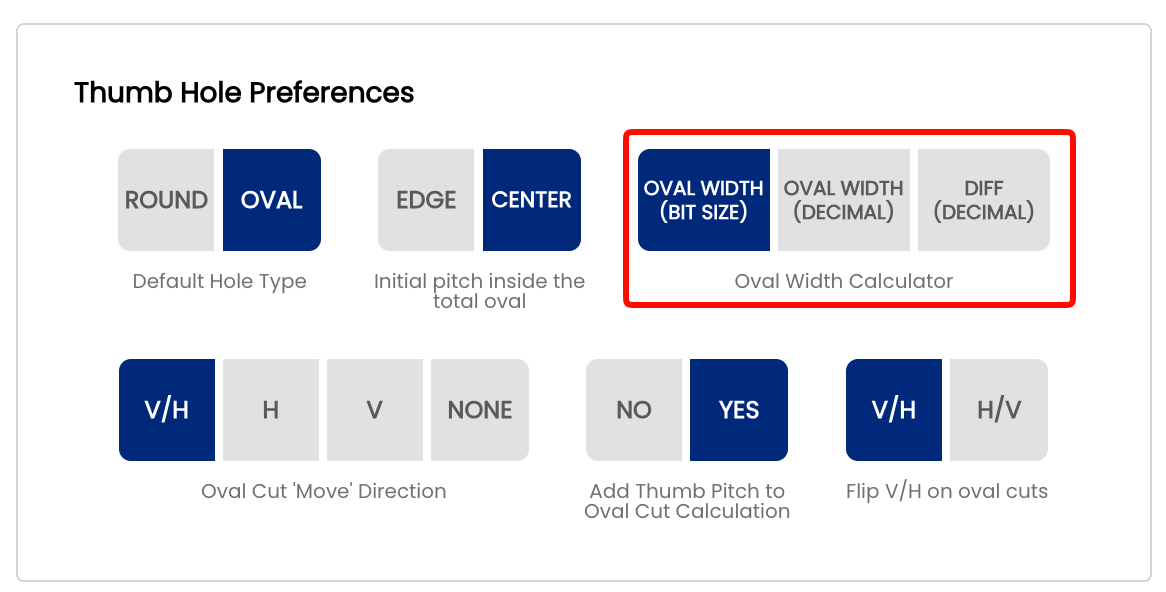
Note: saveLike buttonall issystem required. ⚠️ Verify with your Spectre team: confirm whetherdefaults, this setting auto-savescontrols oronly requiresthe pre-selection on new spec sheets. It can always be changed on a per-sheet basis without affecting your shop default.
🎬 See It in Action
Watch Mark Buffa demonstrate the full oval measurement process using drill bits and Spectre Pro Shop Software: How to Measure Ovals | Bowling Pro Shop Tutorial
For the caliper method specifically, watch Mark Buffa walk through measuring an explicit save action.
📊 Bit Size to Decimal Reference
The table below covers the most common oval widththumb values seen in pro shop drilling. Use it to verify your display is showing what you expect after switching formats.
| |
| |
| |
| |
| |
| |
| |
| |
| |
| |
Tip: If your drill press usesusing a digital readoutcaliper calibratedand in decimals,entering the Decimalvalue formatdirectly willinto letSpectre: youHow transferTo Measure An Oval Thumb | Caliper Method
For the full oval widthcutting valuesprocess directly to the machine without mental conversion.
☁️ Is This Setting Per-Device or Account-Wide?
Display format preferences in Spectre Cloud are typically stored at the account level and sync across all devices. This means changing the format on your desktop will also updateincluding how ovalthese widthsmeasurements appear on a tablet or mobile device loggedfeed into the sameSpectre account.Oval Calculator, see: How to Cut an Oval Thumb! | Full Pro Shop Tutorial!
✅fullOnereferencechangepresentationappliescoveringeverywherethe oval calculator math, all four Edge/Center + Pitch scenarios, and cut direction explanations is attached to page 2.3.2: Cutting Ovals —no need to update each device separately.✅ Multi-staff shops: if different staff members prefer different formats, each staff account can maintain its own display preference independently. ⚠️Verify with yourSpectreteam:ProconfirmShopwhether this setting is per-user or per-account/shop.
A
Related Sections
Tip: NotIf sureyou whichare formatnew to oval drilling, start with Oval Width (Bit Size) — it is the most intuitive method and matches the physical tool you use at the press. As your shopworkflow uses?develops Checkand howyou yourstart drillusing bitsa arecaliper labeledfor —more ifprecise theymeasurements, readswitching 1to 1/8",Oval useWidth Bit(Decimal) Size.or IfDiff your press readout shows 1.125, use Decimal. Either way, the math(Decimal) is identical.a natural progression.
```