
2.3.3 Oval Width Calculator — Bit Size vs. Decimal display
2.3.3 oval
When calculating an oval thumb hole, Spectre Cloud needs to know the oval width — the final size of the opening the bowler's thumb will sit in. This setting controls how you input that measurement. There are three options: Oval Width (Bit Size), Oval Width (Decimal), and Diff (Decimal). All three produce the exact same oval hole — the difference is only in how you measure and enter the value.
The math behind it: Spectre calculates the oval cuts using the formula Oval Width – Starting Bit = Difference. The difference is the hypotenuse of the triangle that determines the V and H moves on your press. Depending on which input method you choose, Spectre either calculates this difference for you or accepts it directly.
📐 The Three Input Options
Oval Width (Bit Size)
You enter the oval width as a drill bit size — for example, 7/8". Spectre Cloud then subtracts the starting bit size from the oval width to calculate the difference internally. This is the most common method for shops that size oval widths using standard drill bits and do not own a caliper.
- ✅ The most widely used method in pro shops
- ✅ No caliper required — drill bits are the measuring tool
- ✅ Input matches the physical bit you used to determine the oval width
- ✅ Spectre calculates the difference automatically — no manual math needed
Example: Starting Bit 3/4", Oval Width 7/8" → Spectre calculates Difference as 0.125" and uses that to determine the V/H cut moves.
Oval Width (Decimal)
You enter the oval width as a decimal value measured directly with a caliper — for example, 0.875". Spectre Cloud then subtracts the starting bit from this decimal value to calculate the difference. This method is preferred by shops that measure oval widths using a digital caliper rather than sizing with drill bits.
- ✅ Precise — caliper measurements capture exact thumb dimensions
- ✅ No conversion needed between bit sizes and decimal values
- ✅ Common in Canadian and international shops where decimal measurement is standard
- ✅ Spectre still calculates the difference automatically from the decimal oval width
Example: Starting Bit 3/4" (0.750"), Oval Width measured by caliper as 0.875" → Spectre calculates Difference as 0.125".
Diff (Decimal)
Instead of entering the oval width at all, you enter the difference directly as a decimal value in thousandths — for example, 0.125. This is equivalent to performing the subtraction Oval Width – Starting Bit yourself before entering anything into Spectre. This method is used by experienced drillers who measure the difference directly with a caliper rather than measuring the full oval width.
- ✅ Fastest input method for experienced drillers who already know their difference
- ✅ Useful when measuring the difference directly with a caliper at the thumb hole
- ✅ Skips the oval width field entirely — one less value to enter
- ❌ Requires the driller to already know or calculate the difference before entering Spectre
- ❌ Less intuitive for newer drillers unfamiliar with the underlying math
Example: You measure directly with a caliper and determine the difference is 0.125". Enter 0.125 into Spectre — no oval width or starting bit calculation needed.
📊 Which Method Should You Use?
| Situation | Recommended Option | Reason |
|---|---|---|
| Shop sizes ovals using drill bits | Oval Width (Bit Size) | Enter the bit you used — Spectre does the math |
| Shop measures oval width with a digital caliper | Oval Width (Decimal) | Enter the caliper reading directly — no conversion needed |
| Experienced driller who measures the difference directly | Diff (Decimal) | Fastest entry — skip the oval width field entirely |
| New to oval drilling | Oval Width (Bit Size) | Most intuitive — matches the physical tool you use to size the hole |
🧮 Understanding the Math
Regardless of which input method you choose, Spectre Cloud always uses the same underlying calculation to determine the oval cut moves:
- Oval Width – Starting Bit = Difference — the difference is the hypotenuse of the triangle formed by the oval cut path.
- The oval degree is used as the angle of that triangle.
- Spectre applies trigonometry (
sinandcos) to the difference and degree to calculate the precise V and H displacement needed for each cut. - Cuts are displayed in 32nds at most — cutting in 32nds produces a smooth oval hole with minimal chatter.
Note: No matter which input method you use, all three options produce the exact same oval hole when the underlying values are equivalent. The choice is purely about how you prefer to measure and enter the data.
⚙️ Changing This Setting
- Open Spectre Cloud at
cloud.spectrebowling.comand log in. - Select Settings from the menu.
- Navigate to the Thumb Hole Preferences section.
- Locate the Oval Width Calculator field and select Oval Width (Bit Size), Oval Width (Decimal), or Diff (Decimal).
- Changes are saved automatically.
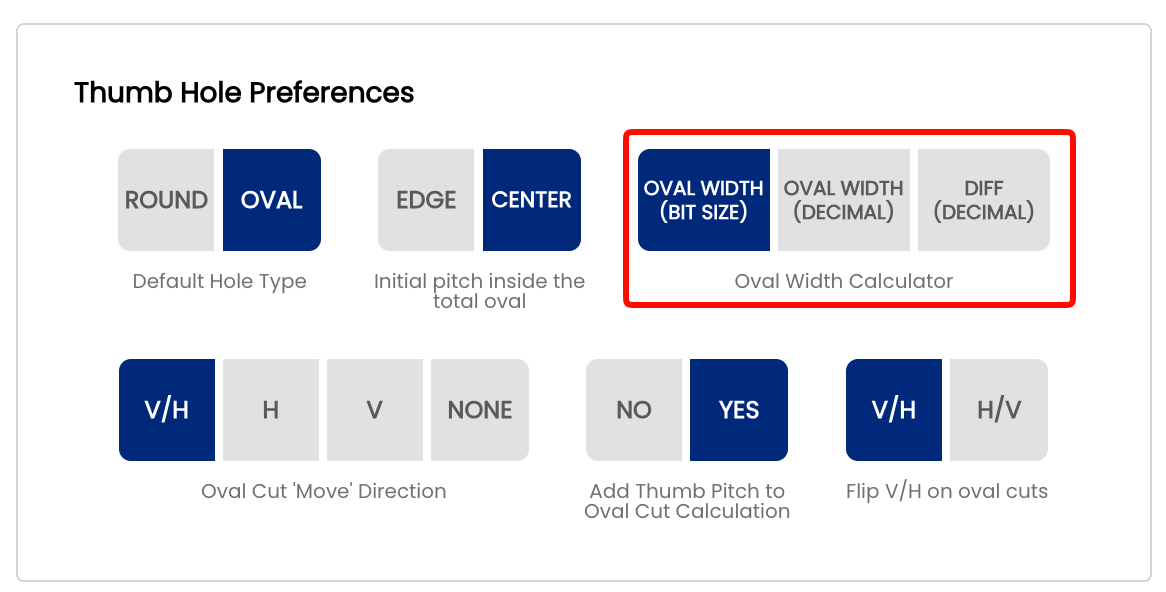
Note: Like all system defaults, this setting controls only the pre-selection on new spec sheets. It can always be changed on a per-sheet basis without affecting your shop default.
🎬 See It in Action
Watch Mark Buffa demonstrate the full oval measurement process using drill bits and Spectre Pro Shop Software: How to Measure Ovals | Bowling Pro Shop Tutorial
For the caliper method specifically, watch Mark Buffa walk through measuring an oval thumb using a digital caliper and entering the value directly into Spectre: How To Measure An Oval Thumb | Caliper Method
For the full oval cutting process including how these measurements feed into the Spectre Oval Calculator, see: How to Cut an Oval Thumb! | Full Pro Shop Tutorial!
A full reference presentation covering the oval calculator math, all four Edge/Center + Pitch scenarios, and cut direction explanations is attached to page 2.3.2: Cutting Ovals — Spectre Pro Shop Software.
Related Sections
Tip: If you are new to oval drilling, start with Oval Width (Bit Size) — it is the most intuitive method and matches the physical tool you use at the press. As your workflow develops and you start using a caliper for more precise measurements, switching to Oval Width (Decimal) or Diff (Decimal) is a natural progression.