04 Spec Sheets
Measurements · Drilling · Records
- 4.1 — Terminology & Concepts
- 4.1.1 Acronyms Used in Spectre Cloud
- 4.1.2 Span types explained: F, C, O, H
- 4.1.3 Grip type definitions: Finger Tip vs. Conventional
- 4.1.4 Pitch terminology
- 4.1.5 Bridge: standard bridge sizes and their purpose
- 4.1.6 Insert OD: drill bit sizing for STD and VACU grips
- 4.2 — Creating a Spec Sheet
- 4.2.1 Creating a blank spec sheet for a bowler
- 4.2.2 Naming a spec sheet
- 4.2.3 Selecting grip type on the spec sheet
- 4.2.4 How to identify the type of grip from measurement sheet
- 4.2.5 Cloning a spec sheet
- 4.2.6 Printing a spec sheet
- 4.3 — Span
- 4.3.1 Entering span measurements (F, C, O, H)
- 4.3.2 The four span types: F, C, O, H
- 4.3.3 Ring finger 5/16" rule
- 4.4 — Finger Measurements
- 4.4.1 Round finger holes, no inserts
- 4.4.2 Finger inserts
- 4.4.3 STD vs. VACU
- 4.4.4 Oval fingers, no inserts
- 4.4.5 Inputting pitches
- 4.4.6 CLT (Center Line Transformation)
- 4.5 — Thumb Measurements
- 4.5.1 Selecting the thumb hole shape (Round or Oval)
- 4.5.2 Entering thumb hole size
- 4.5.3 Entering vertical and lateral pitch for thumb
- 4.5.4 Thumb insert type and size
- 4.6 — Oval Thumb
4.1 — Terminology & Concepts
4.1.1 Acronyms Used in Spectre Cloud
📐 Acronyms Used in Spectre Cloud
Beyond the three primary span type acronyms, Spectre Cloud uses a number of additional shorthand terms throughout its interface. The following reference covers the most commonly encountered.
| Acronym | Full Name | Where Used | What It Refers To |
|---|---|---|---|
| PAP | Positive Axis Point | Bowler profile; layout fields | The point on the ball's surface at the end of the bowler's initial axis of rotation at release — the geometric anchor for all structured layout systems |
| VAL | Vertical Axis Line | Layout fields (VLS, Dual Angle) | The vertical line running through the bowler's PAP — used as a reference for pin and mass bias placement in VLS and Dual Angle layouts |
| MB | Mass Bias | Layout fields | The heaviest point of the ball's core — its placement relative to the grip center affects the ball's flare potential and backend motion |
| VLS | Versatile Layout System | Layout type selector; spec sheets | Storm Bowling's chart-based layout system for traditional thumb bowlers — see 2.5.1.1 |
| 2LS | Two-Layout System | Layout type selector; spec sheets | Storm Bowling's layout system designed for two-handed bowlers — see 2.5.1.2 |
| PAL | Performance Axis Layout | Layout type selector; spec sheets | Three-input layout system (drilling angle, pin distance, VAL angle) — referred to as Dual Angle in Spectre Cloud's UI — see 2.5.1.3 |
| CLT | Center Line Transformation | Bowler profile; Auto-CLT setting | A fitting measurement that defines how a bowler's finger centerline relates to the ball's grip center — used to derive lateral finger pitch — see 2.6.3 |
| OD | Outside Diameter | Insert fields; spec sheets | The outer diameter of a finger insert — the drill bit must match this dimension for the insert to seat correctly — see 2.6.6 |
| RG | Radius of Gyration | Arsenal Plus; ball detail fields | A measure of how the ball's mass is distributed relative to its axis — lower RG = earlier roll, higher RG = longer skid |
| diff / differential | Differential of RG | Arsenal Plus; ball detail fields | The difference between a ball's highest and lowest RG values — higher differential = more flare potential and stronger backend reaction |
| V | Vertical | Oval calculator; milling settings | The vertical axis of oval cut movement — see 2.3.5 and 2.3.6 |
| H | Horizontal | Oval calculator; milling settings | The horizontal axis of oval cut movement — see 2.3.5 and 2.3.6 |
| RPM | Revolutions Per Minute | Bowler profile (rev rate field) | The unit used to record a bowler's rev rate — how many times the ball rotates on its axis per minute during lane travel |
| RH / LH | Right-Handed / Left-Handed | Bowler profile; pitch settings; Auto-Invert | Shorthand for the bowler's dominant hand — affects pitch sign conventions, layout orientation, and Auto-Invert behaviour |
| F | Full Span | Spec Sheet Span | Measured span with all inserts included. Also known as the complete span |
| C | Cut-to-Cut | Spec Sheet Span | Full Span minus the thickness of the inserts. This is used primarely when drilling the thumb first and then having to find the measurement for the 31/32 hole for the inserts. Cut-to-Cut on the PBA tour (biggest hole to biggest hole) is known as H in Spectre. |
| O | Outer-to-Cut | Spec Sheet Span | Used with an interchangeable thumb insert. Typically when drilling a new ball for a bowler using an interchangeable, they won't need you to drill another thumb. This measurement makes it easy when drilling a new ball for this bowler, as they can simply show up to your shop, the holes are in the right spot, and they simply have to lock in their male inner sleeve. |
| H | Hole-to-Hole | Spec Sheet Span | Known as Cut-to-Cut on the PBA services truck, this is the biggest hole to the biggest hole. |
Related Sections
- 4.1.2 — Spec sheet overview: sections and layout (if applicable)
- 2.3.2 — Span type configuration: Full Span, Edge, Center
- 2.5.1 — Default layout type: VLS, 2LS, Dual Angle, None
- 2.6.3 — Auto-CLT: lateral pitch of fingers based on CLT chart
- 2.6.6 — Autofill Insert OD: auto drill bit size per insert type and grip
- 5.x — Oval Calculator: overview
- 9.x — Tips and Troubleshooting: glossary of bowling fitting terms
Tip: Print this page and keep a copy at the drill press during onboarding of new staff. Acronym familiarity is one of the first barriers a new team member faces when reading a spec sheet under time pressure — having a quick reference to hand removes that barrier in the first few sessions and builds confidence faster than repeated explanation alone.
4.1.2 Span types explained: F, C, O, H
4.1.2 concept
The span type setting on a Spectre Cloud spec sheet defines the measurement convention used to record the distance between the finger holes and the thumb hole. Choosing the right span type — and understanding what each one measures — ensures spec sheet values are interpreted and drilled correctly every time. This page explains how each of the four span types works, how they differ, and how to choose between them for a given bowler or workflow.
Note: This page explains the span types conceptually. For the acronyms used to represent them on spec sheets (F, C, O, H), see 4.1.1. For oval hole measurement — a separate concept from span type — see the Oval Calculator (Book 05).
📐 What Is a Span Measurement?
A span measurement records the distance between a bowler's finger holes and their thumb hole on a drilled bowling ball. It is the primary dimension that determines how far the thumb must reach — and how comfortable and consistent the grip feels through the swing and release. All four span types describe this same fundamental distance, but they differ in where the measurement begins and ends and whether the inserts are included.
- ✅ Span is one of the most important measurements on a spec sheet — an incorrect span produces a grip that is either too stretched or too cramped, directly affecting ball control and release consistency.
- ✅ The same bowler measured in two different span types will produce different numeric values — the numbers are not interchangeable without conversion.
- ✅ Spectre Cloud stores the span type alongside the measurement value on every spec sheet, so a value is never interpreted without its corresponding convention.
📐 Full Span (F)
Full Span is the complete measured span, everything included — inserts and all. It is taken with the bowler's grips/inserts in place, capturing the full distance the thumb must reach from the seated finger position to the thumb hole. It is also referred to as the complete span.
When to Use Full Span
- ✅ The most widely used convention and a sensible default for most shops — it describes the bowler's actual reach with their grips installed.
- ✅ Intuitive to explain to a bowler, since it reflects the grip exactly as they feel it.
- ✅ Required input for the Cut to Cut auto-suggestion — Full Span must be entered on both fingers for that calculation to run (see below).
📐 Cut to Cut (C)
Cut to Cut is the Full Span minus the thickness of the insert — the span measured to the actual drilled cut of the finger hole, before the inserts are accounted for. It is most useful when you drill the ball thumb-first: rather than mentally subtracting the grip thickness to find where the finger holes go, you work directly from the Cut to Cut value.
When to Use Cut to Cut
- ✅ Ideal for a thumb-first drilling workflow — the number already accounts for the insert thickness, so there's no mental math at the press.
- ✅ References the physical cut on the ball, making it reproducible across fitters.
- ✅ Supported by a built-in auto-suggestion in Spectre Cloud (see Autofill Cut to Cut, 2.6.9).
- ❌ Less intuitive for the bowler, since it describes the drilled hole rather than the felt grip.
Autofill requirements: The Cut to Cut auto-suggestion doesn't measure anything on its own — it derives the value. For it to run, the spec sheet needs a Full Span measurement on both fingers, plus the insert type and insert size for each. From the insert type and size, Spectre Cloud calculates the insert wall thickness and subtracts it from the Full Span to produce the Cut to Cut value. If any of those inputs is missing, the autofill can't calculate.
Watch the terminology: Spectre's Cut to Cut (C) is not the same thing the PBA services truck calls "Cut-to-Cut." The PBA truck's "Cut-to-Cut" (biggest hole to biggest hole) is Spectre's Hole to Hole (H) — see below.
📐 Outer to Cut (O)
Outer to Cut is used for interchangeable thumbs. It is measured from the inside of the female portion of the interchangeable to the cut of the finger's outer-diameter hole. It has nothing to do with oval holes — the "O" stands for Outer to Cut, not Oval.
Its purpose is repeat-drilling convenience. When a bowler with an interchangeable thumb comes in for a new ball, you don't need to drill a fresh thumb hole for them. Using the Outer to Cut measurement, the holes land in exactly the right spot, and the bowler simply locks in their own male inner sleeve.
When to Use Outer to Cut
- ✅ Any bowler who uses an interchangeable thumb system.
- ✅ Repeat customers — they can show up, and the ball is ready for their existing sleeve without re-fitting the thumb.
- ✅ Keeps a consistent reference across every ball in that bowler's arsenal.
- ❌ Only relevant to interchangeable setups — not applicable to bowlers drilling a fixed thumb hole.
📐 Hole to Hole (H)
Hole to Hole is measured biggest hole to biggest hole — for example, from a 1 1/2" thumb hole to a 31/32" finger hole. It is a purely physical, edge-to-edge measurement of the largest openings on the ball.
This is the measurement the PBA services truck refers to as "Cut-to-Cut." Because Spectre already uses "Cut to Cut" for a different measurement (C, above), that PBA convention lives under the name Hole to Hole in Spectre to avoid confusion.
When to Use Hole to Hole
- ✅ Quick physical reference straight off the ball, independent of inserts or grips.
- ✅ Familiar to anyone coming from a PBA-truck background, where this is called "Cut-to-Cut."
- ✅ Useful for verifying a drilled ball against spec, since it references fixed points on the ball.
- ❌ Does not describe the bowler's felt reach — it's a hole-geometry measurement, not a grip measurement.
📊 Span Types Compared
| Full Span (F) | Cut to Cut (C) | Outer to Cut (O) | Hole to Hole (H) | |
|---|---|---|---|---|
| What it measures | Complete span, inserts and all | Full Span minus insert thickness | Inside of the female interchangeable to the cut of the finger OD hole | Biggest hole to biggest hole (e.g., 1½" to 31/32") |
| Inserts included? | Yes — everything included | No — insert thickness removed | Interchangeable system (female/male sleeve) | N/A — hole edge to hole edge |
| Primary use | General fitting; the default/complete reference | Thumb-first drilling; deriving finger-hole position | Bowlers with interchangeable thumbs; repeat drilling | Quick physical reference; PBA-truck workflows |
| PBA truck term | — | Not the truck's "Cut-to-Cut" | — | This is the truck's "Cut-to-Cut" |
| Auto-suggestion | — | Yes — needs Full Span (both fingers) + insert type & size (2.6.9) | — | — |
🔄 Span Type and Spectre Cloud's Auto-Suggestions
Spectre Cloud's auto-suggestion features are aware of the span type selected on the current spec sheet and apply their calculations within that convention. The primary one tied to span type is Autofill Cut to Cut, which derives the Cut to Cut value from the Full Span rather than requiring you to measure it separately.
For Autofill Cut to Cut to run, the spec sheet must contain:
- A Full Span measurement on both fingers (middle and ring).
- The insert type for each finger.
- The insert size for each finger.
From the insert type and size, Spectre Cloud determines the insert wall thickness, then subtracts it from the Full Span to produce the Cut to Cut value. If any of these inputs is missing, the calculation can't complete.
- ✅ Auto-Calculate Ring Span (2.6.8) operates within the selected span type's convention.
- ⚠️ Verify with your Spectre team: confirm which (if any) auto-suggestions are active for Outer to Cut (O) and Hole to Hole (H), as these behaviours may differ from Full Span and Cut to Cut.
Related Sections
- 4.1.1 — Understanding acronyms: F, C, O, H and other Spectre Cloud shorthand
- 2.6.8 — Auto-Calculate Ring Span
- 2.6.9 — Autofill Cut to Cut: based on Full Span, insert type, and insert size
- 05 — Oval Calculator: oval hole shape (a separate concept from span type O)
- 9.x — Tips & Troubleshooting: converting between span types
Tip: If your shop is setting a default span type, Full Span is the lowest-friction choice — it's the complete measurement most fitters already work in, it aligns with published fitting charts, and it's the input the Cut to Cut autofill depends on. Reach for Cut to Cut when you drill thumb-first, Outer to Cut for bowlers on interchangeable thumbs, and Hole to Hole when you want the biggest-hole-to-biggest-hole reference the PBA truck calls "Cut-to-Cut." Remember: none of these is "Oval" — that's a hole shape, not a span type.
4.1.3 Grip type definitions: Finger Tip vs. Conventional
4.1.3 concept
A bowler's grip type defines how deeply their fingers are inserted into the ball — and it is one of the most consequential decisions in a pro shop fitting. Grip type determines the standard span, pitch, bridge, and insert values that apply to a bowler, and it is the first meaningful fitting choice for any new bowler purchasing their first personal ball. This page explains the two grip types — Fingertip and Conventional — how they differ physically and in terms of ball motion, and how the choice is reflected throughout Spectre Cloud.
🎳 Fingertip Grip
In a fingertip grip, the middle and ring fingers are inserted into the ball to the first knuckle only — the fingertip. This is a shallower insertion than conventional, leaving the bulk of the finger outside the ball and relying on the fingertip's contact with the hole edge (or insert) to hold and release the ball.
Physical Characteristics
- ✅ Fingers inserted to the first knuckle — approximately to the first crease of the finger from the tip.
- ✅ Produces a longer lever arm from the wrist to the finger contact point — this increases the torque available at the moment of release.
- ✅ The thumb exits the ball before the fingers, allowing the fingers to impart lift and rotation — the primary source of revolutions and hook for most competitive bowlers.
- ✅ Almost universally used with finger inserts — the shallower insertion depth means the fingertip bears significant load, and inserts cushion this contact point and provide a consistent grip surface.
Ball Motion Characteristics
- ✅ Higher rev rate potential than conventional — the longer lever arm allows more rotation to be imparted at release.
- ✅ Greater hook potential — more axis rotation and tilt are achievable with a fingertip grip.
- ✅ More sensitive to release technique — small changes in finger lift angle produce noticeable changes in ball path.
- ✅ Preferred by the majority of league and competitive bowlers for its performance potential.
Fitting Standards — Fingertip
- ✅ Standard bridge:
1/4"— the narrower bridge suits the shallower insertion depth and the extended finger position. - ✅ Inserts: strongly recommended — most fingertip bowlers use inserts on both middle and ring fingers.
- ✅ Span: longer than an equivalent conventional span for the same hand — the shallower insertion places the fingertip further from the thumb hole.
🎳 Conventional Grip
In a conventional grip, the middle and ring fingers are inserted into the ball to the second knuckle — past the first crease, with a deeper portion of the finger inside the hole.
Physical Characteristics
- ✅ Fingers inserted to the second knuckle — approximately to the second crease from the tip.
- ✅ Produces a shorter lever arm than fingertip — the deeper insertion places the contact point closer to the palm.
- ✅ The ball is held more securely in the hand — less reliance on finger strength to maintain the grip through the swing.
- ✅ Used without inserts — the deeper insertion provides sufficient grip surface from the ball hole itself. Holes will have alot of outer bevel to ensure the comfort of the bowler.
- ❌ Inserts are not suggested.
Ball Motion Characteristics
- ✅ Lower rev rate than fingertip — the shorter lever arm limits the rotation imparted at release.
- ✅ Straighter ball path — less hook potential makes conventional grip better suited to targeting-based play styles.
- ✅ More forgiving of release inconsistency — the deeper, more secure grip reduces the sensitivity to finger angle variations at release.
- ✅ Preferred by beginners, youth bowlers, senior bowlers, or anyone who has a hard time holding onto the ball with a finger-tip grip.
Fitting Standards — Conventional
- ✅ Standard bridge:
3/8"— the conventional default (see 4.1.5). The1/4"warranty minimum still applies, but conventional fits default wider than fingertip. - ❌ Inserts: not recommended.
- ✅ Span: shorter than an equivalent fingertip span for the same hand.
📊 Fingertip vs. Conventional — Side-by-Side
| Fingertip | Conventional | |
|---|---|---|
| Insertion depth | To first knuckle | To second knuckle |
| Lever arm | Longer — more torque at release | Shorter — more secure hold |
| Rev rate potential | Higher | Lower |
| Hook potential | Higher | Lower |
| Release sensitivity | Higher — technique-dependent | Lower — more forgiving |
| Standard bridge | 1/4" | 3/8" |
| Inserts | Strongly recommended | Not recommended |
| Typical bowler profile | League, competitive, performance-oriented | Beginner, youth, senior, recreational |
| Autofill Bridge in Spectre Cloud | 1/4" (2.6.5) | 3/8" (2.6.5) |
🔄 Grip Type in Spectre Cloud
Grip type is recorded on the bowler's profile (see 3.1.2) and is used throughout Spectre Cloud to drive autofill defaults and IBPSIA-standard suggestions. Selecting the correct grip type at profile creation ensures every subsequent spec sheet starts with the right baseline values.
- ✅ Autofill Bridge (2.6.5) — applies
1/4"for fingertip,3/8"for conventional (see 4.1.5). - ✅ Autofill Insert OD (2.6.6) — insert OD lookup is grip-sensitive; fingertip and conventional grips may use different insert seating approaches for the same insert model.
- ✅ Pitch Suggestion (2.6.2) — forward pitch norms differ between grip types; the suggestion engine applies grip-appropriate starting values.
- ✅ Span suggestions — IBPSIA span starting points differ by grip type; selecting the correct type ensures span autofill applies the correct baseline.
- ✅ Grip type can be updated on the bowler's profile at any time — see 3.2.2 for editing guidance.
Related Sections
- 4.1.2 — Span types explained: F, C, O, H
- 4.1.1 — Understanding acronyms: F, C, O, H and other Spectre Cloud shorthand
- 4.1.5 — Bridge: 1/4" fingertip, 3/8" conventional
- 3.1.2 — Required fields: name, hand, grip type
- 2.6.5 — Autofill Bridge: 1/4" fingertip, 3/8" conventional
- 2.6.6 — Autofill Insert OD: auto drill bit size per insert type and size
- 2.6.2 — Pitch suggestion: auto forward pitch based on hand flexibility
4.1.4 Pitch terminology
4.1.4 concept
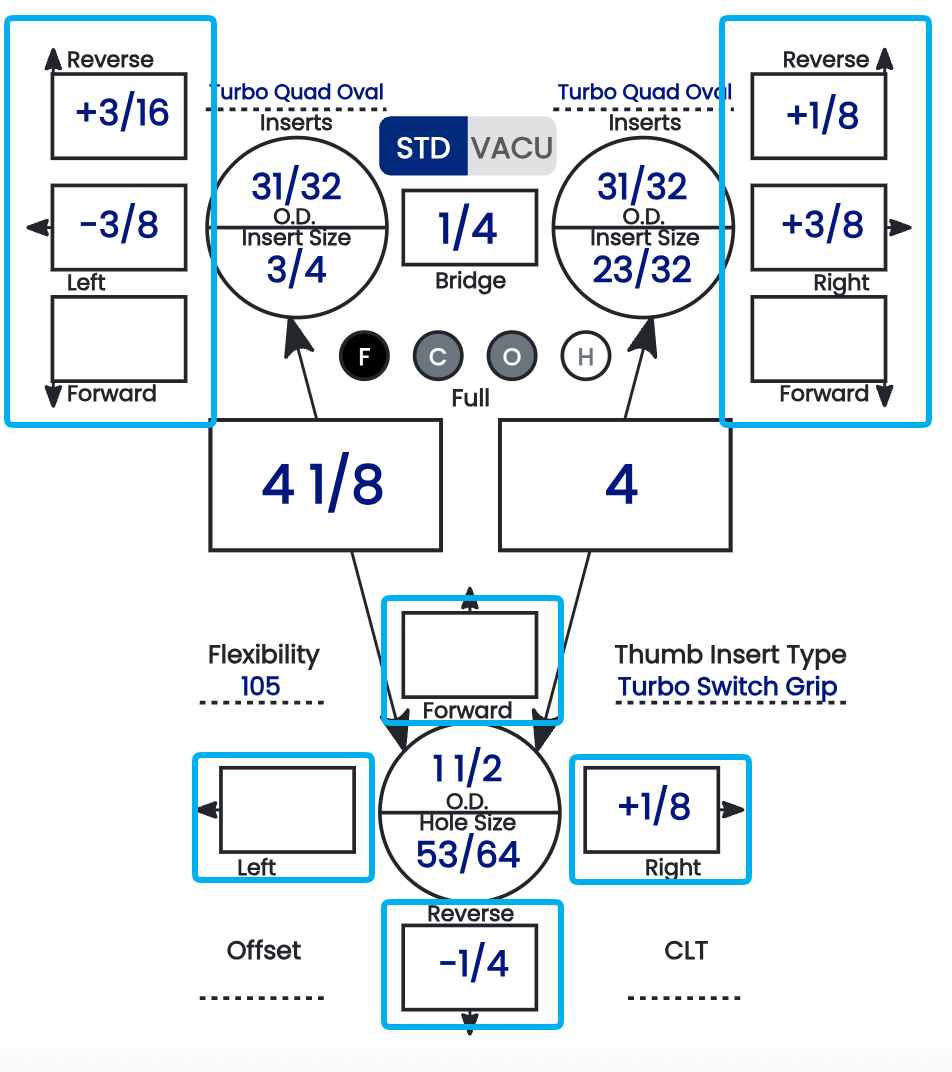
Pitch is the angle at which a finger or thumb hole is drilled relative to the ball's center. It affects grip comfort, how securely the ball is held through the swing, and how cleanly it releases. In Spectre Cloud, you set pitch for each hole using the pitch tiles on the spec sheet — the boxes framed by directional arrows around each hole. This page explains how those tiles work and defines the four pitch terms: Forward, Reverse, Lateral, and Zero.
Note: For the display and sign settings referenced here, see chapter 2.4. For the auto-suggestions that propose pitch values, see 2.6.2 and 2.6.3.
🛠️ Setting Pitch with the Pitch Tiles
On a Spectre Cloud spec sheet, each hole — thumb, middle finger, and ring finger — has its own pitch tile. Each tile is surrounded by arrows that represent the two pitch axes:
- ✅ Forward / Reverse — the arrows pointing toward and away from the ball's center. Forward tilts the hole toward the center of the ball; reverse tilts it toward the outside.
- ✅ Lateral — the sideways arrows, tilting the hole toward or away from the adjacent hole.
You enter the pitch amount in the tile in the chosen direction. Forward/reverse and lateral are independent, so a single hole can carry both at once (for example, a small forward pitch and a small lateral pitch together).
🔢 Fractions or Thousandths of an Inch
Pitch values in the tiles can be displayed two ways, controlled by a Spectre Cloud setting:
- ✅ Fractions — e.g.
1/4",1/8",3/16". - ✅ Thousandths of an inch — the same values shown in decimal, e.g.
1/4"as.250"and1/8"as.125".
The value is identical either way — only the notation changes. Choose whichever matches how your drill press readout and your shop's habits express pitch, so there's no conversion in your head at the press.
⚠️ Verify with your Spectre team: confirm the exact name and location of the fractions-vs-thousandths display setting so it can be linked precisely from this page.
➕➖ Pitch Polarity (+/-)
By default the arrows around each tile carry the direction. You can also turn on polarity so a + or − sign appears in the pitch tiles, giving you the direction as a sign in addition to the arrows. This is set in chapter 2.4 and is worth aligning to your specific machine:
- ✅ Whether right lateral pitch reads as positive or negative — 2.4.1.
- ✅ Whether forward thumb pitch reads as positive or negative — 2.4.2.
- ✅ Whether the +/- signs display in the pitch tiles at all — 2.4.3.
Matching these to how your drill press signs its pitch is the single best way to avoid drilling a hole in the wrong direction.
📐 The Four Pitch Terms
Forward pitch angles the hole toward the center of the ball. It draws the thumb or finger deeper in, increasing grip security and slowing the exit slightly. Common for less flexible thumbs, conventional grips, or a ball that feels loose. Typical range: 0 to 1/2" forward; 1/4" is the common IBPSIA starting point.
Reverse pitch angles the hole toward the outside of the ball, away from center. It assists the thumb's exit for a faster, cleaner release, but reduces grip security if overapplied. Common for higher rev-rate bowlers, very flexible thumbs, or a thumb that hangs. Typical range: 1/16" to 1/4" reverse.
Lateral pitch tilts the hole sideways, toward or away from the adjacent hole, to relieve side pinching and align with the bowler's hand geometry. Direction is described relative to the ring-finger side and flips for left-handed bowlers:
| Direction | Right-Handed | Left-Handed |
|---|---|---|
| Toward ring finger | Tilts opening to the right | Tilts opening to the left |
| Away from ring finger | Tilts opening to the left | Tilts opening to the right |
Typical range: 0 to 3/8"; 1/8" toward the ring finger is among the most common.
Zero pitch — also called manufacturer's or no added pitch — drills the hole straight toward the ball's center with no added tilt on either axis. It's a valid, complete spec (not a placeholder) and a common starting point for a first fitting.
Note: Because lateral direction is physically opposite for RH and LH bowlers, dominant hand is a required field on the bowler profile. The Auto-Invert setting (2.6.4) flips lateral pitch automatically when cloning or templating across handedness.
📊 Pitch Summary Table
| Pitch Type | Direction | Primary Effect |
|---|---|---|
| Forward | Toward center of ball | Increases grip security; slows exit |
| Reverse | Toward outside of ball | Faster, cleaner thumb exit |
| Lateral | Toward/away from ring finger | Relieves side pinch; aligns to hand geometry |
| Zero | Straight toward center | Neutral; no added adjustment |
Related Sections
- 4.1.3 — Grip type definitions: Fingertip vs. Conventional
- 4.1.2 — Span types: Full Span, Cut to Cut, Outer to Cut, Hole to Hole
- 2.4.1 — Does your machine display right pitch as positive? Y/N
- 2.4.2 — Does your machine display forward thumb pitch as positive? Y/N
- 2.4.3 — Display +/- in pitch tiles: showing direction to avoid errors
- 2.6.2 — Pitch suggestion: auto forward pitch based on hand flexibility
- 2.6.3 — Auto-CLT: lateral pitch of fingers based on CLT chart
- 2.6.4 — Auto-invert standard lateral pitches when changing RH to LH
Tip: Before you drill, make sure your fractions-vs-thousandths and +/- polarity settings match how your drill press readout expresses pitch. When the spec sheet and the press speak the same language, you read the tile and drill it directly — no mental conversion, no risk of reversing a direction.
4.1.5 Bridge: standard bridge sizes and their purpose
4.1.5 concept
The bridge is the distance between the near edges of the middle and ring finger holes on a drilled ball — the strip of material, or land area, that holds the two finger holes apart. It's one of the smallest measurements on a spec sheet, but it's an industry-standard value that depends on grip type, and Spectre Cloud defaults it for you.
📏 Standard Bridge by Grip Type
The bridge default is set by the bowler's grip type:
- ✅ Fingertip —
1/4"— the standard default for fingertip fits. - ✅ Conventional —
3/8"— the standard default for conventional fits.
Spectre Cloud applies the correct default automatically based on the grip type recorded for the bowler (see Autofill Bridge, below).
⚠️ The 1/4" Warranty Minimum
Whatever the grip type, 1/4" is the hard floor. Ball manufacturers will not warrant a ball that cracks if the bridge was drilled narrower than 1/4" — below that width, the land area between the finger holes is too thin to reliably survive repeated impact.
- ✅
1/4"is the fingertip default and the universal warranty minimum. - ✅ Conventional defaults wider, at
3/8". - ❌ A bridge narrower than
1/4"risks cracking the land area — and voids the manufacturer's crack warranty if it does.
🛠️ Autofill Bridge in Spectre Cloud
When Autofill Bridge (2.6.5) is enabled, Spectre Cloud pre-populates the bridge field with the standard value for the bowler's grip type — 1/4" for fingertip, 3/8" for conventional — so you don't need to enter it on a routine drill. The fitter only intervenes when a specific, deliberate reason calls for a different value.
🖥️ Bridge on the Spec Sheet
The bridge field sits in the insert and finger hole section of the spec sheet.
- ✅ It's shown in whatever unit and format your account uses — fractional or decimal, per your display settings.
- ✅ The autofilled value can be overridden by typing a different measurement directly.
- ✅ A manually entered bridge is saved to the sheet's history and is visible when the sheet is reviewed or cloned.
- ✅ When cloning a spec sheet, the bridge carries forward — confirm it's still appropriate for the new ball before saving.
Related Sections
- 4.1.4 — Pitch terminology: Forward, Reverse, Lateral, Zero
- 4.1.3 — Grip type definitions: Fingertip vs. Conventional
- 4.1.2 — Span types: Full Span, Cut to Cut, Outer to Cut, Hole to Hole
- 2.6.5 — Autofill Bridge: 1/4" fingertip, 3/8" conventional
- 9.x — Tips & Troubleshooting: narrow bridge and land area considerations
Tip: Let Autofill Bridge set the grip-appropriate default — 1/4" fingertip, 3/8" conventional — and treat 1/4" as the floor you never drill below. Going narrower than 1/4" for any grip gives up the manufacturer's crack warranty, so only do it for a specific, documented fitting reason.
4.1.6 Insert OD: drill bit sizing for STD and VACU grips
4.1.6 concept
When drilling finger holes for bowlers who use inserts, the drill bit must match the insert's Outside Diameter (OD) — the outer dimension that sets the hole size. Spectre Cloud sizes these holes for you through Autofill Insert OD (2.6.6). This page explains what OD is, how it differs from insert size, and how the two insert systems — STD and VACU — are drilled and recorded on the spec sheet.
🎳 Insert OD vs. Insert Size
Two dimensions matter for an insert, and it's important not to confuse them:
- ✅ OD (Outside Diameter) — the outer dimension of the insert, published by the manufacturer. This is the drill bit size. You match the bit to the OD, never to the bowler's finger.
- ✅ Insert size — the inner diameter (ID), sized to fit the bowler's finger. In Spectre Cloud, the insert size field is the ID — Spectre does not track ID as a separate value.
- ✅ Spectre derives the OD (drill bit size) from the insert type and insert size you record — so entering both correctly is what makes Autofill Insert OD accurate.
📐 STD (Standard) Inserts
Standard inserts are press-fit: the hole is drilled to the insert's OD and the insert is pressed in, held by friction against the ball's coverstock.
- ✅ Drill bit size equals the insert's published OD — a direct, one-to-one match, at full depth.
- ✅ A correct STD fit presses in with firm hand pressure or a seating tool — it should not drop in freely or require excessive force.
- ✅ If the insert spins after seating, the hole was drilled slightly too large — re-drilling to size is preferable on a new ball.
📐 VACU (Vacuum) Inserts
VACU inserts are drilled in two diameters so the insert has room to expand. The hole is stepped: an oversized pocket at the top, then the insert's true OD deeper down.
- Drill the top portion of the hole at the size shown on the spec sheet.
- Drill that top portion
1"deep. - Continue to the full depth of the insert using the insert's regular, actual OD.
The oversized top creates a pocket — a void where the insert does not touch the surrounding ball wall. That void gives the insert room to expand.
- ✅ The spec-sheet OD value for a VACU insert is the top-portion (pocket) size, not the insert's body OD.
- ✅ The deeper portion is drilled at the insert's actual OD, exactly as a STD hole would be.
- ❌ Drilling the whole hole at the actual OD removes the pocket entirely — the insert loses its room to expand, defeating the purpose of a VACU fit.
📊 STD vs. VACU — Key Differences
| STD (Standard) | VACU (Vacuum) | |
|---|---|---|
| Drilling method | Single diameter at the insert's OD, full depth | Two diameters — oversized top ~1" deep, then the actual OD to full depth |
| What the spec-sheet OD means | The drill bit size for the whole hole | The top-portion (pocket) drill size |
| Why it's sized this way | Friction press-fit secures the insert | The oversized top leaves a void so the insert can expand |
| Common use case | General fingertip / insert fitting | Bowlers whose fingers need room to expand |
⚙️ How Spectre Cloud Handles STD vs. VACU
Autofill Insert OD (2.6.6) populates the drill bit size on the spec sheet from the insert type and insert size recorded for the bowler. Recording the insert type correctly is what tells Spectre which sizing to apply.
- ✅ When the insert type is STD, the autofilled OD is the drill bit size for the full hole.
- ✅ When the insert type is VACU, the autofilled OD is the top-portion (pocket) size — drill that ~1" deep, then switch to the insert's actual OD for the rest.
The drill bit size is saved to the spec sheet and carries forward when the sheet is cloned. Confirm the insert type and OD are still correct for the new ball before saving, and if a bowler switches systems (STD to VACU or vice versa), create a new spec sheet so the history reflects what was actually drilled on each ball.
Related Sections
- 4.1.5 — Bridge: 1/4" fingertip, 3/8" conventional
- 4.1.4 — Pitch terminology: Forward, Reverse, Lateral, Zero
- 4.1.3 — Grip type definitions: Fingertip vs. Conventional
- 2.6.6 — Autofill Insert OD: auto drill bit size per insert type and size
- 2.6.7 — Auto-Repeat Insert Size: mirror size from ring to middle finger
- 9.x — Tips & Troubleshooting: insert seating issues and OD mismatches
Tip: The most common VACU error is drilling the whole hole at one size. Remember it's two cuts: the spec-sheet size for the first inch to form the pocket, then the insert's actual OD to depth. If your shop is adding VACU for the first time, walk every driller through that two-diameter step at the press before the first VACU ball — it's the one detail that's easy to miss and easy to get right once seen.
4.2 — Creating a Spec Sheet
4.2.1 Creating a blank spec sheet for a bowler
1. Access Bowler Profiles
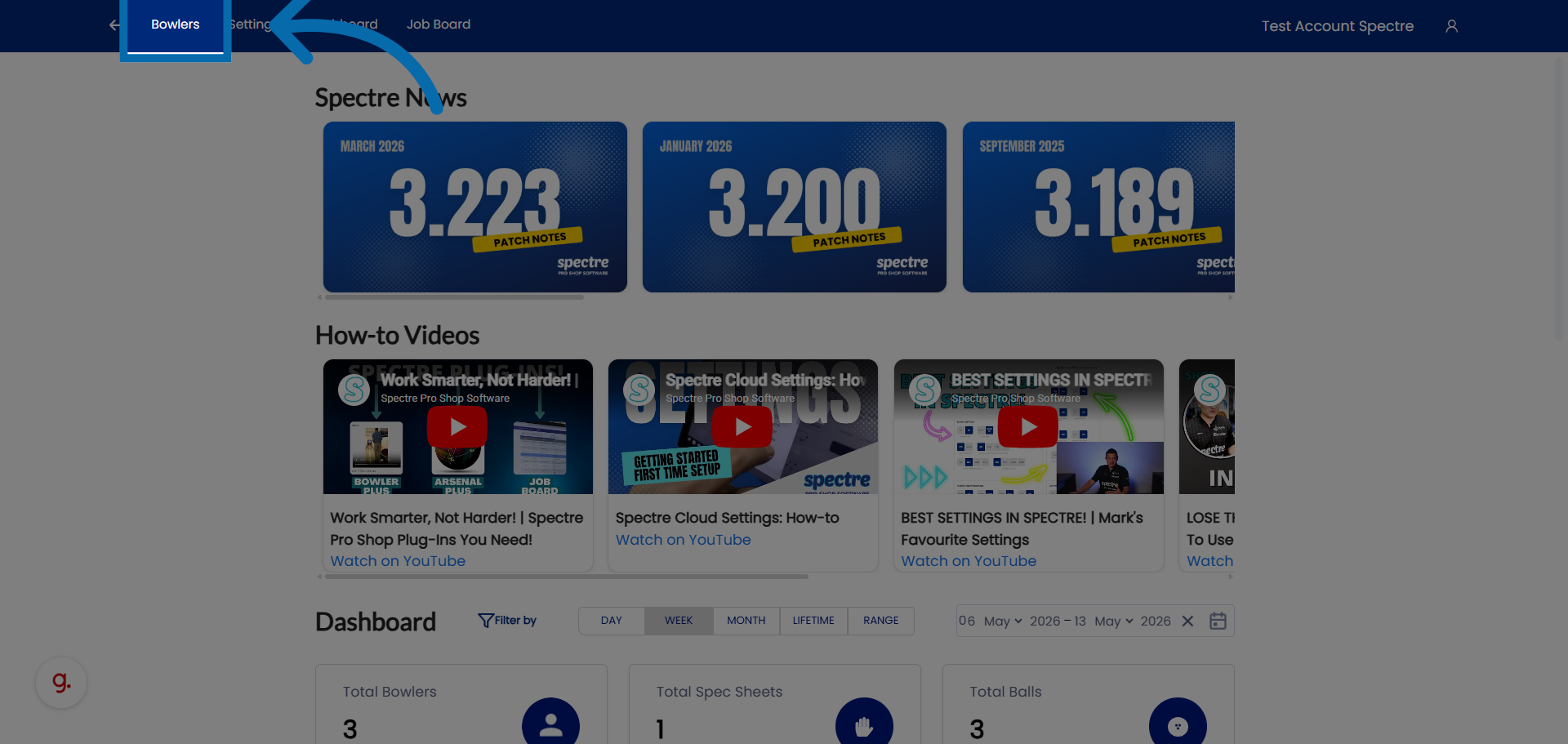
2. Select Bowler
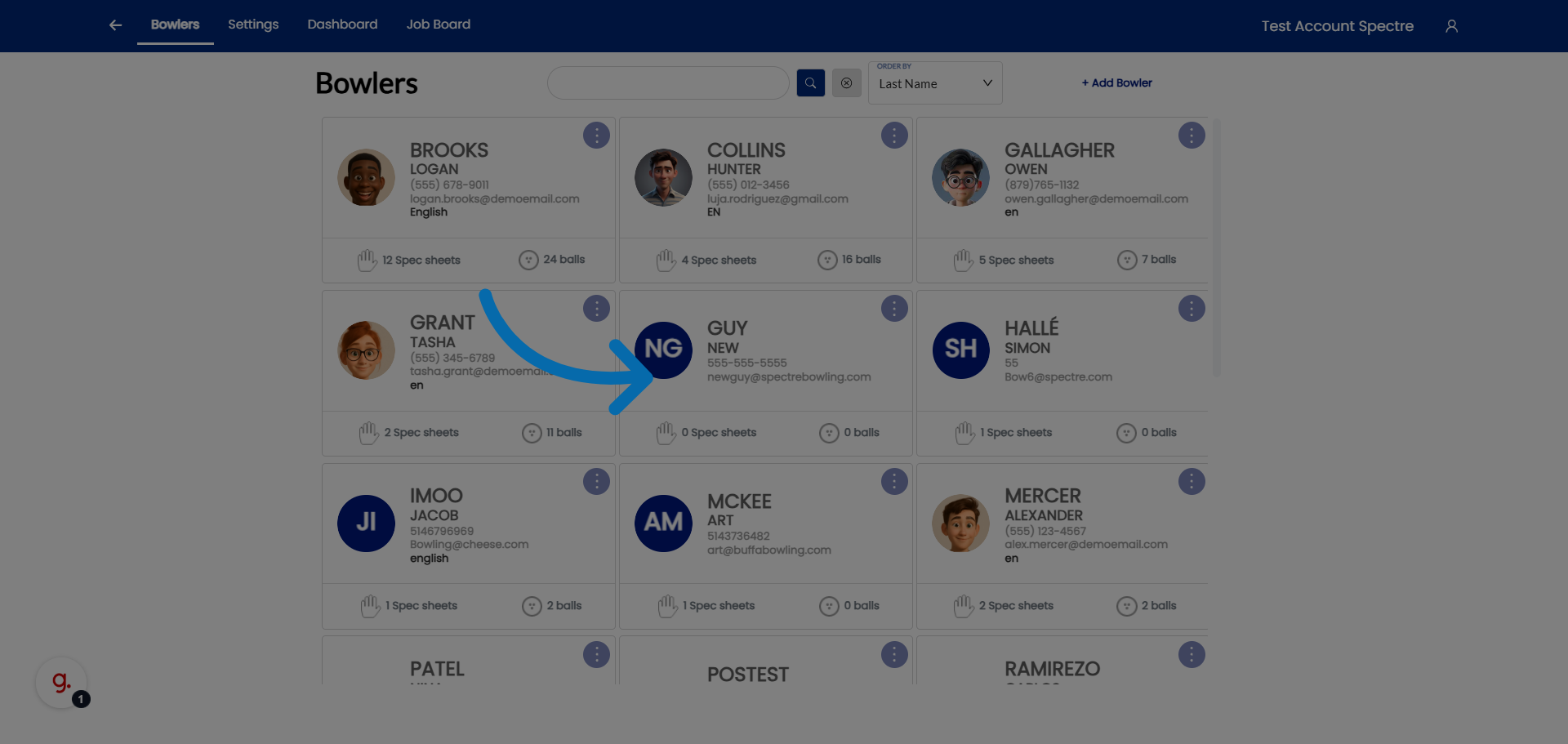
3. Open Spec Sheets Addition
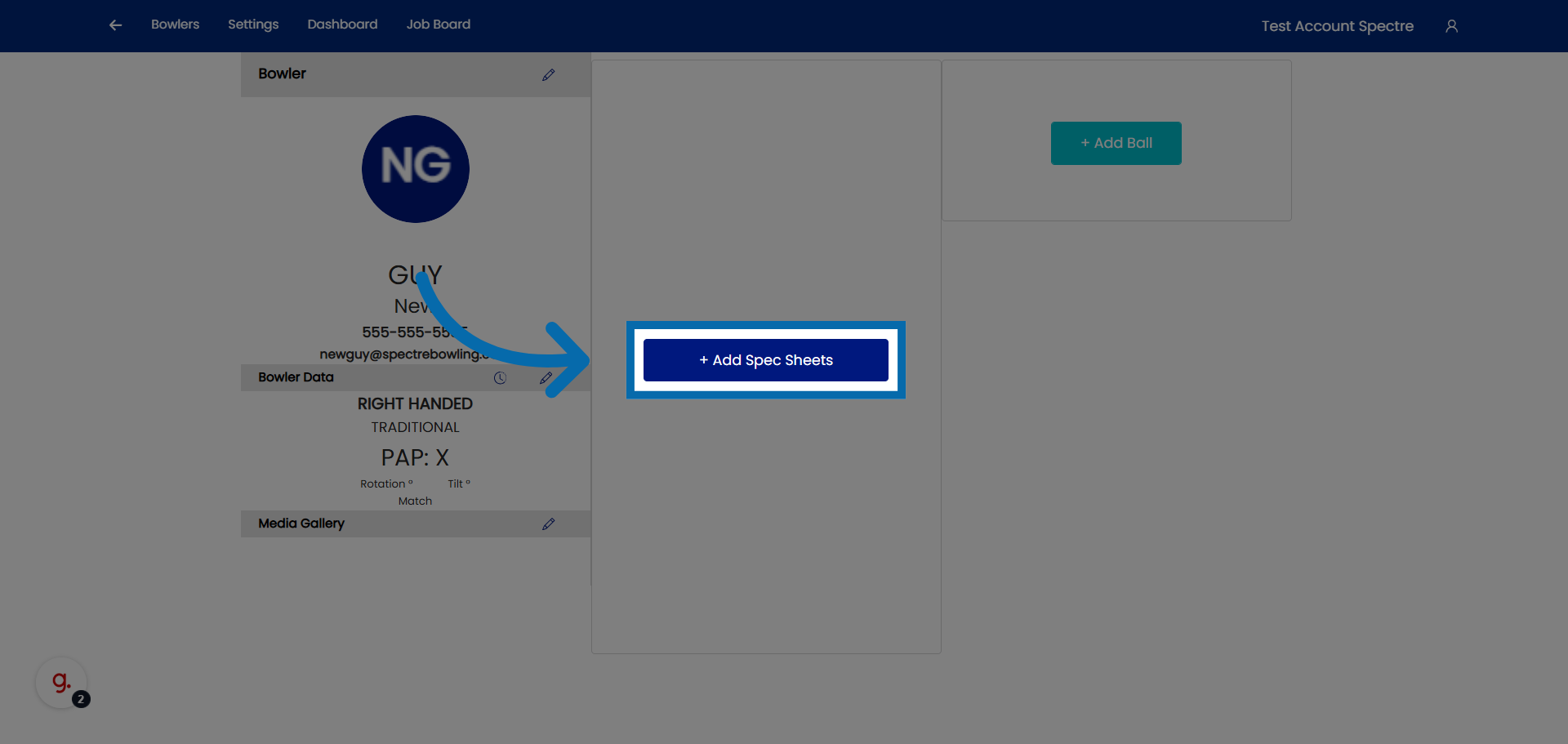
4. Lets create a new spec sheet for an already existing profile.
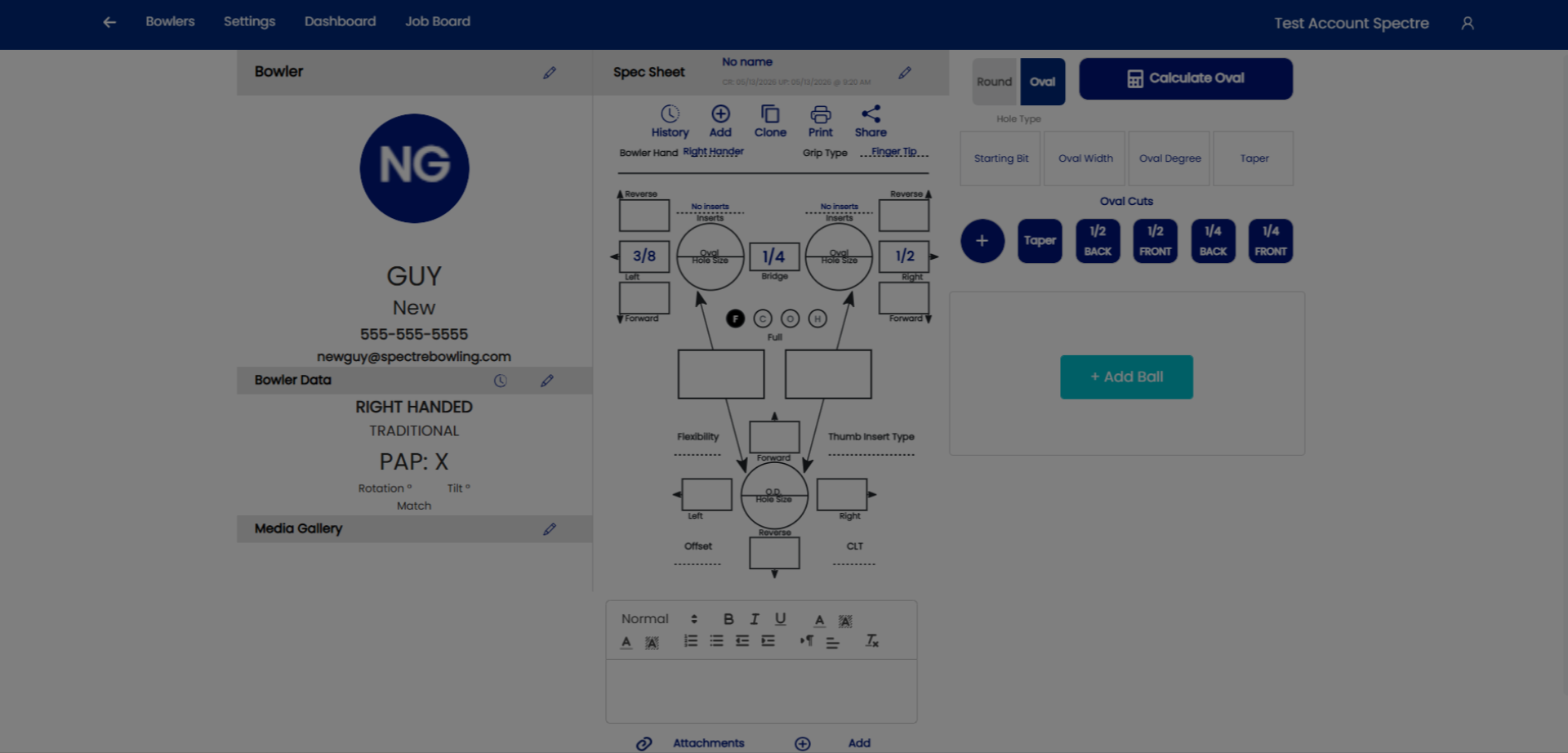
5. Select a bowler
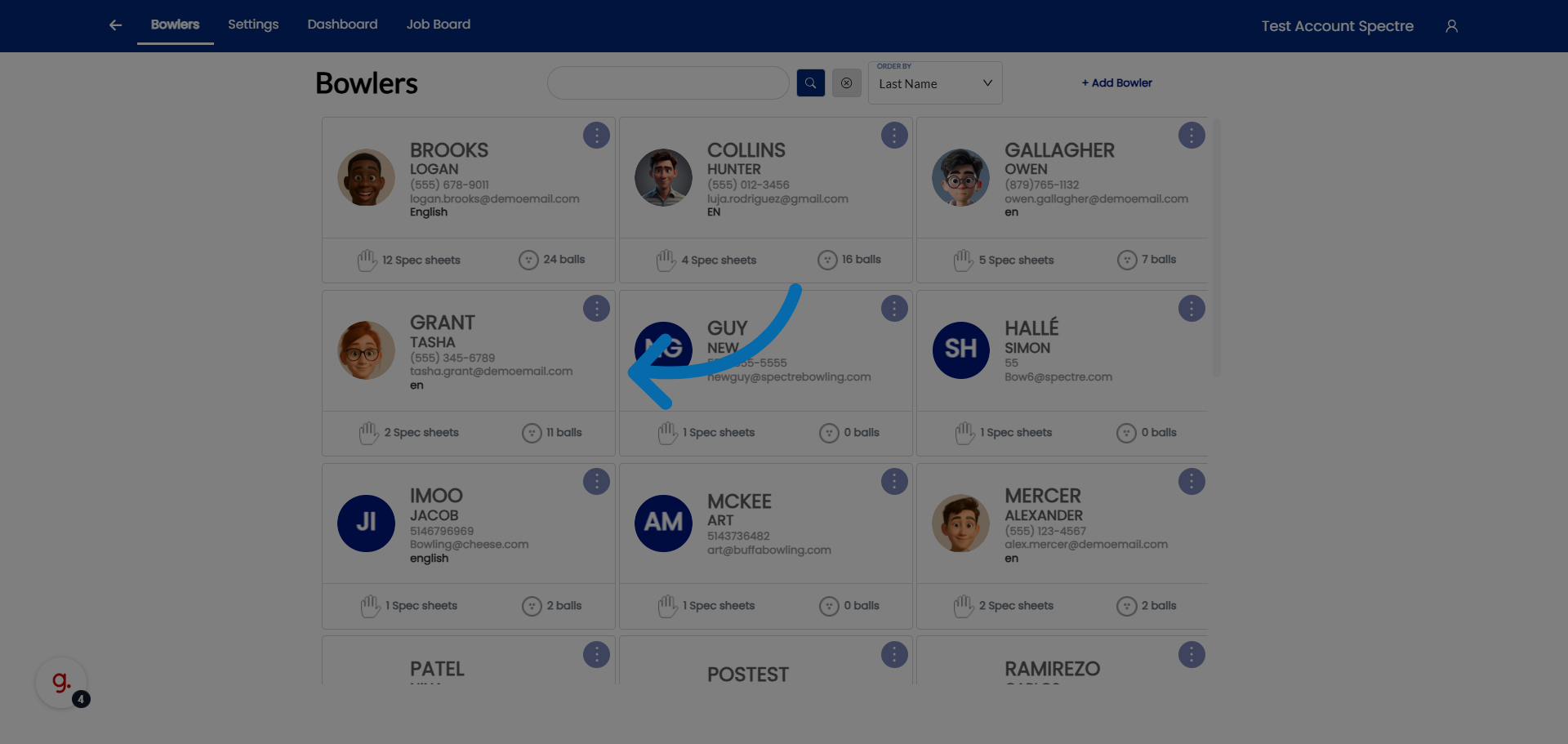
6. Open Additional Options
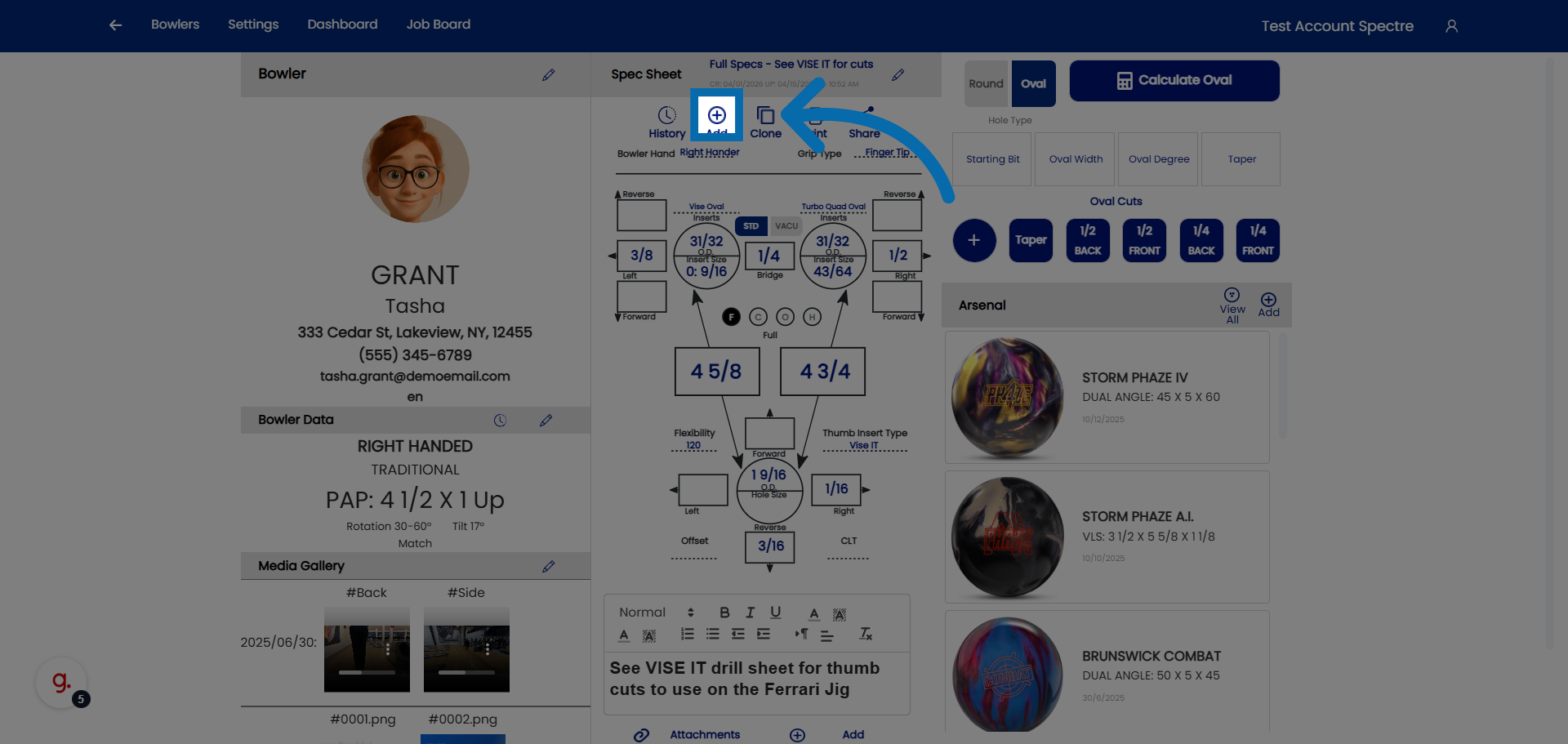
7. Access Further Spec Sheet Settings
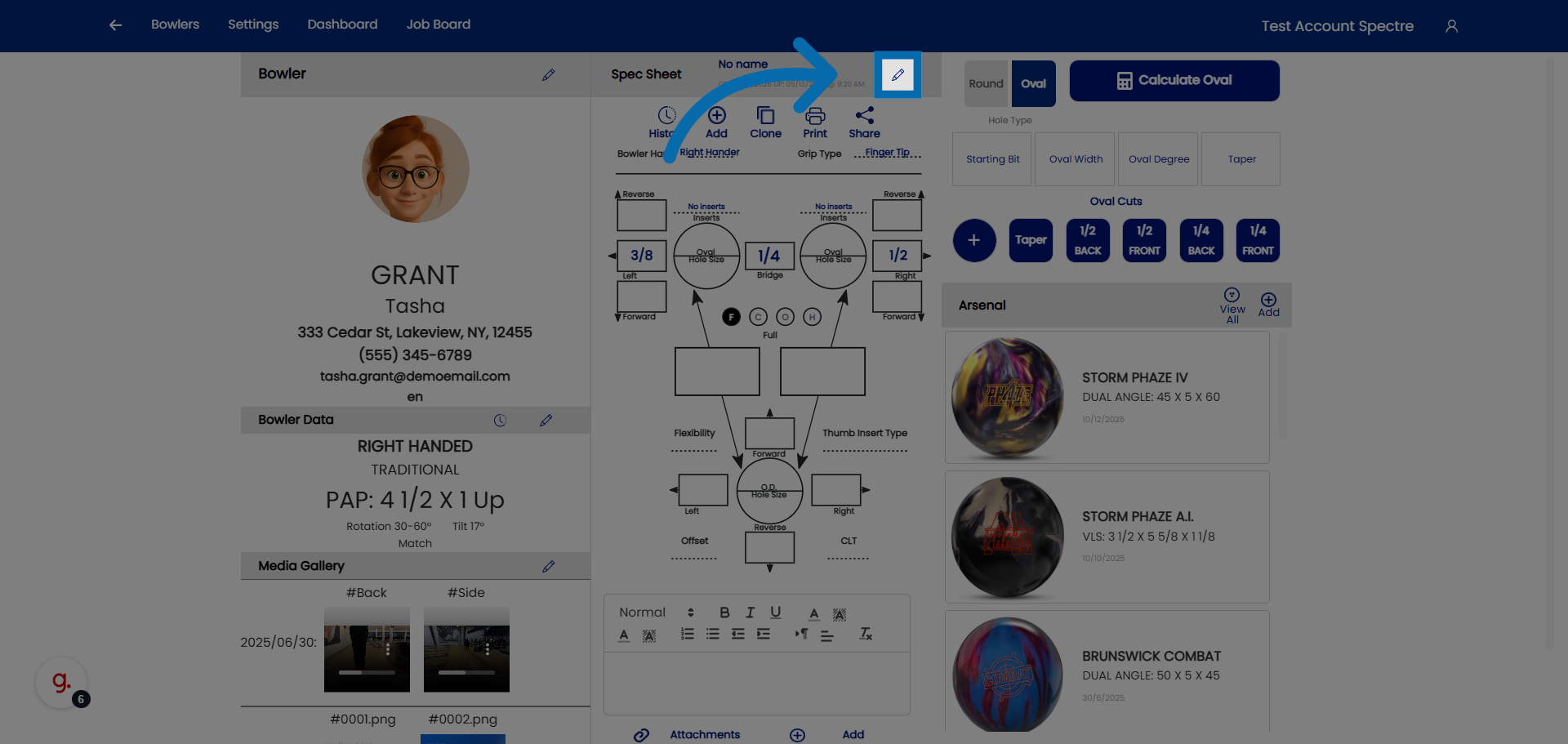
8. Select Spec Sheet Name Field
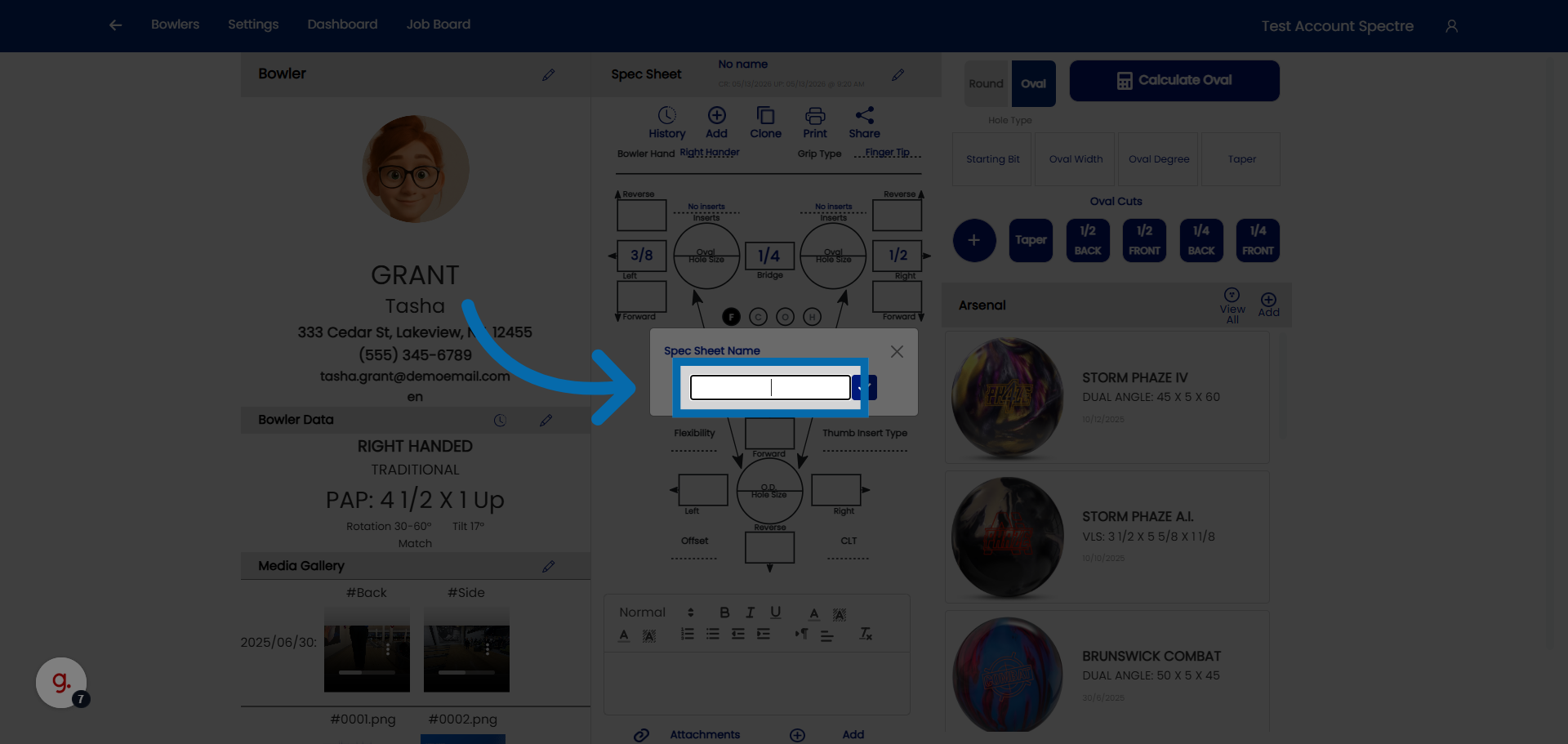
9. Confirm Spec Sheet Addition
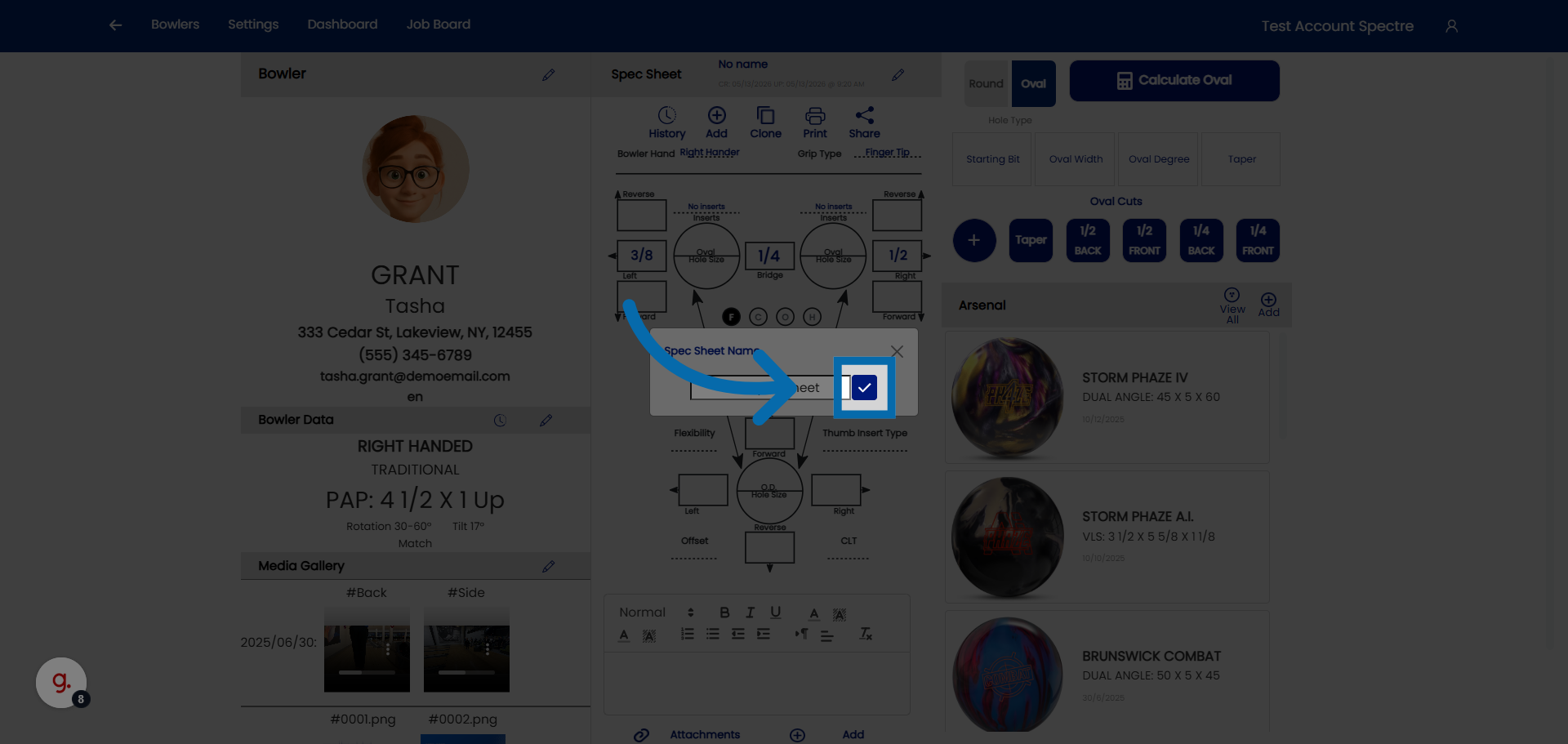
4.2.2 Naming a spec sheet
4.2.2 step-by-step
When you create a new spec sheet, Spectre Cloud lets you give it a plain-English name at the top of the sheet. This name is how you identify the sheet later — a far more useful label than relying on the created and modified dates alone.
🎳 Naming the Spec Sheet
The name field sits at the top of the spec sheet when it's created. Use it to describe, in your own words, what the sheet is for — so anyone opening the bowler's history can tell at a glance what each sheet represents.
- ✅ Give the sheet a name that describes what was done or why — for example,
Refit pain ring finger 2026. - ✅ A descriptive name makes a sheet easy to find without hunting through dates.
- ✅ Be consistent so other staff can immediately understand which sheet is which.
- ❌ Avoid relying on the created/modified dates alone to tell sheets apart — they don't tell you what changed or why.
🔄 Naming When You Clone a Sheet
Spectre Cloud's Clone feature creates a copy of an existing spec sheet in the bowler's history. It's the right way to make a small change and log it properly — the original stays intact, and the copy records the new work.
When you clone a sheet, Spectre Cloud prompts you to rename it before the copy loads. This is your chance to describe the change you're about to make.
- ✅ Rename the clone to reflect what's different about it — for example, the reason for the refit or the adjustment being made.
- ✅ A clear name on each clone turns the bowler's history into a readable record of what was done and when.
- ❌ Keeping the default or duplicate name defeats the purpose — you lose the ability to tell one sheet from the next.
Note: Naming is the key to a useful drilling history. A good name identifies what was done on that sheet — without it, a list of near-identical sheets and dates is hard to interpret later.
Related Sections
- 4.2.1 — Creating a new spec sheet
- 4.2.3 — Selecting span type (F, C, O, H)
- 4.3 — Cloning a spec sheet
- 7.1 — Arsenal overview (linking balls to spec sheets)
Tip: Think of the sheet name as a one-line summary of the work. Refit pain ring finger 2026 tells you everything at a glance; "Spec Sheet 3" tells you nothing. When you clone to make a change, take the extra few seconds at the rename prompt — future you, reviewing the history, will be glad you did.
4.2.3 Selecting grip type on the spec sheet
1. Access Bowler Section
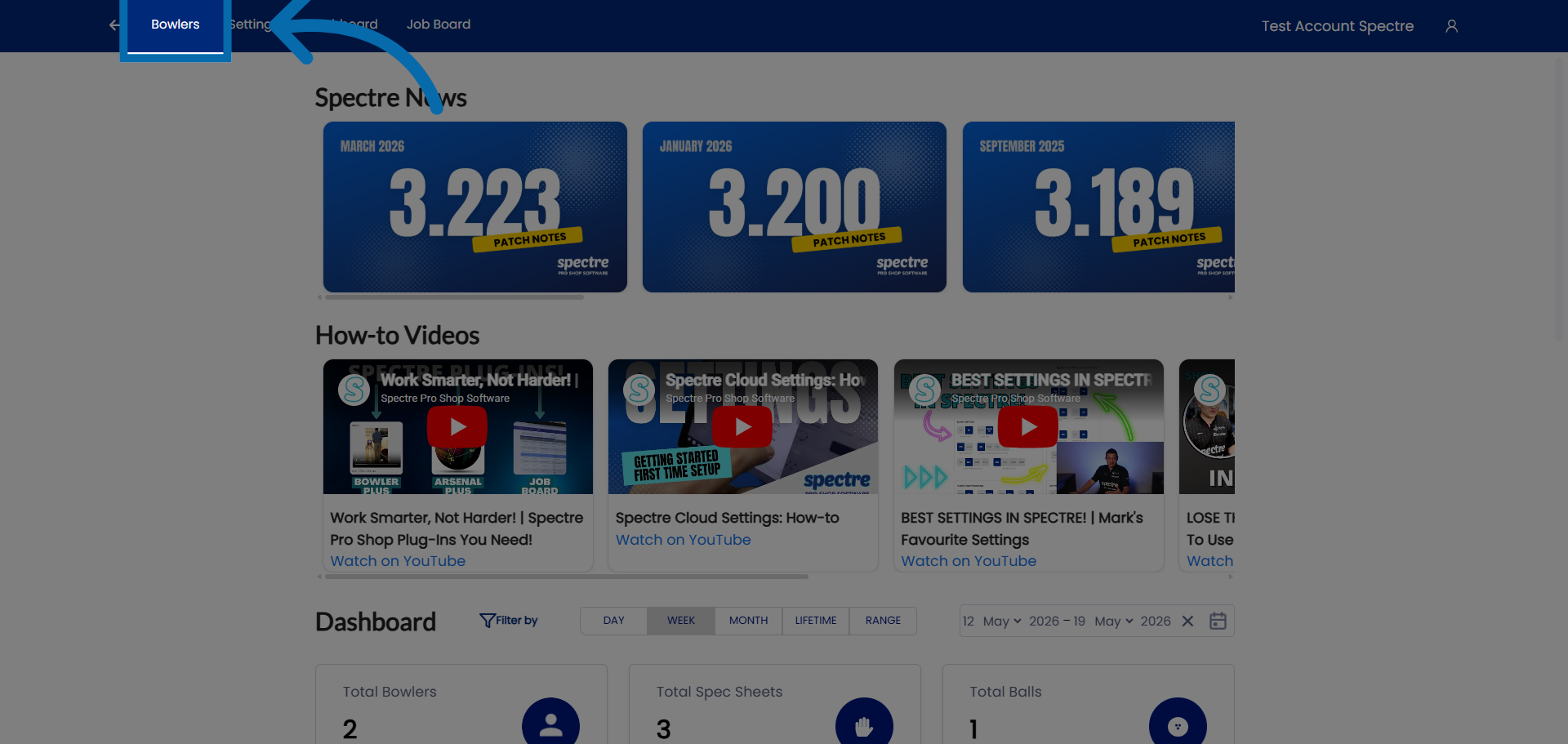
2. Select Bowler
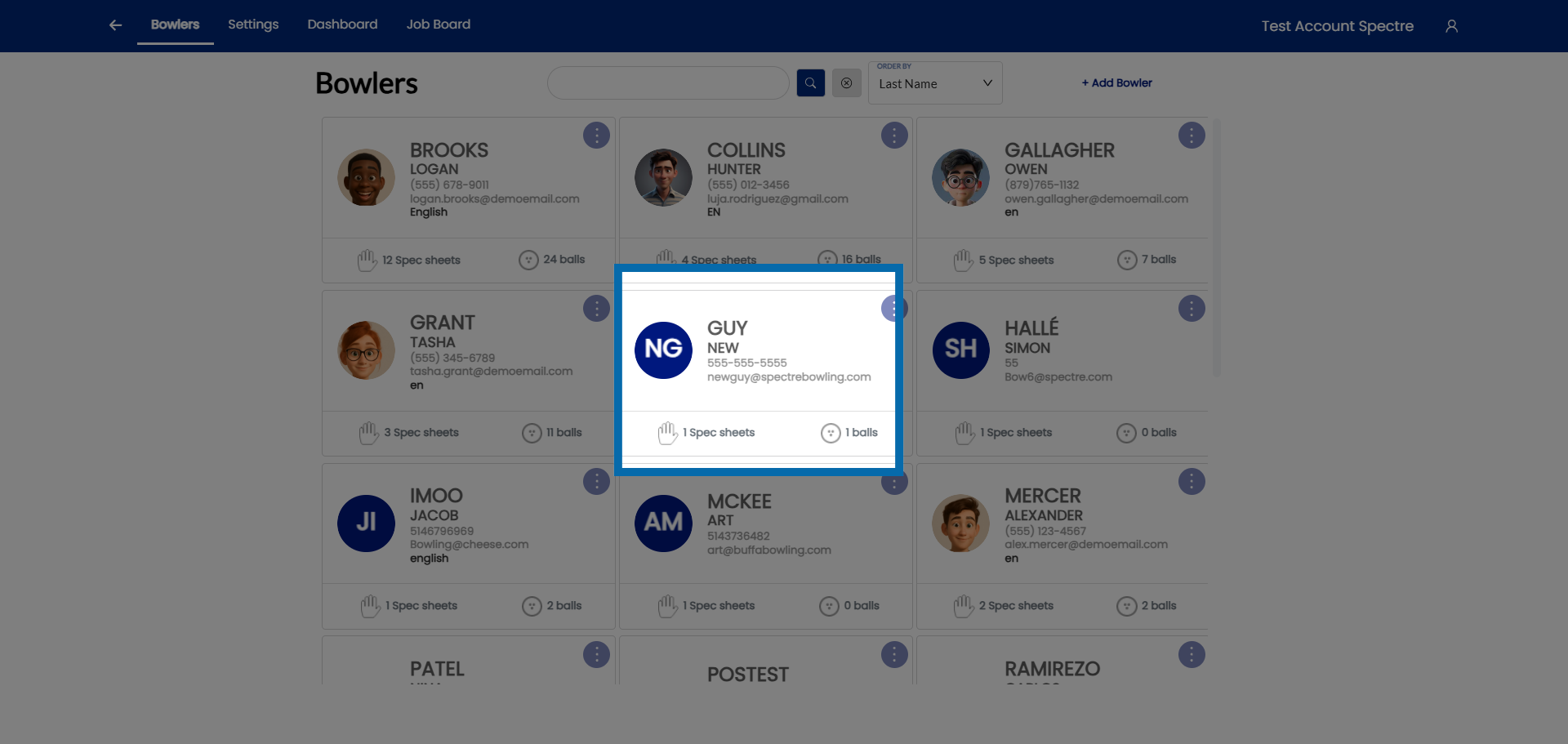
3. Click on grip type
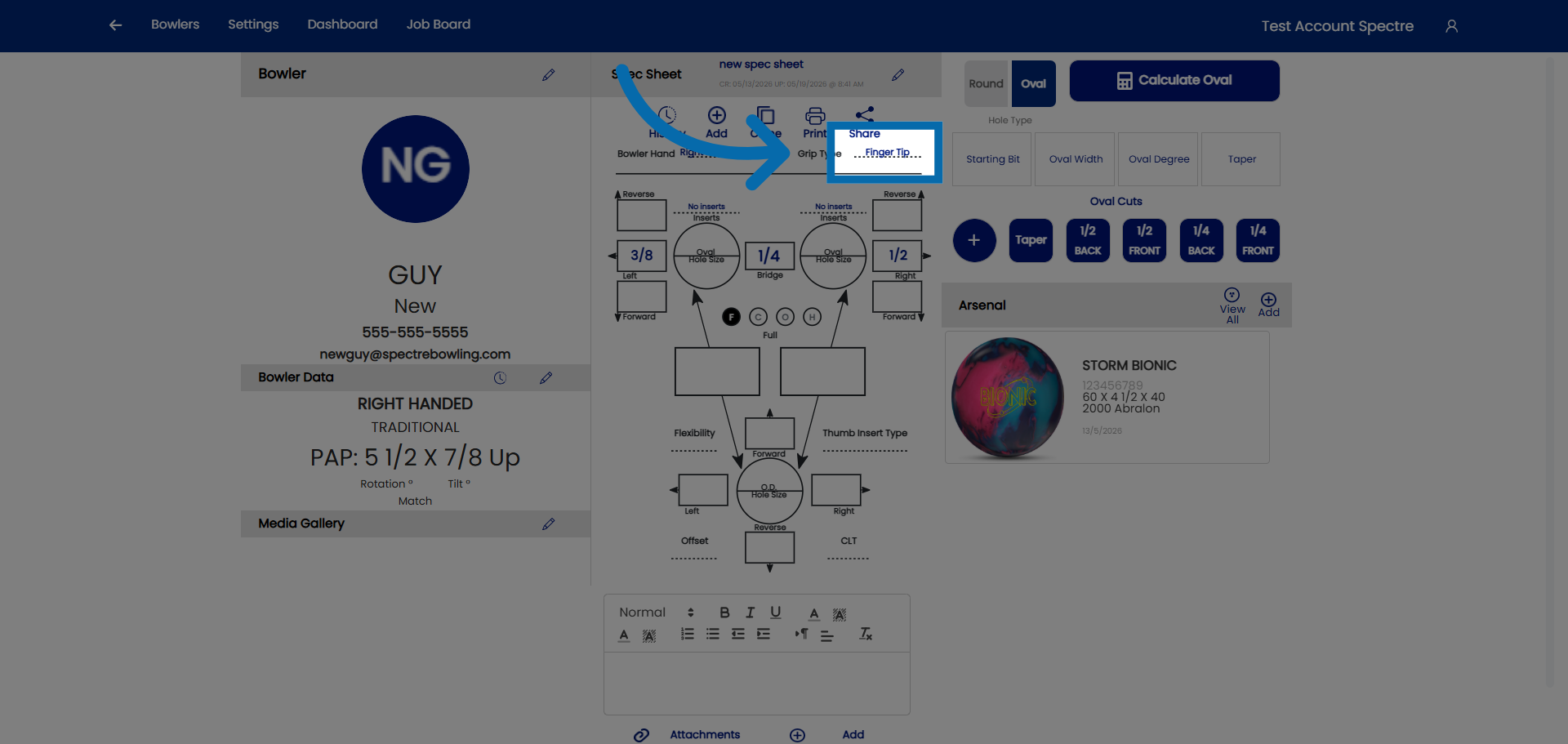
4. Click on the drop down
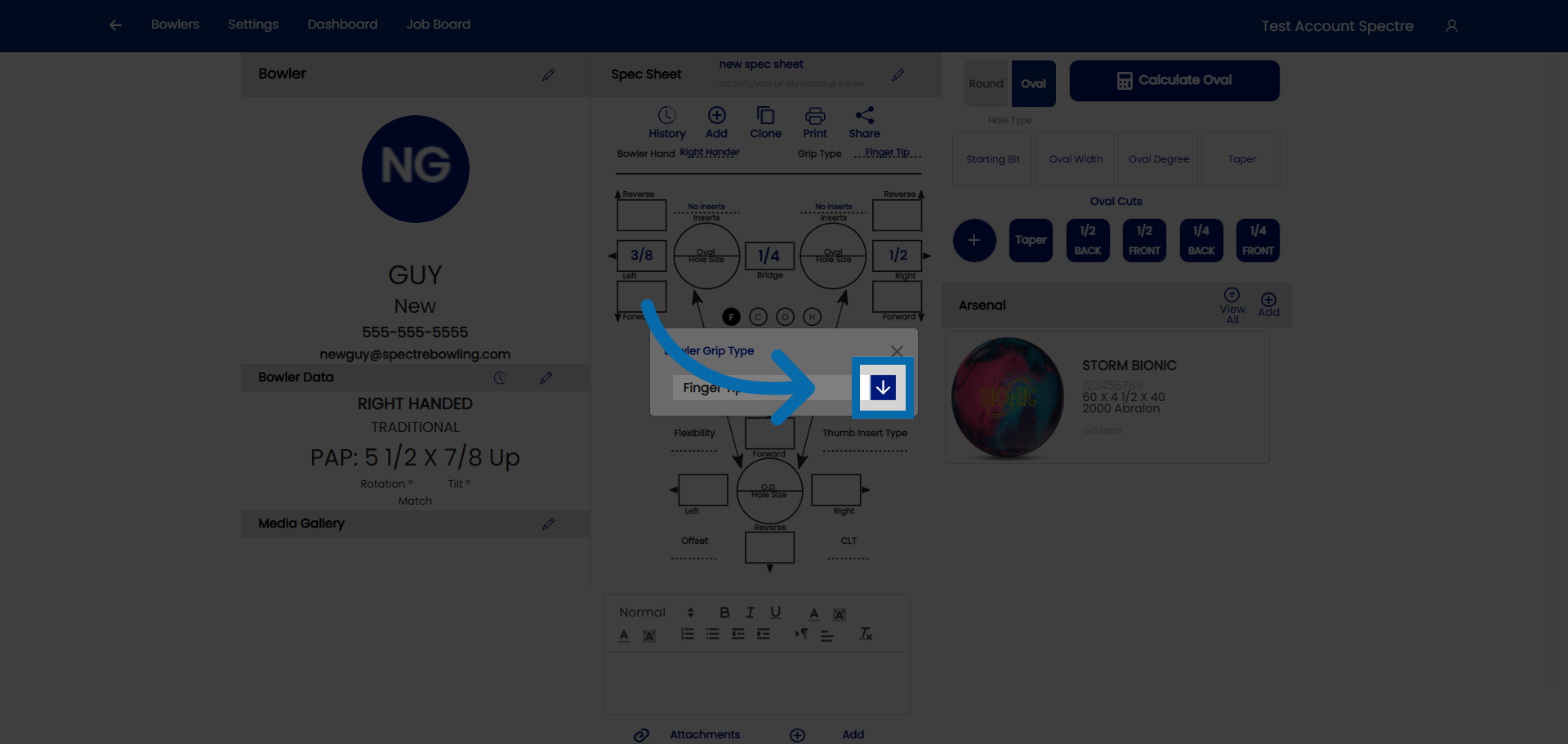
5. Select grip type
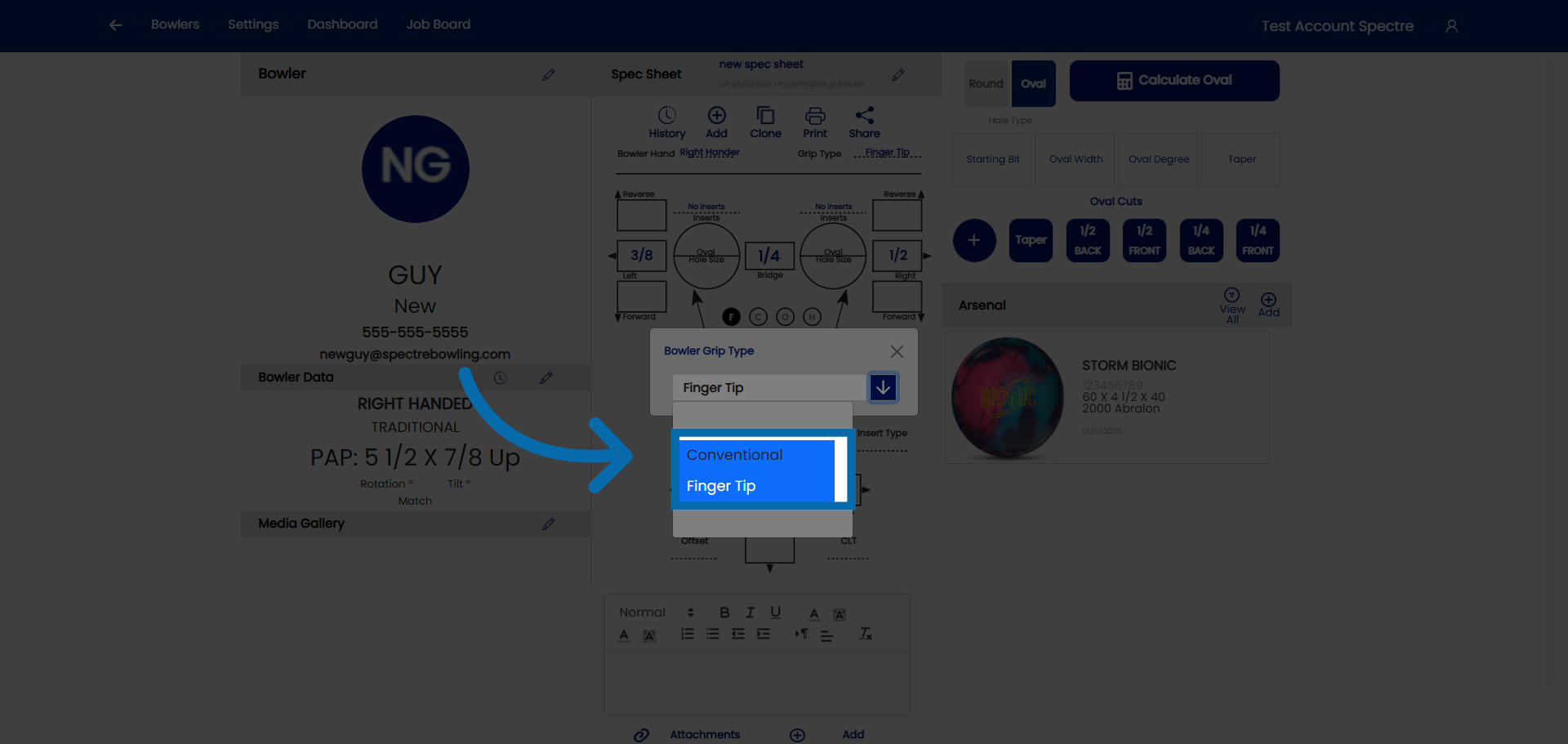
4.2.4 How to identify the type of grip from measurement sheet
4.2.4 step-by-step
Before entering span and pitch measurements, you need to identify which grip type the bowler uses. The grip type determines how the fingers sit in the ball and which measurements are relevant. Most fitting sheets — handwritten, printed, or from a previous system — record grip type either explicitly or implicitly through the measurements themselves.
🎳 The Two Grip Types
Spectre Cloud supports the two IBPSIA-standard grip types. Understanding how each is defined helps you read any fitting sheet accurately.
| Grip Type | Finger insertion depth | Typical bowler profile |
|---|---|---|
| Conventional | Fingers inserted to the second knuckle (middle joint) | Beginners, recreational bowlers, seniors, youth |
| Fingertip | Fingers inserted to the first knuckle (tip joint only) | Most competitive and league bowlers; the most common adult grip |
Note: The overwhelming majority of adult league and competitive bowlers use a fingertip grip. If a fitting sheet doesn't state a grip type, fingertip is the most likely default for an adult bowler — but always confirm with the bowler directly.
🛠️ Selecting Grip Type in Spectre Cloud
- Open the spec sheet you're creating or editing.
- Locate the Grip Type selector in the spec sheet header or measurement section.
- Choose Conventional or Fingertip based on your reading of the fitting sheet.
- Spectre Cloud adjusts the available span fields and IBPSIA auto-suggestion logic to match the selected grip type.
Important: Selecting the wrong grip type will cause span fields to mismatch the bowler's actual measurements and may produce incorrect IBPSIA auto-suggestions. If you're unsure, choose Fingertip as the default for adults and confirm with the bowler at their next visit.
Related Sections
- 4.1.3 — Grip type definitions: Fingertip vs. Conventional
- 4.3.1 — Entering span measurements (F, C, O, H)
- 4.4.5 — Inputting finger pitch
- 2.6.x — IBPSIA auto-suggestions (Book 02 settings)
Tip: Not sure which grip a new walk-in bowler uses? Fingertip bowlers often have calluses or grooving at the first knuckle from years of fingertip use — a quick look at the hand usually tells you.
4.2.5 Cloning a spec sheet
4.2.5 TIP step-by-step
When you need to make an adjustment to an existing fit, and you want to document the change in the spec sheet history, cloning a spec sheet saves time and prevents transcription errors. Instead of re-entering every measurement from scratch, you duplicate an existing sheet and change only what's different for the new fit. The original spec sheet is never altered.
🔄 What Cloning Does
- ✅ Creates a complete copy of the selected spec sheet — span, pitch, grip type, layout, and notes.
- ✅ Prompts you to rename the sheet before the copy loads — so you can describe the new drilling right away (e.g.,
Refit pain ring finger 2026). - ✅ Saves the clone as a separate, independent record — changes to the clone never affect the original.
- ❌ Does not automatically link the clone to an arsenal ball — that's done separately.
🛠️ How to Clone a Spec Sheet
- Open the bowler's profile from the Bowlers list.
- Go to the Spec Sheets tab for that bowler.
- Find the sheet you want to clone — use the name and date to confirm you have the right record.
- Open the sheet and select the Clone option.
- When prompted, give the clone a new name that reflects the new ball or the change you're making.
- Spectre Cloud opens the renamed copy for editing.
- Edit any measurements, pitches, or layout details that differ from the original.
- Save the cloned spec sheet.
📸 Visual Walkthrough
- Open the bowler profile — select the bowler whose spec sheet you want to clone.
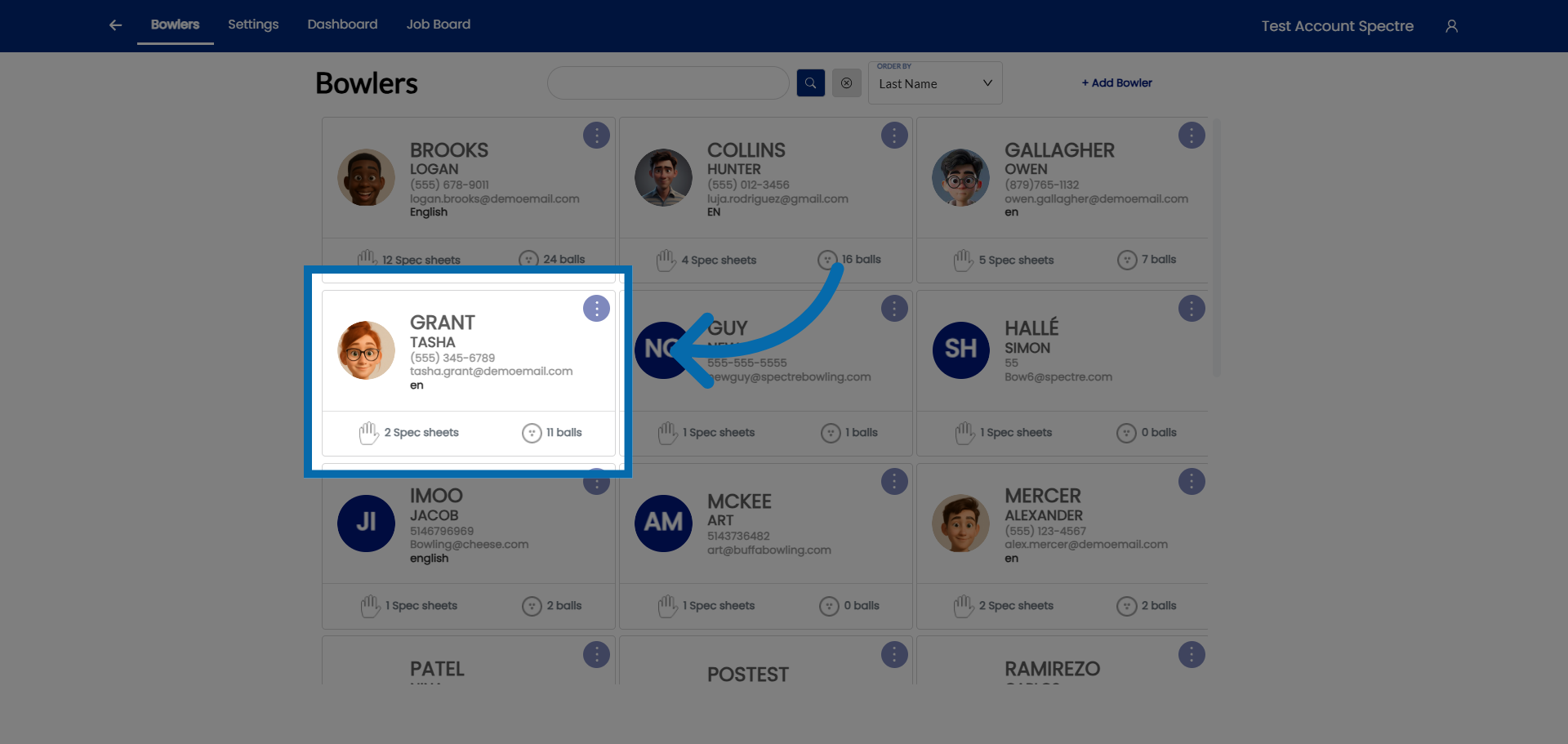
- Hit the CLONE button — create a clone of the spec sheet.
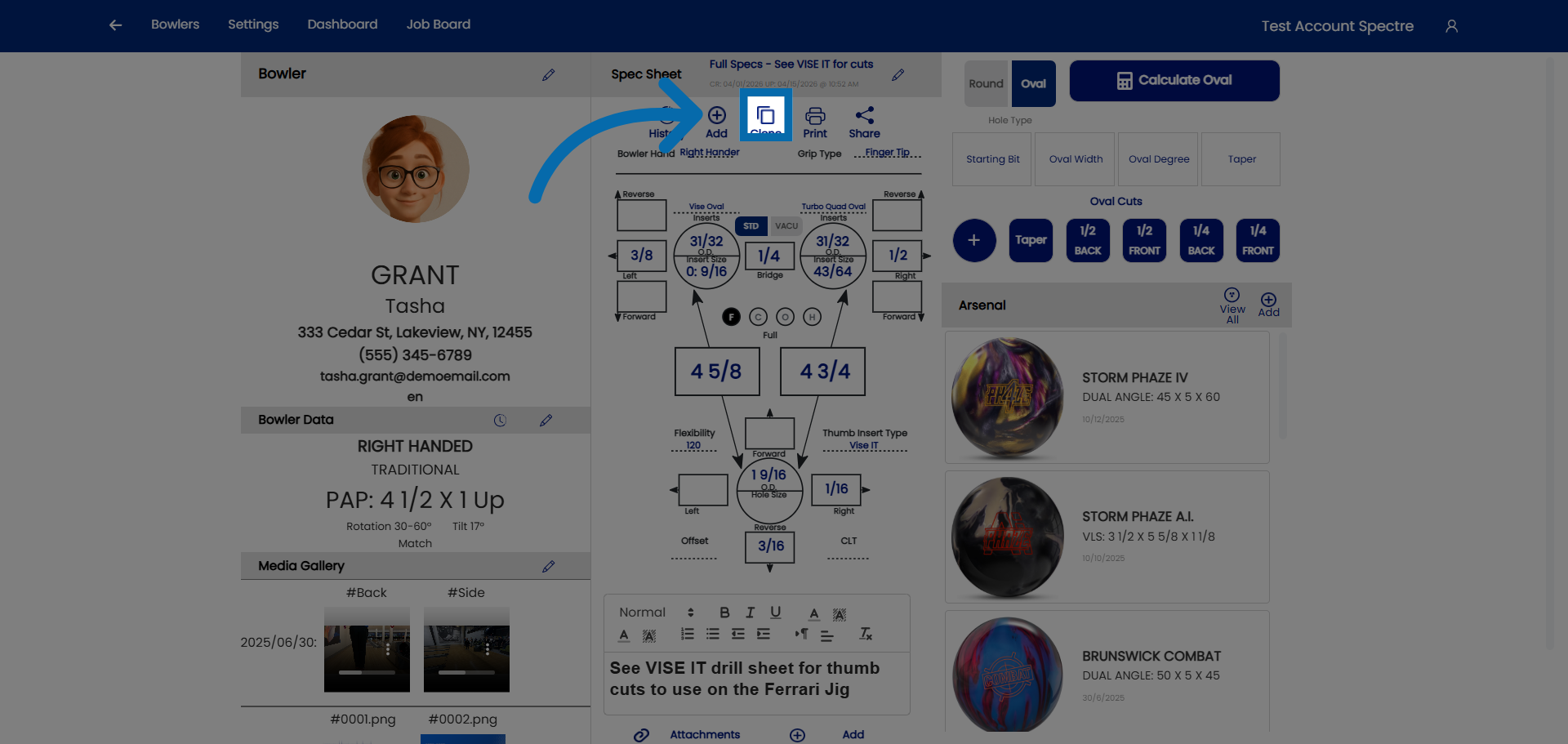
- Name the cloned sheet — click "Spec Sheet Name" to rename the clone at the prompt.
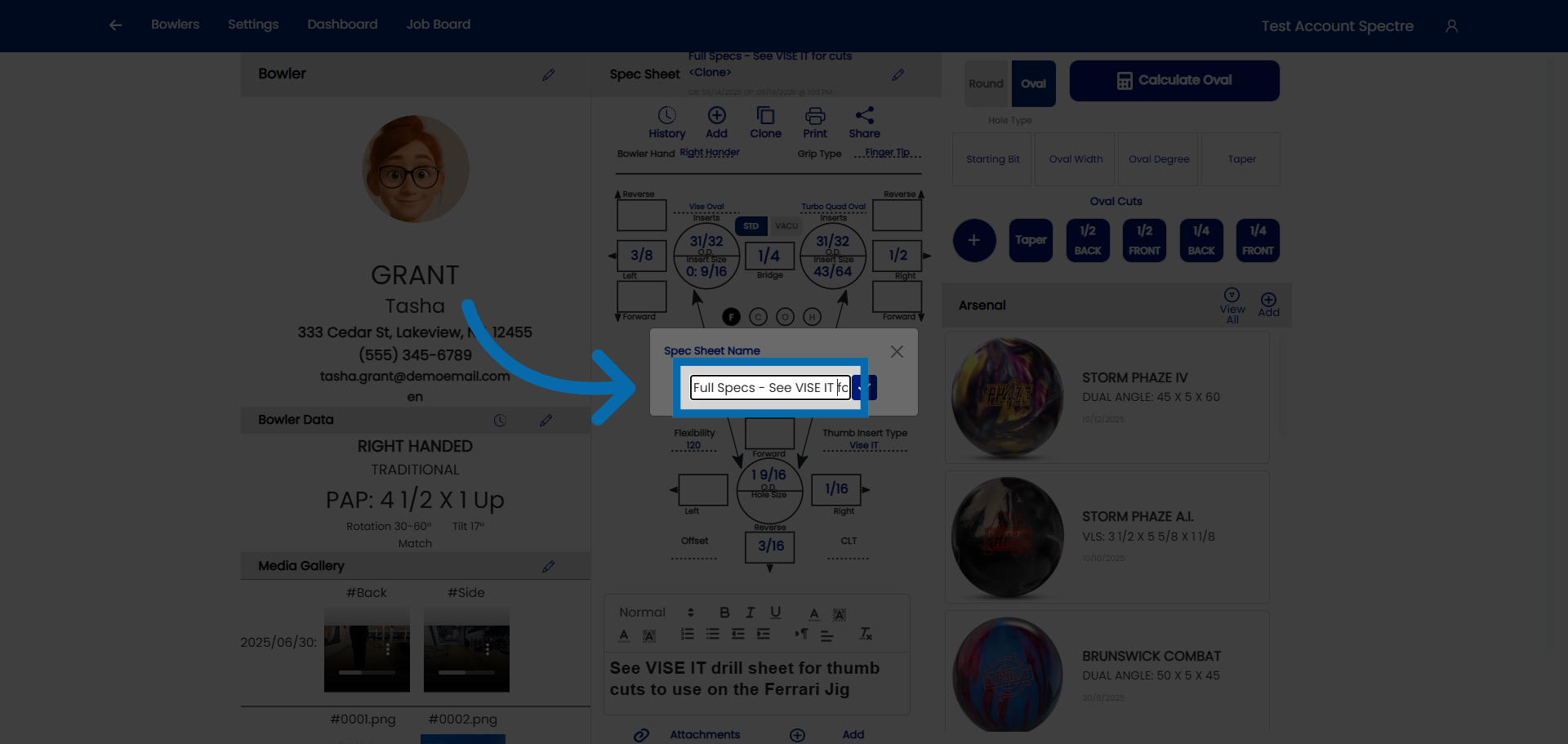
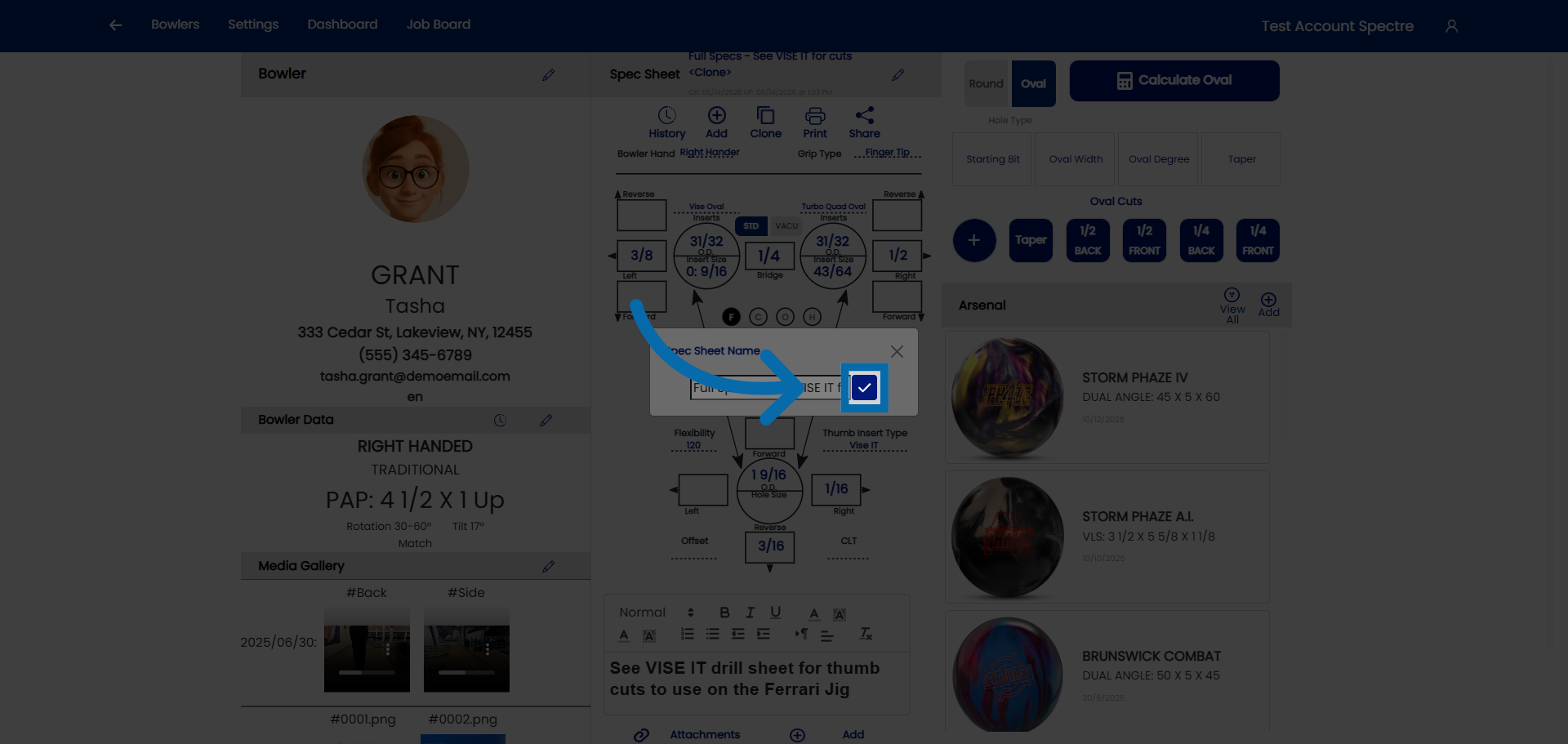
- Confirm the name.
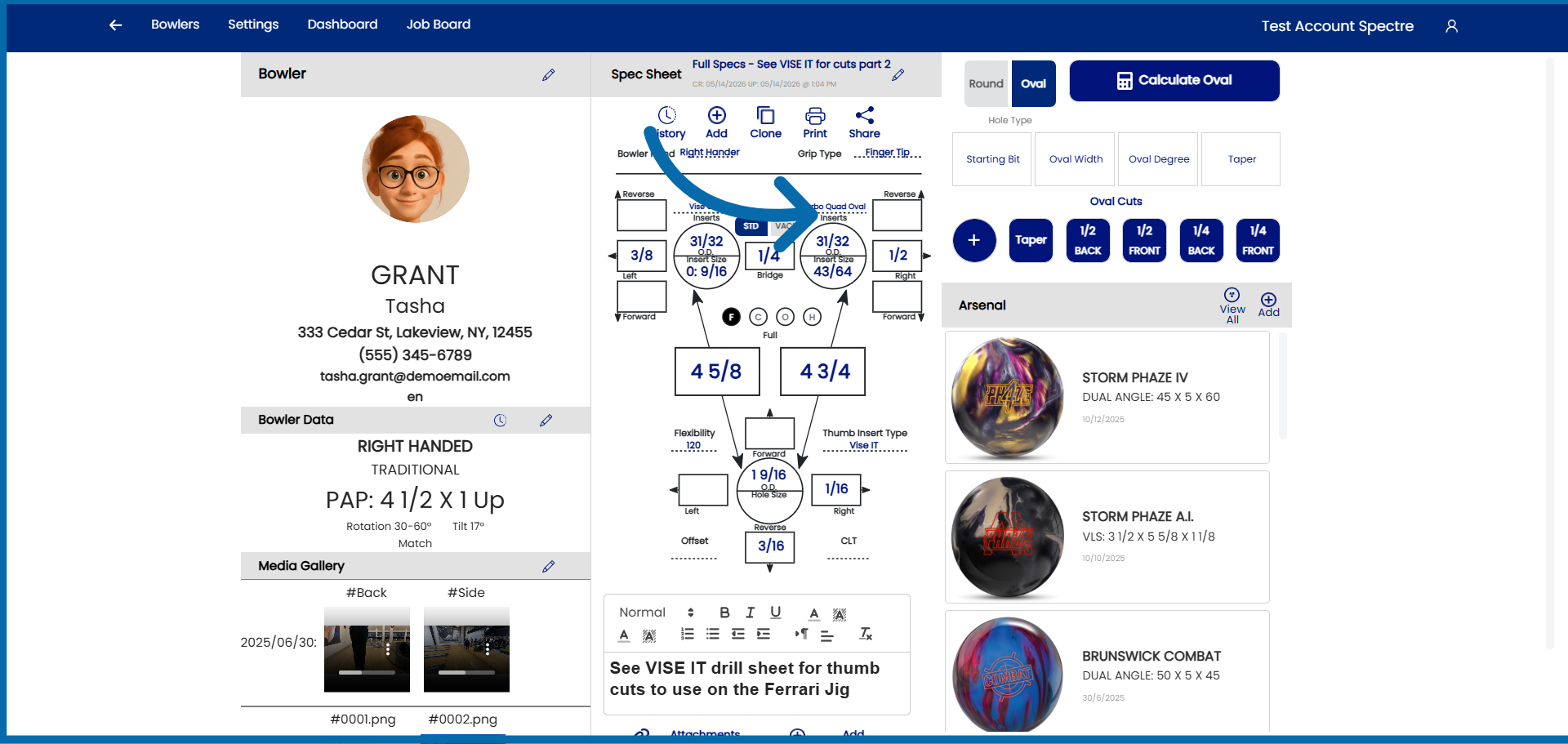
- Modify the necessary fields — proceed to adjust the bowler's specs on the cloned sheet.
Related Sections
- 4.2.2 — Naming a spec sheet
- 4.2.1 — Creating a new spec sheet
- 4.4 — Viewing spec sheet history for a bowler
- 7.1 — Arsenal overview (linking cloned spec sheets to arsenal balls)
Tip: The rename prompt at clone time is the moment your history earns its value. A quick, descriptive name on every clone turns a bowler's spec sheet list into a readable record of their equipment evolution — and makes future ball conversations much easier.
4.2.6 Printing a spec sheet
4.2.6 TIP step-by-step
Once a spec sheet is complete, you can print it directly from Spectre Cloud to use at the drill press, hand to a colleague, or file for your records. Spectre Cloud generates a clean, formatted printout that includes all measurements, layout details, and notes for the selected spec sheet.
🖥️ How to Print a Spec Sheet
- Open the bowler's profile and navigate to their Spec Sheets tab.
- Open the spec sheet you want to print.
- Select the Print option — look for the print icon or button in the spec sheet action menu.
- Spectre Cloud opens a print-ready view of the spec sheet in your browser.
- Your browser's standard print dialog will open. Select your printer, adjust page size if needed, and confirm.
Related Sections
- 4.2.2 — Naming a spec sheet (ball name, date, notes)
- 4.2.5 — Cloning a spec sheet to preserve old measurements
- 4.4 — Viewing spec sheet history for a bowler
- 8.1 — Profile settings (pro shop name and logo)
- Book 07 — Job Board plugin
Tip: Saving spec sheets as PDFs and storing them in a shared folder (Google Drive, Dropbox, or a network drive) gives your whole team instant access to drilling records even when Spectre Cloud is not open in front of them.
```
4.3 — Span
4.3.1 Entering span measurements (F, C, O, H)
4.3.1 step-by-step
Span measurements define the distance between the thumb hole and each finger hole. Spectre Cloud supports four span types, and it's important to enter values under the correct one — the number only means what it's supposed to when it's paired with the right span type.
📐 The Four Span Types (Summary)
Spectre Cloud uses four span measurement types. Each is explained in full — including how it's measured and when to use it — in 4.3.2. In brief:
- ✅ Full Span (F) — the complete measured span, everything included, inserts and all.
- ✅ Cut to Cut (C) — Full Span minus the insert thickness; used when drilling thumb-first.
- ✅ Outer to Cut (O) — for interchangeable thumbs; inside of the female interchangeable to the cut of the finger OD hole.
- ✅ Hole to Hole (H) — biggest hole to biggest hole (what the PBA truck calls "Cut-to-Cut").
For the full detail on each type, see 4.3.2 — Span types. This page covers how to enter the values once you know which type you're working in.
🎳 The Span Fields on the Spec Sheet
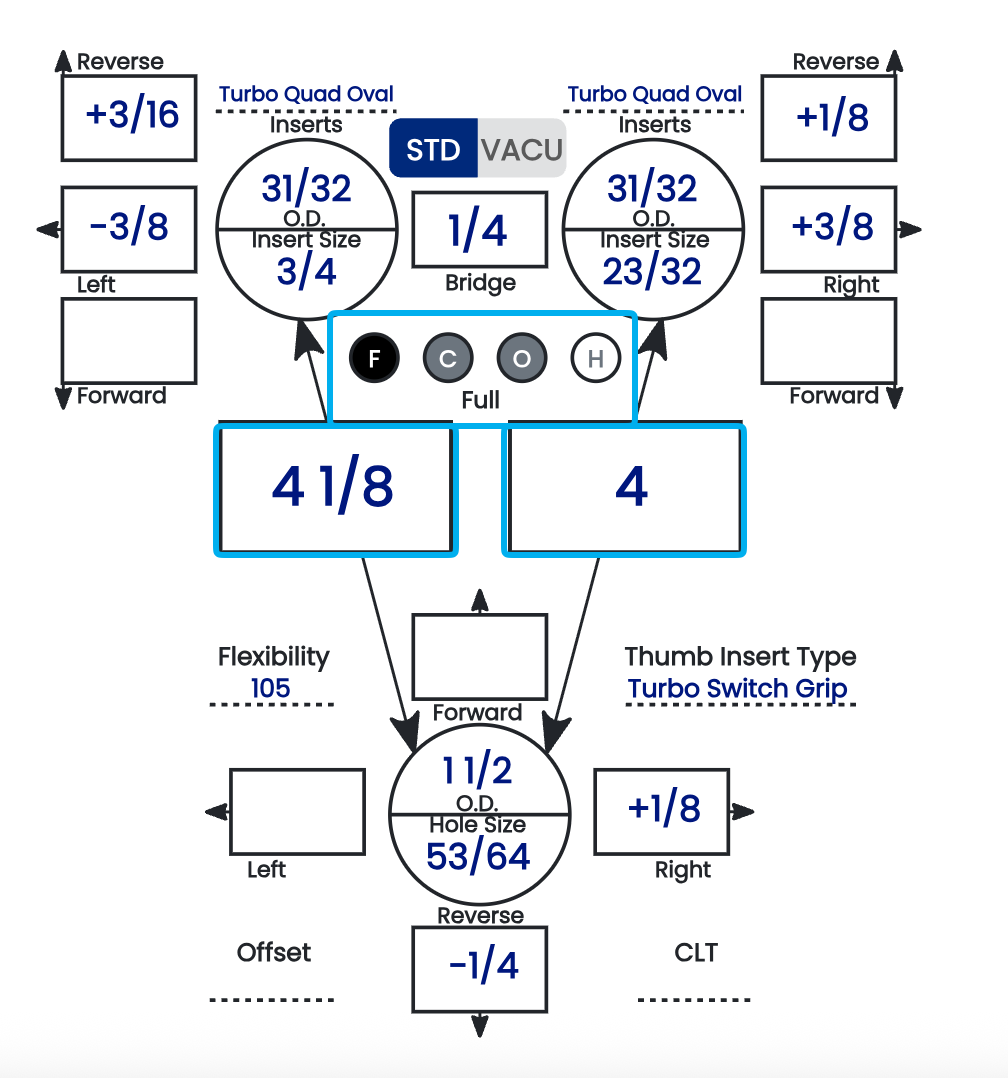
The two span boxes sit at the center of the spec sheet, directly below the finger holes. For a right-handed bowler:
- ✅ The left box is the middle finger.
- ✅ The right box is the ring finger.
Enter each finger's span in its box. The values are almost always different from one another, so confirm you're entering each in the correct field.
Note: The middle and ring finger boxes flip when you change the bowler's dominant hand. Because handedness mirrors the layout, switching a bowler from right-handed to left-handed (or vice versa) swaps which box is the middle finger and which is the ring — so always confirm the bowler's hand is set correctly before reading or entering span values.
🔘 Reading the F / C / O / H Bubbles
Between the two span boxes is a row of four bubbles — F, C, O, H — one for each span type. Their shading tells you, at a glance, which span type is currently displayed and which ones already hold a value:

| Bubble state | Meaning |
|---|---|
| Black background | This is the span type currently being displayed in the span boxes. |
| Grey background | A value is present for this span type (but it's not the one currently displayed). |
| White background | Nothing is present — the value for this span type is blank or incomplete. |
The bubbles let you switch which span type is shown and immediately see which types are already filled in. A grey bubble means that span exists on the sheet; a white bubble means it doesn't yet.
⚙️ Only Cut to Cut Is Automated
This is the key thing to understand about span entry: Cut to Cut is the only span type with any automation behind it.
- ✅ Cut to Cut (C) has an automated toggle in the settings — Autofill Cut to Cut (2.6.9) — which derives the value from the Full Span and insert dimensions.
- ❌ Full Span, Outer to Cut, and Hole to Hole are manual entry only. There is no automation behind them — whatever you type is what's recorded.
- ❌ None of the span types have error validation. Spectre Cloud will not flag a value that's out of range, transposed, or entered under the wrong span type — the entry is taken exactly as given.
Because there's no validation catching mistakes, the responsibility for a correct value sits entirely with the person entering it. Confirm the span type and re-check the numbers before saving.
🔢 Adjusting Span Increments
The values available when entering a span come from a drop-down, and the increment of that drop-down is adjustable in the settings (see 2.2.7). If the default steps are finer or coarser than you like to work in, change the increment so the drop-down offers the values that match your shop's habits.
📋 Entering Span — Step by Step
- Confirm the bowler's dominant hand is set correctly — this determines which box is the middle finger and which is the ring.
- Confirm the span type is set correctly (see 4.3.2) — check that the intended bubble (F, C, O, or H) is the one with the black background.
- Enter the middle finger span in its box.
- Enter the ring finger span in its box.
- Double-check both values against your fitting source before moving on.
Related Sections
- 4.3.2 — The four span types: F, C, O, H
- 2.2.7 — Adjusting span measurement increments
- 4.2.4 — Identifying grip type from a measurement sheet
- 2.6.9 — Autofill Cut to Cut: the one automated span toggle
- 4.4.5 — Inputting pitches
Tip: Glance at the bubble row before you save. A black bubble tells you which span you're looking at, and the grey ones tell you which other spans are already on file — an easy way to confirm nothing you meant to enter was left white and blank.
4.3.2 The four span types: F, C, O, H
4.3.2 concept
Spectre Cloud supports four span types — Full Span (F), Cut to Cut (C), Outer to Cut (O), and Hole to Hole (H). All four measure the distance between the finger holes and the thumb hole, but they differ in where the measurement begins and ends and whether the inserts are included. This page defines each; for entering them on the sheet, see 4.3.1.
📐 Full Span (F)
The complete measured span — everything included, inserts and all. Also called the complete span.
- ✅ The most common convention; IBPSIA fitting charts generally assume Full Span.
- ✅ Describes the bowler's actual reach with their grips installed.
- ✅ Required input for the Cut to Cut auto-suggestion (needed on both fingers).
-

📐 Cut to Cut (C)
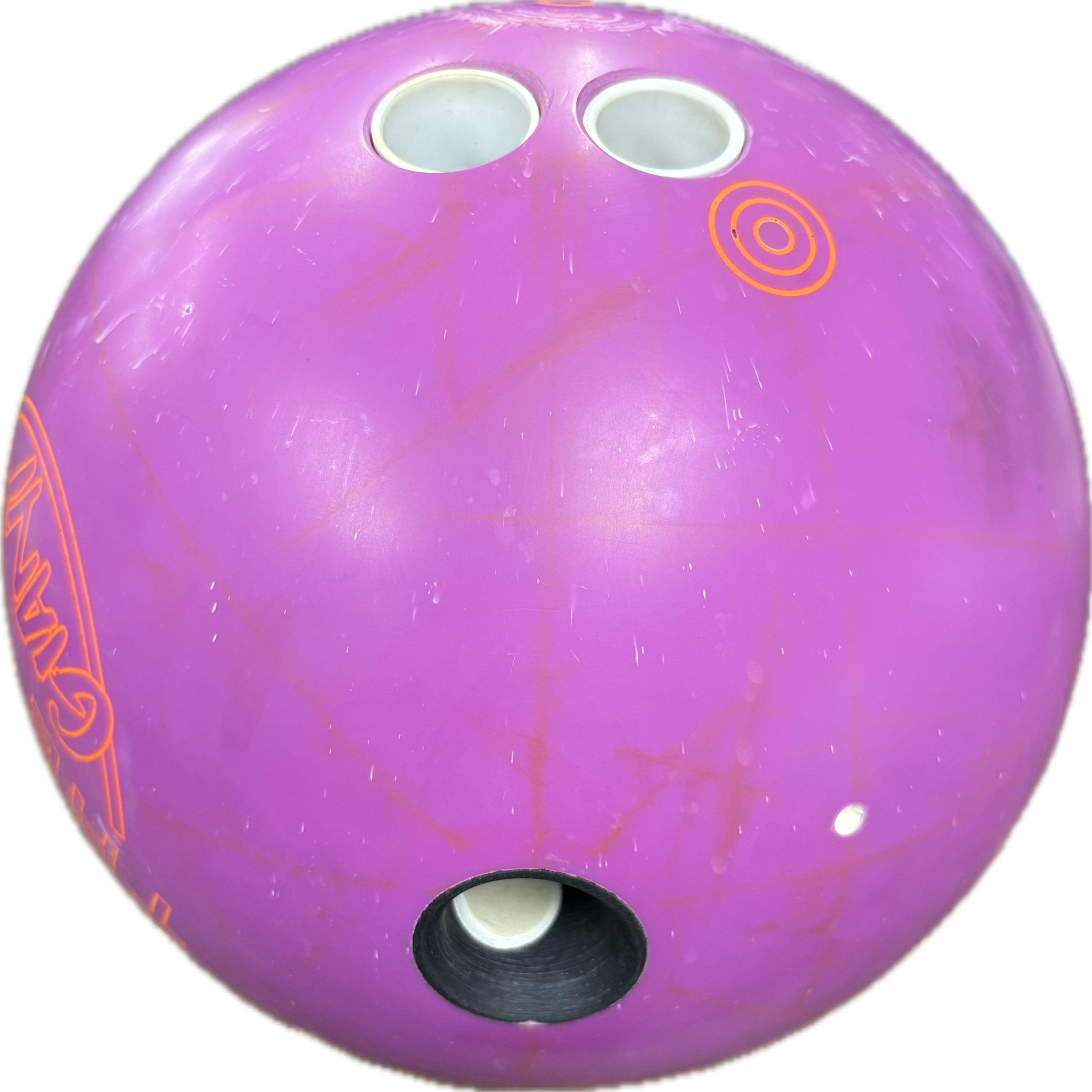
Full Span minus the thickness of the insert — the span measured to the actual drilled cut, before the inserts are accounted for. Useful when drilling thumb-first, so you don't subtract the grip thickness by hand.
- ✅ The one span type with an auto-suggestion — Autofill Cut to Cut (2.6.9).
- ⚠️ Not the same as the PBA truck's "Cut-to-Cut" — that is Hole to Hole (H), below.

📐 Outer to Cut (O)
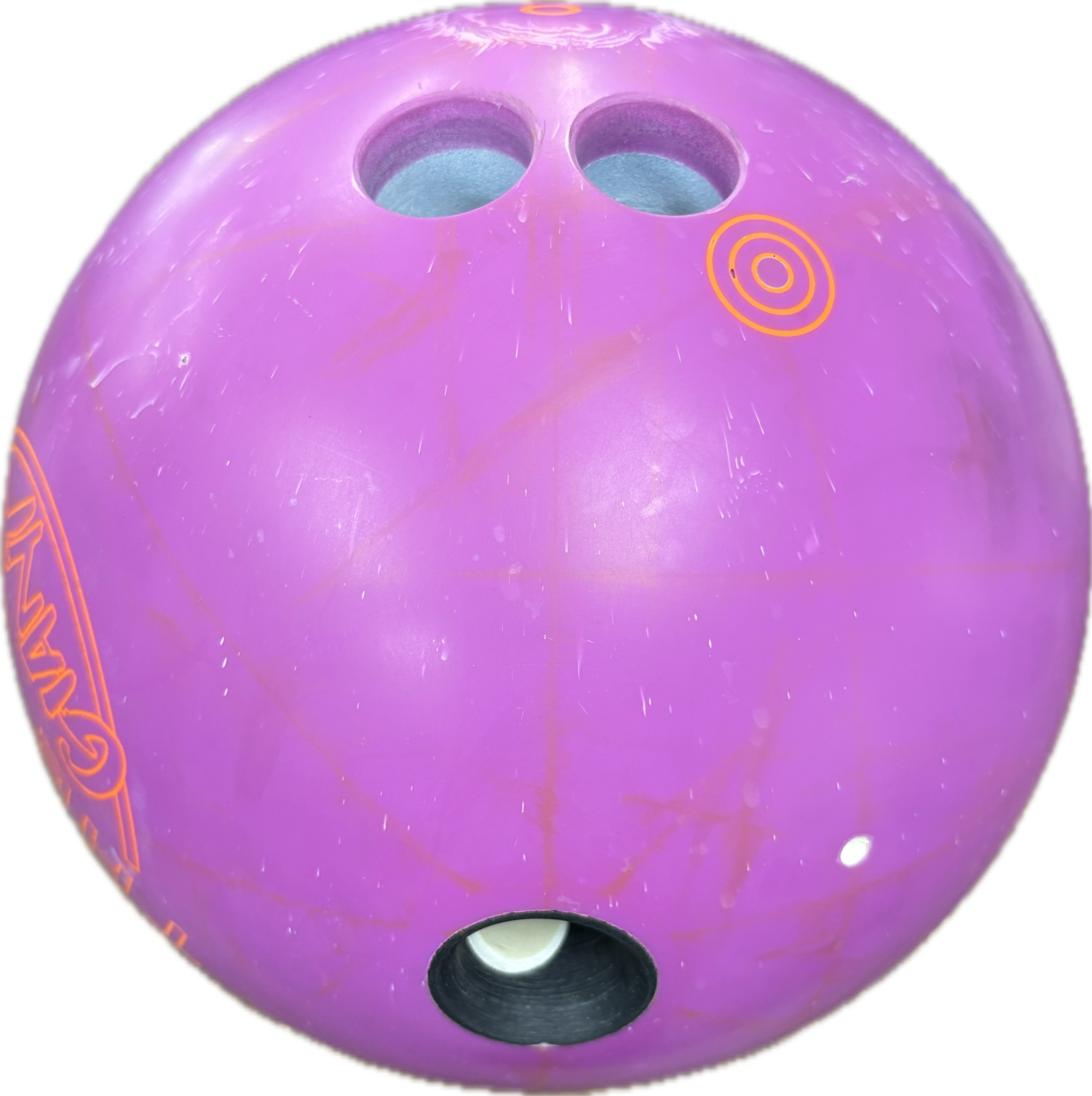
For interchangeable thumbs — measured from the inside of the female portion of the interchangeable to the cut of the finger's outer-diameter hole.
- ✅ Lets a bowler with an interchangeable thumb use a new ball by locking in their own male inner sleeve — no new thumb to drill.
- ❌ "O" is Outer to Cut, not Oval — an oval is a hole shape (Book 05), a separate concept.

📐 Hole to Hole (H)
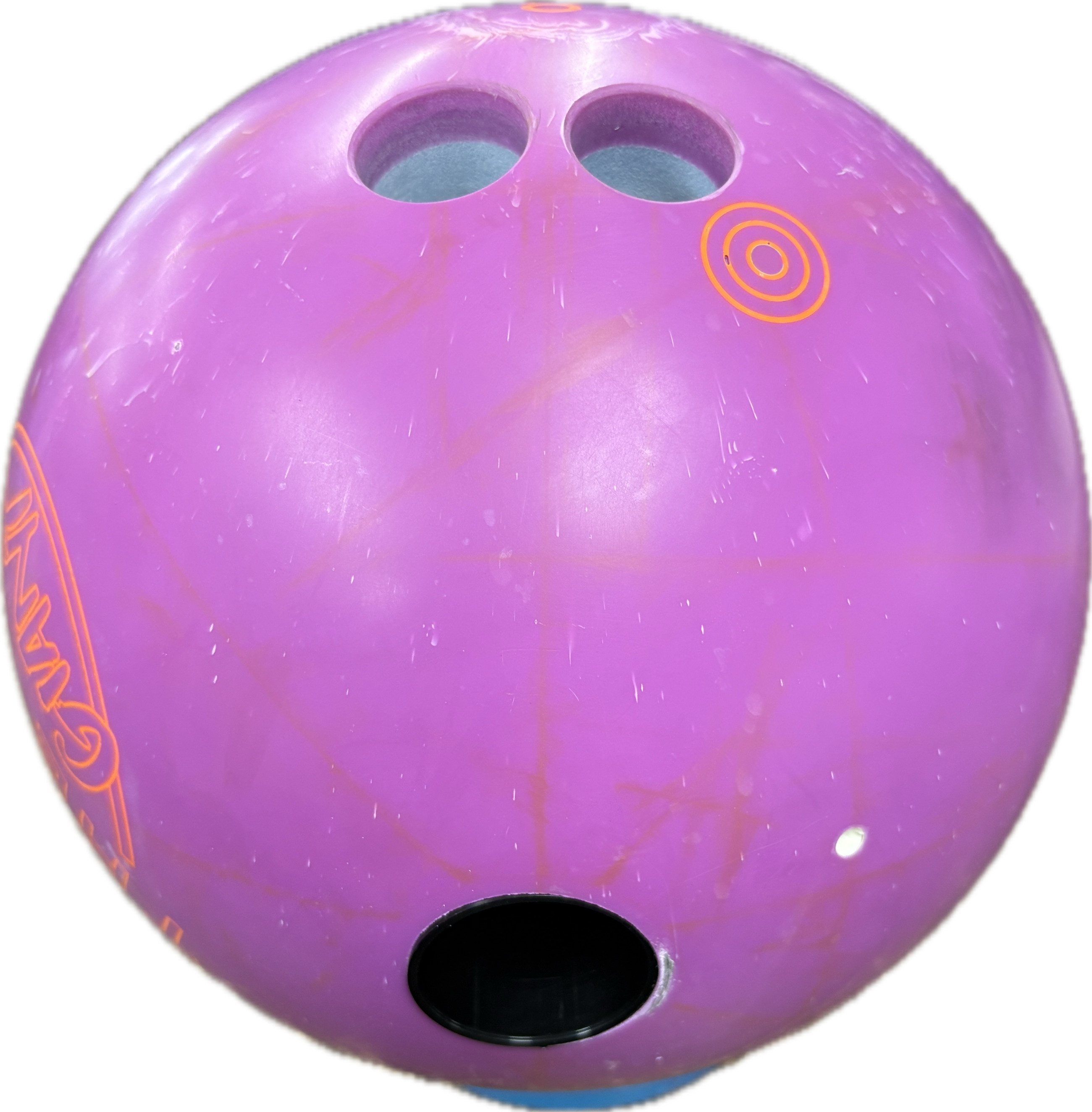
Biggest hole to biggest hole — for example, a 1 1/2" thumb to a 31/32" finger. A purely physical, edge-to-edge measurement of the largest openings.
- ✅ This is what the PBA services truck calls "Cut-to-Cut."

📊 The Four Span Types
| Full Span (F) | Cut to Cut (C) | Outer to Cut (O) | Hole to Hole (H) | |
|---|---|---|---|---|
| What it measures | Complete span, inserts and all | Full Span minus insert thickness | Inside of the female interchangeable to the cut of the finger OD hole | Biggest hole to biggest hole (e.g. 1½" to 31/32") |
| Inserts included? | Yes | No | Interchangeable sleeve | N/A — hole edge to hole edge |
| Primary use | General fitting; the default reference | Thumb-first drilling | Interchangeable thumbs | Quick physical reference; PBA-truck workflows |
| Auto-suggestion | — | Yes (2.6.9) | — | — |
Related Sections
- 4.3.1 — Entering span measurements (F, C, O, H)
- 4.3.3 — Ring finger 5/16" rule
- 4.1.1 — Acronyms: F, C, O, H
- 2.6.9 — Autofill Cut to Cut
- 05 — Oval Calculator (oval hole shape — distinct from span type O)
Tip: Full Span is the lowest-friction default — it's the complete measurement most fitters work in and the input the Cut to Cut auto-fill depends on. Reach for Cut to Cut when drilling thumb-first, Outer to Cut for interchangeable thumbs, and Hole to Hole when you want the biggest-hole-to-biggest-hole reference the PBA truck calls "Cut-to-Cut."
4.3.3 Ring finger 5/16" rule
4.3.3 measurement
The ring finger span is often derived from the middle finger span rather than measured independently, using the 5/16" Ring Finger Rule. Spectre Cloud can apply this calculation for you through Auto-Calculate Ring Span (2.6.8), or you can enter the ring finger span manually.
📐 The Rule
The ring finger span is calculated as:
Ring Finger Span = Middle Finger Span + (5/16" − d)
Where d is the observed difference between the second joint lines of the middle and ring fingers, measured with the bowler's hand flat on the ball. When the joint lines are level (d = 0"), the ring span comes out 5/16" longer than the middle span; as d increases, the ring span shortens relative to the middle.
| d value | Adjustment (5/16" − d) | Effect on ring span |
|---|---|---|
0" | +5/16" | Ring span 5/16" longer than middle |
5/16" | 0" | Ring span equals middle span |
> 5/16" | Negative | Ring span shorter than middle |
⚙️ Auto Calculation in Spectre Cloud
When Auto-Calculate Ring Span is used:
- Enter the middle finger span as measured.
- Enter the d measurement in its field.
- Spectre Cloud calculates and displays the ring finger span using
Middle Span + (5/16" − d). - Review the result before saving.
⚠️ Verify with your Spectre team: confirm the exact field label for the d input and whether the calculated ring span is read-only or an editable value the operator can still override.
✏️ Manual Entry
If you measure the ring finger span directly, you can enter it manually instead of using the calculation — appropriate when you have independent measurements of both fingers, or when transferring an explicit ring span from a legacy sheet.
Related Sections
- 4.3.1 — Entering span measurements
- 4.4.5 — Inputting pitches
- 2.6.8 — Auto-Calculate Ring Span (the 5/16" rule)
- 05 — Oval Calculator
Tip: The 5/16" rule produces a starting span, not a fixed prescription. If a bowler reports the ring finger feels consistently tighter or looser than the middle despite a correct-looking sheet, re-check the d measurement first — it takes under a minute and often explains the complaint.
4.4 — Finger Measurements
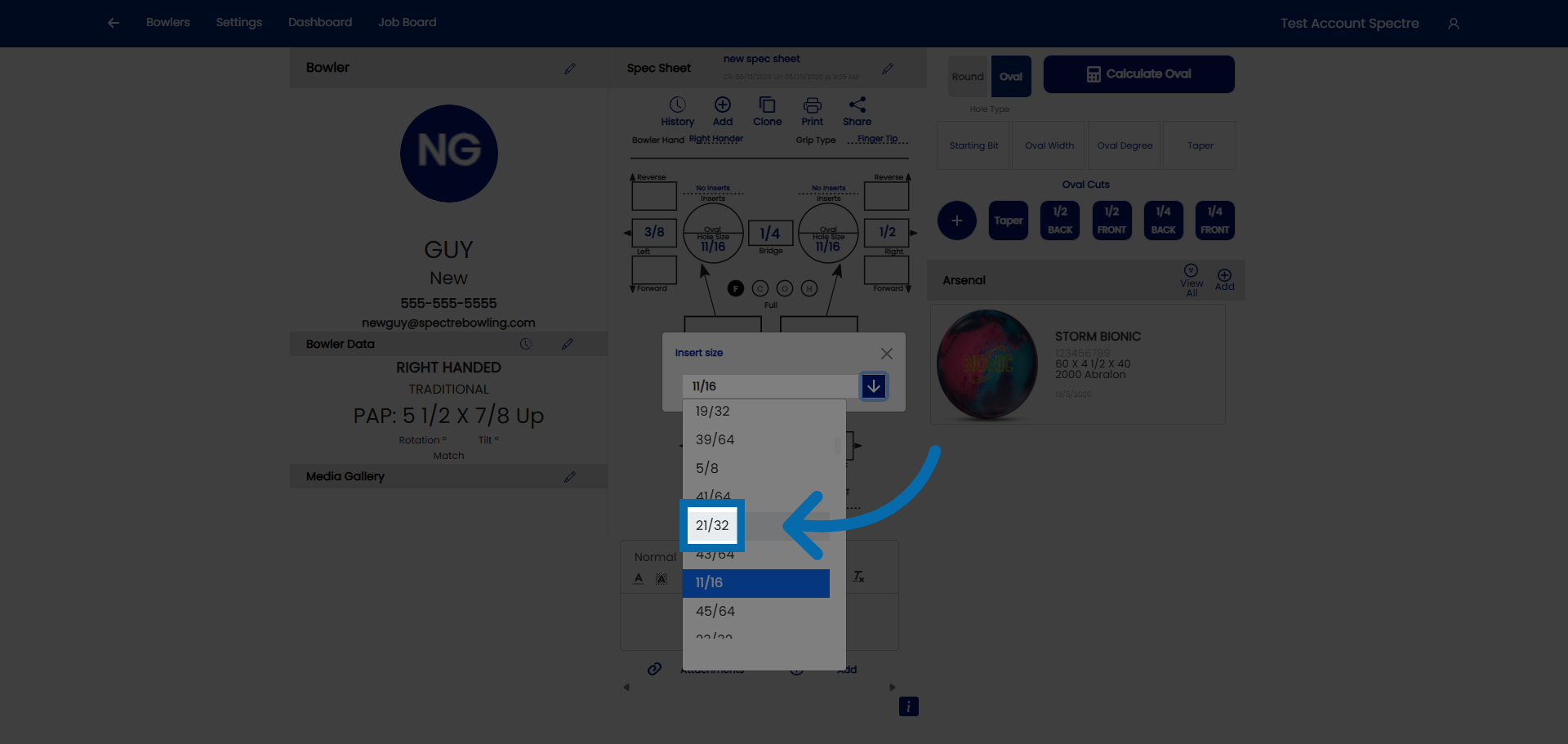
4.4.1 Round finger holes, no inserts
1. Select Customer Account
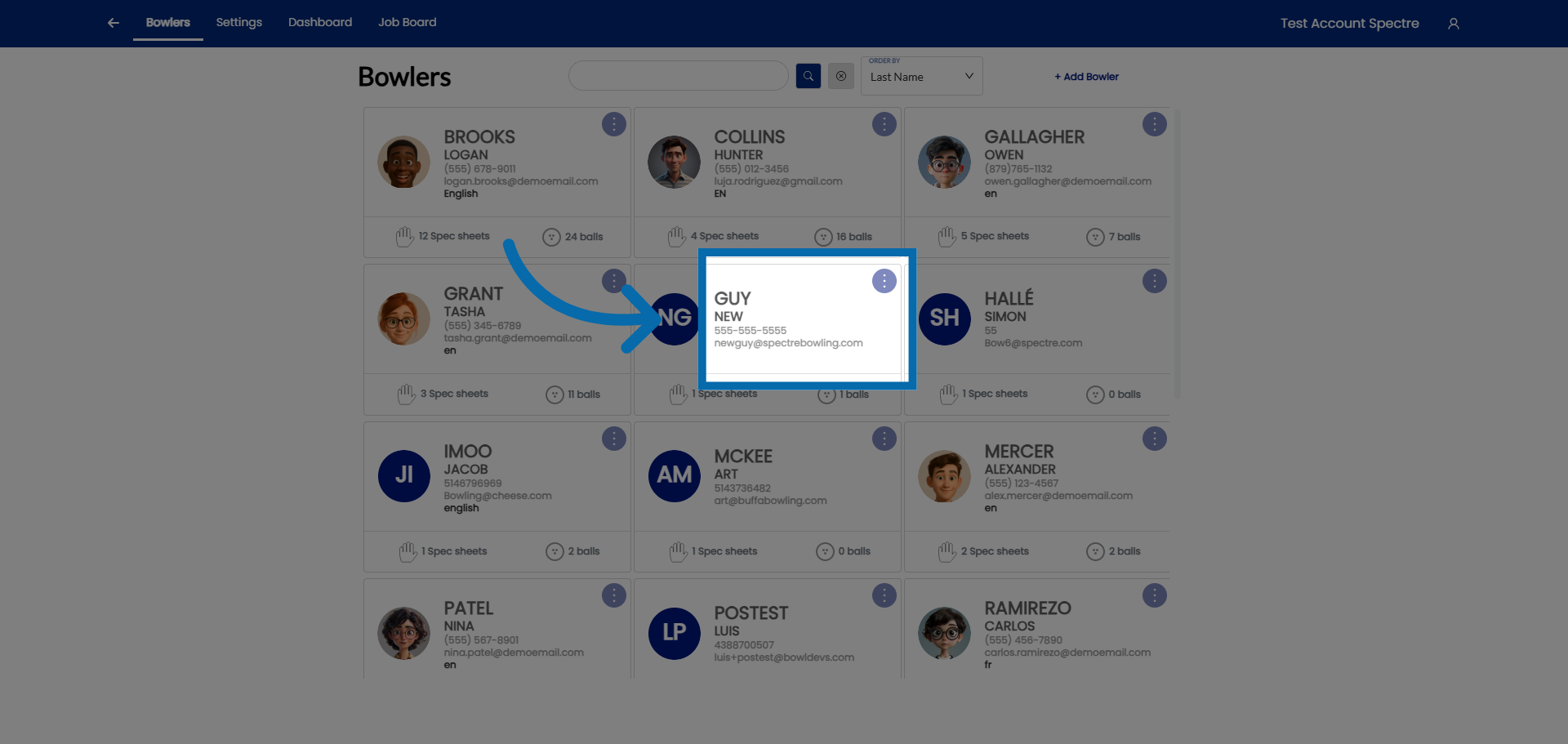
2. Hole size
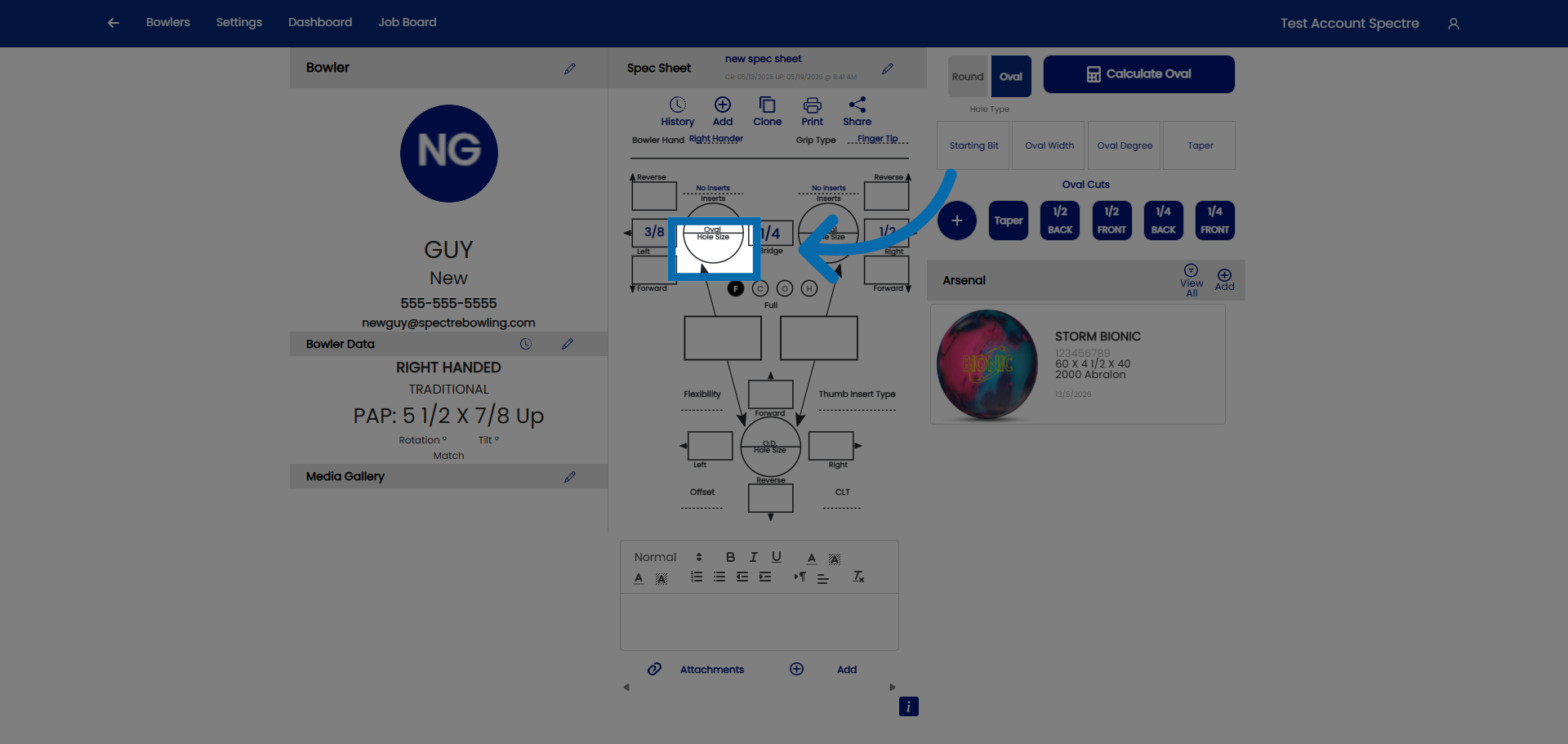
3. Open drop down
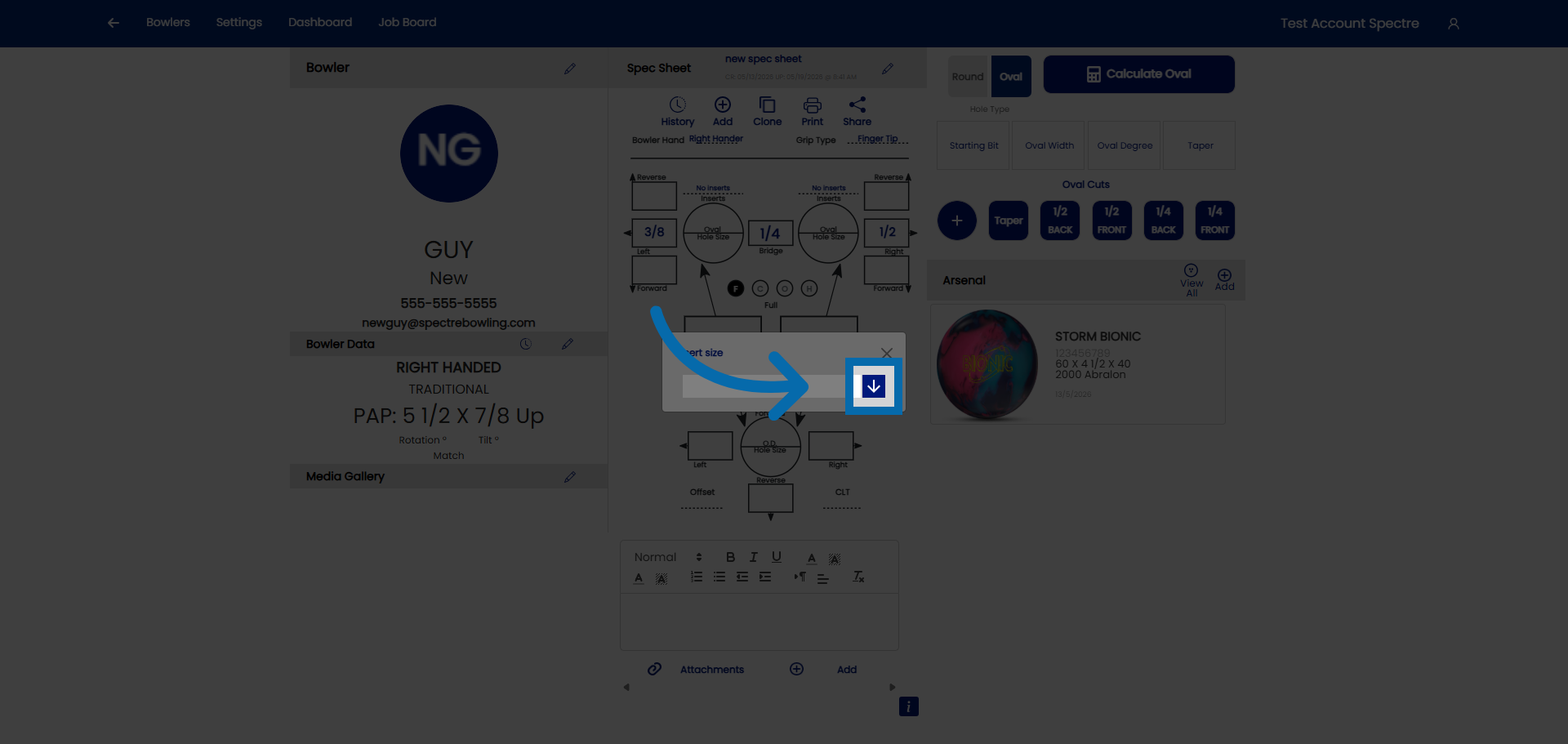
4. Select the size
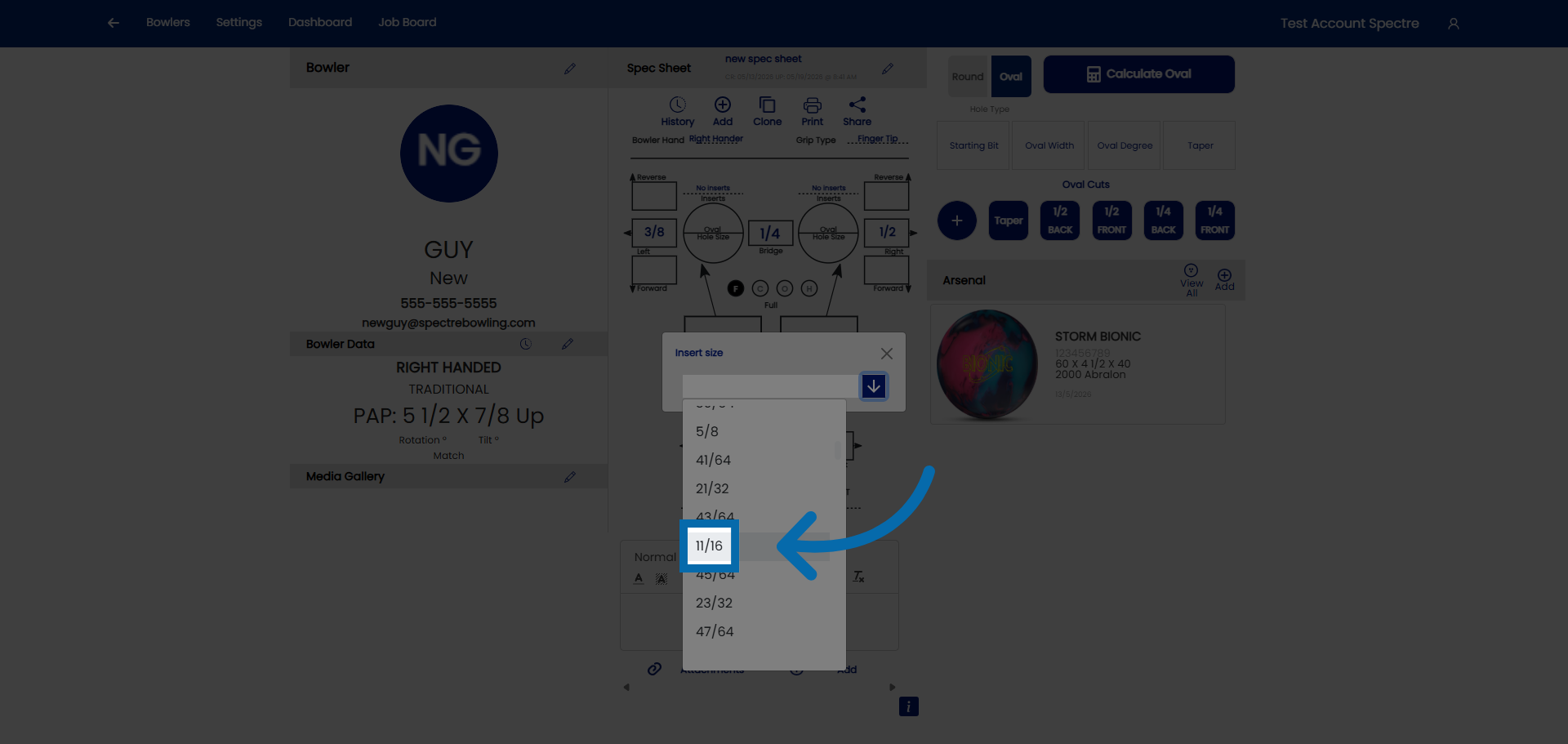
5. Hole size
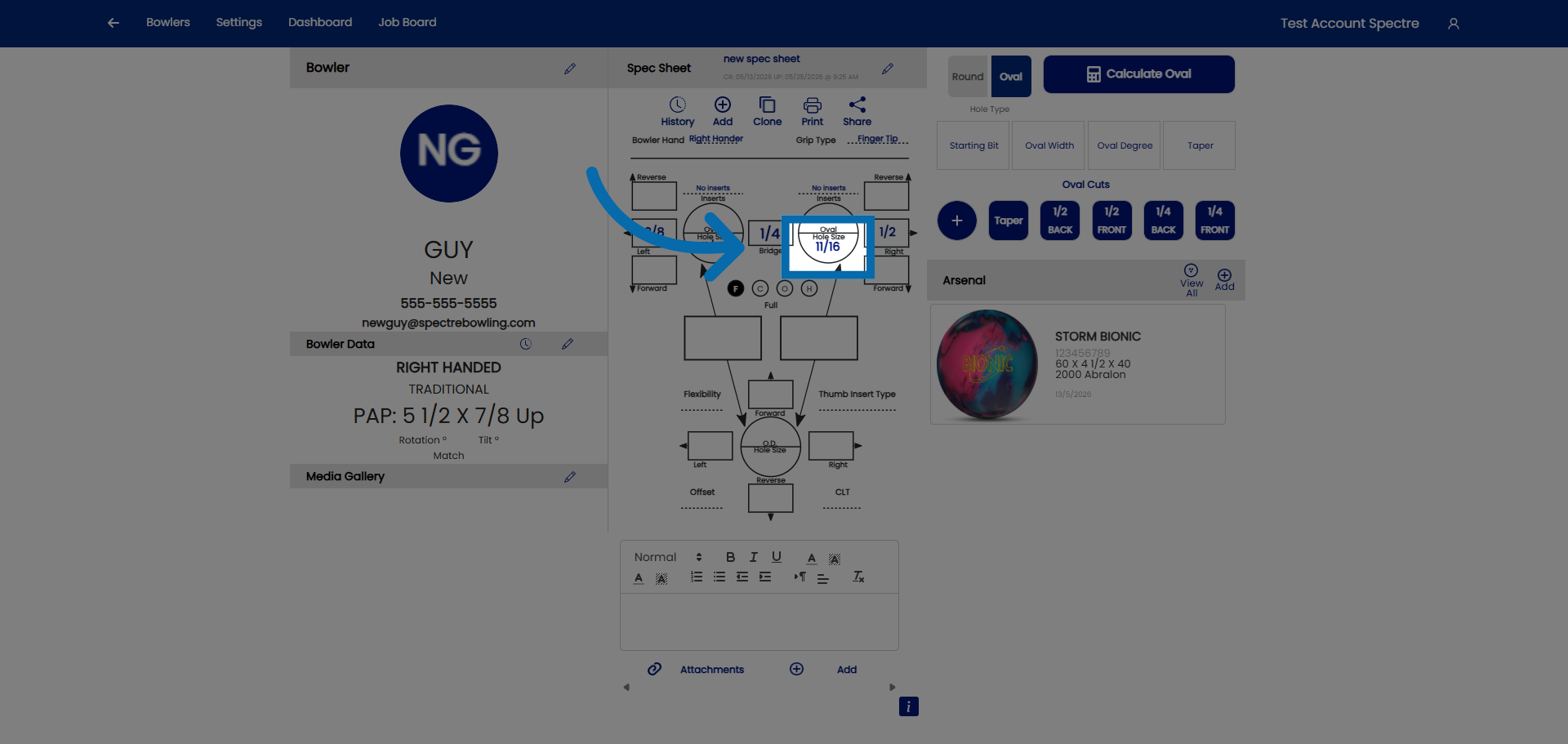
6. Open drop down
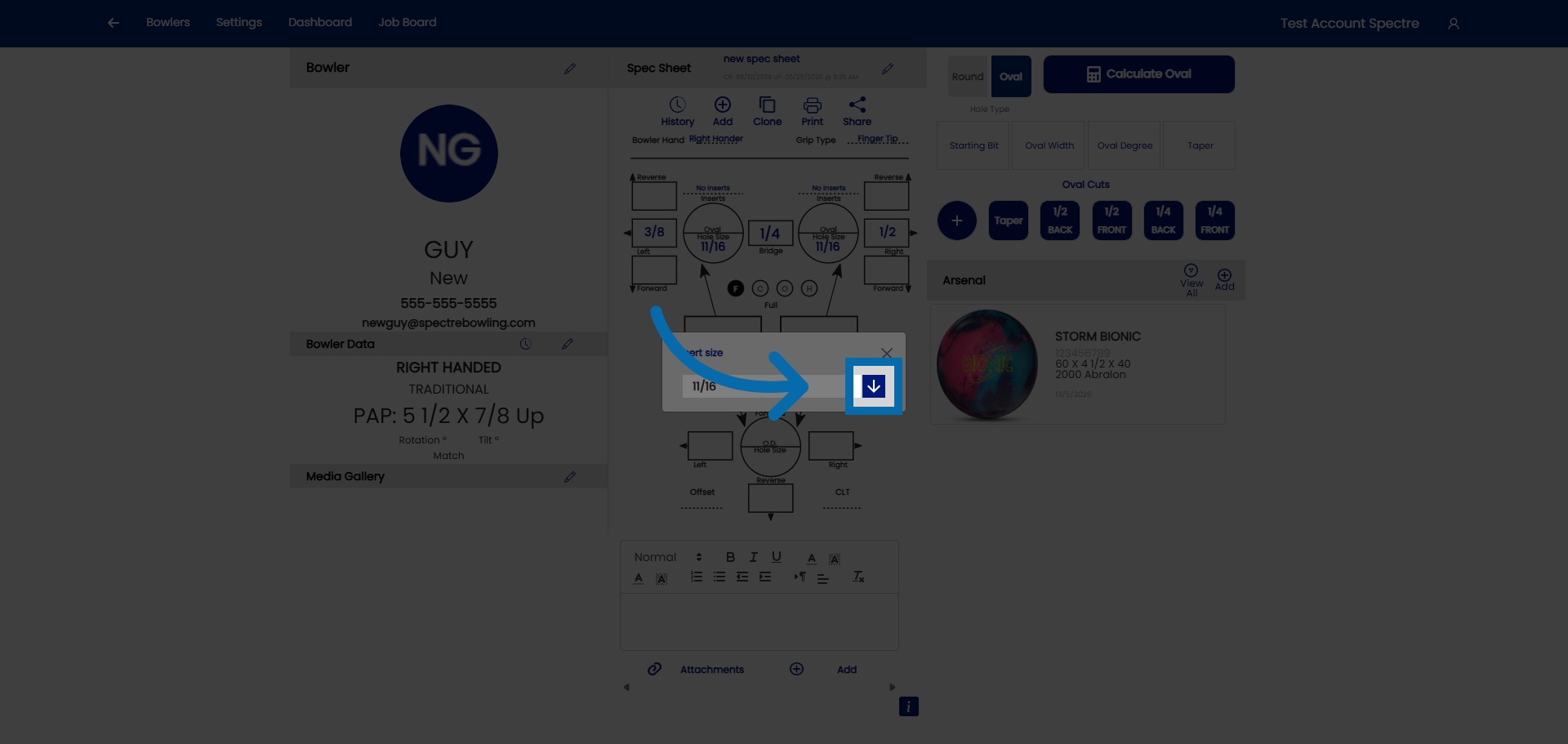
7. Select the size
4.4.2 Finger inserts
4.4.2 measurement
When a bowler uses finger inserts, the spec sheet needs the insert type, the insert size (ID), and the drill bit OD for each finger. The order you enter them in matters — enter type and size first and Spectre Cloud's auto-suggestions do the rest. For the STD vs. VACU distinction, see 4.4.3; for the underlying OD concept, see 4.1.6.
🛠️ Recommended Order of Entry
Always enter finger inserts in this order — insert type first, then insert size — and let the auto-suggestions handle the rest:
- ✅ 1. Insert type — select the type first. Spectre Cloud then filters the size drop-down to show only the sizes available for that insert type, so you can't pick a size the insert doesn't come in.
- ✅ 2. Insert size (ID) — choose the size that fits the bowler's finger. The insert size is the inner diameter; Spectre does not track ID as a separate value.
- ✅ 3. Let the auto-suggestions work — with type and size in place, the finger auto-suggestions fill in the rest automatically.
Note: The list of insert types offered in the drop-down can itself be filtered in the Settings section — so you only see the brands and types your shop actually carries, keeping the type list short and relevant.
⚙️ What the Auto-Suggestions Do
Once insert type and size are entered:
- ✅ Autofill Insert OD (2.6.6) — if Auto-OD is turned on, Spectre selects the drill bit OD of the hole automatically based on the insert size, so you don't look it up or calculate it.
- ✅ The filtered size drop-down (from selecting the type first) keeps the choices valid for that specific insert.
Note: This is why order matters. Selecting the type first narrows the size list; entering the size then drives the OD auto-fill. Enter them out of order and you lose the filtering and may have to set the OD by hand.
📋 Entering Finger Inserts in Spectre Cloud
- Select the insert type for the finger (
None,STD, orVACU). Middle and ring are independent. - Select the insert size (ID) from the now-filtered drop-down.
- With Auto-OD on, Spectre fills the OD automatically; otherwise enter it manually.
- Repeat for the other finger.
Related Sections
- 4.4.1 — Round finger holes, no inserts
- 4.4.3 — STD vs. VACU
- 4.4.4 — Oval fingers, no inserts
- 4.1.6 — Insert OD concept: STD vs. VACU, insert size vs. OD
- 2.6.6 — Autofill Insert OD
- 2.6.7 — Auto-Repeat Insert Size: mirror size from ring to middle finger
Tip: Build the habit of type → size → let it fill. Selecting the insert type first is the single step that makes the rest of the finger-insert entry fast and error-free — the size list filters itself and the OD fills itself in.
4.4.3 STD vs. VACU
4.4.3 concept
Finger inserts seat in one of two ways — STD (Standard) or VACU (Vacuum). The insert type you record on the sheet (see 4.4.2) tells Spectre Cloud how the hole is drilled. This page explains the difference. For the OD-sizing concept, see 4.1.6.
📐 STD (Standard)
Standard inserts are press-fit: the hole is drilled to the insert's OD, at full depth, and the insert is pressed in and held by friction against the ball's coverstock.
- ✅ Drill bit size equals the insert's published OD — a direct, one-to-one match, full depth.
- ✅ A correct STD fit presses in with firm hand pressure or a seating tool — it shouldn't drop in freely or need excessive force.
- ❌ Never undersize an STD hole — a too-tight press-fit risks cracking the ball surface.
📐 VACU (Vacuum)
VACU inserts are drilled in two diameters so the insert has room to expand:
- Drill the top portion at the size shown on the spec sheet.
- Drill that top portion
1"deep. - Continue to the insert's actual OD for the rest of the depth.
The oversized top forms a pocket — a void where the insert doesn't touch the surrounding ball wall — giving the insert room to expand.
- ✅ The spec-sheet OD for a VACU insert is the top-portion (pocket) size, not the insert's body OD.
- ✅ The deeper portion is drilled to the insert's actual OD, exactly like a STD hole.
- ❌ Drilling the whole hole at one size removes the pocket entirely and defeats the VACU fit.
📊 STD vs. VACU
| STD (Standard) | VACU (Vacuum) | |
|---|---|---|
| Drilling | Single diameter at the insert OD, full depth | Oversized pocket ~1" deep, then actual OD to depth |
| Spec-sheet OD means | Drill size for the whole hole | Top-portion (pocket) size |
| Why | Friction press-fit | Void lets the insert expand |
Related Sections
- 4.4.2 — Finger inserts (recording type, size, OD)
- 4.1.6 — Insert OD concept: STD vs. VACU, insert size vs. OD
- 2.6.6 — Autofill Insert OD
Tip: The most common VACU error is drilling the whole hole at one size. Remember it's two cuts — the spec-sheet size for the first inch to form the pocket, then the insert's actual OD to depth.
4.4.4 Oval fingers, no inserts
4.4.4 measurement
For a bowler who wants an oval finger hole without inserts, Spectre Cloud replaces the round OD field with an OVAL field. There is no auto-suggestion or calculation here — it's a simple text input you annotate yourself.
🔵 The OVAL Field
- ✅ When you set a finger to oval (no inserts), the round OD field becomes an OVAL text input.
- ✅ You type the move in thousandths of an inch — for example,
0.030. - ✅ That value is a move from the hole size: take the finger's hole size — say
11/16"— and move it0.030"in one direction to create the oval. - ❌ There is no auto-suggestion behind this field — it doesn't calculate anything. It simply records the move you type.
📋 Entering an Oval Finger Hole
- Set the finger's round hole size first (e.g.
11/16"). - Switch the finger to oval — the OD field becomes the OVAL input.
- Type the move in thousandths (e.g.
0.030) for the direction you're cutting. - Repeat for the other finger if needed.
Note: Because nothing is auto-calculated, the value you type is exactly what's recorded. Double-check the amount and the direction before drilling.
Related Sections
- 4.4.1 — Round finger holes, no inserts
- 4.4.2 — Finger inserts
- 4.4.5 — Inputting pitches
- 05 — Oval Calculator (oval derivation and calculation workflow)
Tip: The OVAL field is just a move off the round hole size — note both the round size and the oval move in your records so the fit is reproducible on the next ball.
4.4.5 Inputting pitches
4.4.5 measurement
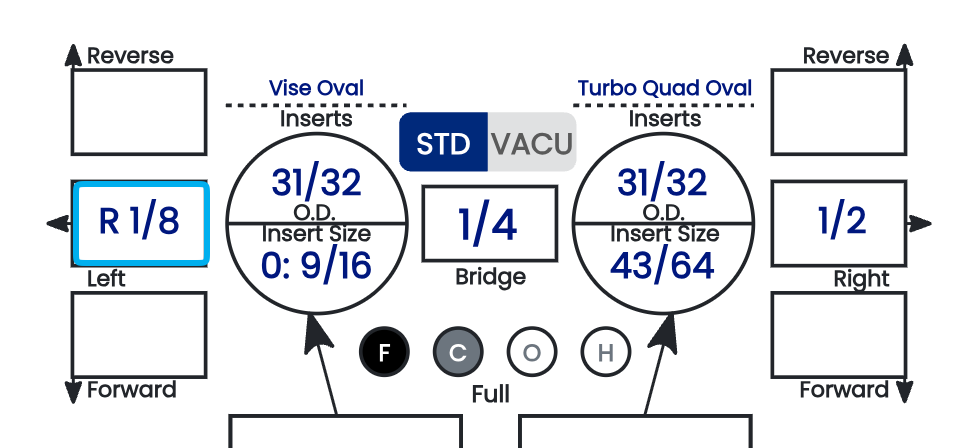
Finger pitch is entered directly into the pitch tiles surrounding each finger hole on the spec sheet. There's no direction to "select" — the tile you put the value in is the direction. This page covers how to read and enter those tiles for the middle and ring fingers.
🛠️ How the Pitch Tiles Work
Each finger hole is framed by pitch tiles, and the tile's position on the sheet determines the direction of the pitch:
- ✅ Forward — always points toward the middle of the sheet. Enter your forward pitch in the forward tile.
- ✅ Reverse — always points toward the outer side of the sheet. Enter your reverse pitch in the reverse tile.
- ✅ Lateral — the Left and Right tiles, self-explanatory by position.
You don't set a direction from a dropdown — you enter the value in the tile that corresponds to the direction you want. Forward/reverse and lateral are separate tiles, so a finger can carry both at once.
Note: To apply a pitch against a tile's default direction — for example, Right pitch on the left finger — scroll to the absolute bottom of that tile's drop-down. There you'll find values listed as Rx, where x is the desired pitch. These cross-direction entries live at the very end of the list, below the standard values.
Note: On fingertip fits, it is quite rare to see forward pitches on the fingers — most fingertip finger pitch is zero or reverse. Treat a forward finger pitch on a fingertip sheet as something worth double-checking against your source.
⚙️ Finger Pitch Is Fully Manual
There is no automation for finger pitch. Every finger pitch value — forward, reverse, and lateral, on both fingers — is manual data entry. Spectre Cloud records exactly what you type, with no auto-suggestion and no error validation behind these fields, so accuracy is entirely on the person entering it.
📋 Entering Finger Pitch — Step by Step
- Locate the pitch tiles around the middle finger and ring finger holes.
- For each finger, enter the forward or reverse value in the correct tile — forward points toward the middle of the sheet, reverse toward the outer side.
- Enter the lateral value in the Left or Right tile as needed.
- Repeat for both fingers.
- Review all the finger pitch entries before moving on to thumb pitch.
- For a cross-direction pitch (e.g. Right on the left finger), use the
Rxvalues at the bottom of the drop-down.

Related Sections
- 4.5.3 — Entering vertical and lateral pitch for thumb
- 4.1.4 — Pitch terminology: Forward, Reverse, Lateral, Zero
- 4.2.4 — Identifying grip type from a measurement sheet
- 4.5 — IBPSIA auto-suggestions
Tip: Because forward points to the middle of the sheet and reverse to the outer side, the sheet's own layout tells you the direction — you don't have to remember a sign convention. Enter each value in the tile that matches the direction you measured, and read the finger pitches back before saving, since nothing here is validated for you.
4.4.6 CLT (Center Line Transformation)
4.4.6 measurement
CLT (Center Line Transformation) is a fitting measurement that captures how a bowler's finger centerline relates to the ball's grip center. Spectre Cloud uses it to derive the lateral finger pitch. This page explains the two ways CLT is measured, which one Spectre accepts, and the reference chart used to look it up.
📏 The Two Ways CLT Is Measured
CLT can be expressed two different ways — they describe the same thing, just in different units:
- ✅ In inches — the distance from the CLT to the centerline at the top of the thumb. This is the most common method. A typical value is around
1". - ✅ In degrees — the angle between the normal centerline and the CLT at the fingers. A typical value is around
16°.
Important: Spectre Cloud accepts CLT in degrees only. If you measured in inches, convert to the angular value — the reference chart below maps the two together.
📊 CLT Reference Chart
The chart below maps each CLT line (A–E) to its angle and to the resulting lateral finger pitches. Because the layout mirrors with handedness, the middle and ring values swap between right- and left-handed bowlers.
[Insert CLT reference diagram here] — add the "Diagram #1" CLT chart image (right-hand and left-hand versions). The transcribed values are below for quick reference and searchability.
Right-Handed Bowler
| Line | Angle | Middle Finger | Ring Finger |
|---|---|---|---|
| A | 8° | 3/8" Left | 1/2" Right |
| B | 16° | 5/16" Left | 9/16" Right |
| C | 24° | 1/4" Left | 5/8" Right |
| D | 32° | 3/16" Left | 11/16" Right |
| E | 40° | 1/8" Left | 3/4" Right |
Left-Handed Bowler
| Line | Angle | Middle Finger | Ring Finger |
|---|---|---|---|
| A | 8° | 3/8" Right | 1/2" Left |
| B | 16° | 5/16" Right | 9/16" Left |
| C | 24° | 1/4" Right | 5/8" Left |
| D | 32° | 3/16" Right | 11/16" Left |
| E | 40° | 1/8" Right | 3/4" Left |
🔄 CLT and Auto-CLT
Once a CLT value is entered in degrees, the Auto-CLT setting (2.6.3) uses this chart to apply the corresponding lateral finger pitches automatically — so the lateral pitch is derived from the CLT rather than entered by hand.
- ✅ Enter CLT in degrees; Auto-CLT looks up the lateral finger pitch from the chart.
- ✅ Because the chart is handedness-specific, the correct lateral directions are applied based on the bowler's dominant hand.
- ⚠️ Verify with your Spectre team: confirm exactly how Auto-CLT interacts with a manually entered lateral finger pitch (4.4.3) when both are present on a sheet.
Related Sections
- 4.4.5 — Inputting finger pitch (forward, reverse, lateral)
- 4.5.3 — Entering vertical and lateral pitch for thumb
- 4.1.4 — Pitch terminology: Forward, Reverse, Lateral, Zero
- 2.6.3 — Auto-CLT: lateral pitch of fingers based on the CLT chart
- 4.2.5 — Cloning a spec sheet (CLT carries forward with other measurements)
Tip: Since Spectre only takes CLT in degrees, decide as a shop whether you measure at the thumb (inches) or at the fingers (degrees). If your fitting habit is the 1" thumb-based measurement, keep this chart handy to translate it to the angular value Spectre expects before you enter it.
4.5 — Thumb Measurements
4.5.1 Selecting the thumb hole shape (Round or Oval)
4.5.1 thumb
The thumb is the largest hole on the ball and the primary control point for the release. Before entering thumb measurements, the spec sheet asks you to set the thumb hole shape — Round or Oval. This choice affects only how you define the hole size. Everything else in the thumb workflow — pitch and insert entry — is the same either way.
⚠️ Two-handed and thumbless bowlers: If a bowler is set as two-handed or thumbless in their profile (see 3.1.2), Spectre Cloud removes the thumb section from the spec sheet entirely. There is no thumb hole to input — the shape selector, thumb size, thumb pitch, and thumb insert fields simply do not appear. The rest of this chapter applies only to bowlers who use a thumb.
🎳 Round vs. Oval — What Actually Changes
Round and oval thumbs are drilled and recorded almost identically. The single point of difference is how the hole's dimensions are specified:
- ✅ Round — the hole is defined by a single size value. This is the most common choice and the simplest to enter (see 4.5.2).
- ✅ Oval — the hole is defined by four oval inputs: starting bit, oval width, oval degree, and taper. These feed Spectre Cloud's oval calculation (see 4.6.1 and Book 05).
Beyond hole size, the two are the same: you enter the thumb pitch in the pitch tiles (4.5.3) and any thumb insert details (4.5.4) exactly the same way for a round or an oval thumb.
🛠️ Selecting the Shape in Spectre Cloud
- In the spec sheet, go to the Thumb section.
- Set the thumb hole shape to Round or Oval.
- The size fields update to match — a single size field for Round, or the four oval input fields for Oval.
⚠️ Verify with your Spectre team: confirm the exact UI element for the thumb shape selector (toggle, dropdown, or radio) and whether Round is the default on a new spec sheet.
Note: Oval is the right choice when a bowler's thumb doesn't sit cleanly in a round hole — the oval follows the thumb's natural shape and rotation. The four oval inputs are covered in 4.6.1; the calculator mechanics live in Book 05.
Related Sections
- 4.5.2 — Entering thumb hole size (Round)
- 4.5.3 — Entering vertical and lateral pitch for thumb
- 4.5.4 — Thumb insert type and size
- 4.6.1 — Selecting an oval thumb: starting bit, oval width, oval degree, taper
- 3.1.2 — Bowler profile: handedness and grip style (two-handed / thumbless)
- 05 — Oval Calculator (full oval mechanics)
Tip: Because only the hole-size step differs, don't think of round and oval as two separate workflows — it's one thumb workflow with two ways to size the hole. Pick the shape first, size the hole the matching way, then proceed through pitch and insert as normal.
4.5.2 Entering thumb hole size
4.5.2 thumb
For a round thumb, the hole size is a single value entered on the spec sheet. The thumb section records both the O.D. (the drill/hole size) and, when a thumb insert or slug is used, the hole size the bowler's thumb actually sits in — the two are different values whenever an insert or slug is involved.
- ✅ Bare thumb: the O.D. is the hole drilled directly into the ball.
- ✅ Thumb slug or insert: the O.D. is the pilot hole drilled to accept the slug/insert; the hole size is the finished opening the thumb sits in. Record both — don't put the same value in both fields.
- ✅ For an oval thumb, the size is not a single value — it comes from the four oval inputs (see 4.6.1), so this single size field does not apply.
🛠️ Entering Thumb Size in Spectre Cloud
- Confirm the thumb shape is set to Round (see 4.5.1).
- Enter the thumb O.D. (hole/drill size).
- If a slug or insert is used, enter the finished hole size as well.
- Proceed to pitch and insert entry.
⚠️ Verify with your Spectre team: confirm the exact field labels for thumb O.D. vs. hole size, and the unit (fractional/decimal inches).
Related Sections
- 4.5.1 — Selecting the thumb hole shape (Round or Oval)
- 4.5.3 — Entering vertical and lateral pitch for thumb
- 4.5.4 — Thumb insert type and size
- 4.4.2 — Finger inserts
- 4.6.1 — Oval thumb inputs (for oval hole sizing)
Tip: Thumb size is the measurement most likely to change between visits — with temperature, time of day, and swelling. Don't carry a thumb size forward from an old sheet without re-checking it.
4.5.3 Entering vertical and lateral pitch for thumb
4.5.3 measurement
Thumb pitch works exactly like finger pitch — you enter it into the pitch tiles around the thumb hole, and the tile is the direction. There's no direction to select from a dropdown. For the full mechanics of the pitch tiles, see 4.4.3; for the terminology, see 4.1.4.
🛠️ How the Thumb Pitch Tiles Work
- ✅ Forward — points toward the center of the ball. Enter forward pitch in the forward tile.
- ✅ Reverse — points toward the outside of the ball. Enter reverse pitch in the reverse tile.
- ✅ Lateral — the Left and Right tiles, by position.
Forward/reverse and lateral are separate tiles, so the thumb can carry both at once. The thumb and fingers are fitted independently — it's normal to have reverse on the thumb and something different on the fingers.
Note: To apply a pitch against a tile's default direction (for example, Right pitch on the left-side tile), scroll to the absolute bottom of that tile's drop-down for the cross-direction values listed as Rx, where x is the desired pitch.
⚙️ Thumb Pitch Is Manual
Thumb pitch is manual data entry — there's no automation and no error validation behind these fields. Spectre records exactly what you type.
📋 Entering Thumb Pitch
- In the thumb section, locate the pitch tiles around the thumb hole.
- Enter the forward or reverse value in the correct tile (forward = toward the center of the ball, reverse = toward the outside).
- Enter the lateral value in the Left or Right tile.
- Review both before saving.
Related Sections
- 4.4.5 — Inputting finger pitch (the pitch-tile mechanics)
- 4.1.4 — Pitch terminology: Forward, Reverse, Lateral, Zero
- 4.5.4 — Thumb insert type and size
Tip: Because forward points to the center of the ball and reverse to the outside, the sheet layout tells you the direction — no sign convention to memorize. Enter each value in the tile that matches the direction you measured, and read it back since nothing here is validated.
4.5.4 Thumb insert type and size
4.5.4 thumb
Many bowlers use a thumb slug or thumb insert rather than a bare thumb hole. This page covers recording the thumb insert on the spec sheet. The physical installation (drilling the pilot hole, seating, adhesive, finishing) follows your shop's standard practice and the insert manufacturer's instructions — it is not covered here.
🎳 Recording the Thumb Insert
- ✅ Record the thumb insert type on the sheet (for example, a switch-grip / interchangeable system, or a fixed slug).
- ✅ Enter the O.D. (the pilot hole drilled in the ball) and the finished hole size (what the thumb sits in) — see 4.5.2.
- ✅ For interchangeable thumbs, the relevant span type is Outer to Cut (O) — it lets you drill a new ball so the bowler simply locks in their own male inner sleeve, with no new thumb to drill. See 4.1.2.
⚠️ Verify with your Spectre team: confirm whether the thumb insert brand/model has a dedicated field or is recorded in Notes, and how the thumb insert O.D. and hole-size fields are labelled in the UI.
Related Sections
- 4.5.2 — Entering thumb hole size
- 4.5.3 — Entering vertical and lateral pitch for thumb
- 4.1.2 — Span types (Outer to Cut for interchangeables)
- 4.4.3 — STD vs. VACU (finger inserts)
Tip: For an interchangeable thumb, recording the setup with the Outer to Cut span means a returning bowler's next ball is ready without re-drilling the thumb — they show up, lock in their sleeve, and go.
4.6 — Oval Thumb
4.6.1 Selecting an oval thumb: starting bit, oval width, oval degree, and taper
4.6.1 oval
An oval thumb hole needs four inputs beyond the standard thumb measurements. Together they define the shape, orientation, and profile of the finished oval so Spectre Cloud can generate the drilling sequence. The calculation mechanics live in the Oval Calculator (Book 05) — this page covers what the four inputs are and where they go on the spec sheet.
🔵 The Four Oval Inputs
- ✅ Starting Bit — the diameter of the round pilot hole drilled before any oval cuts. It fits within the oval's narrowest dimension so the oval passes open the hole outward from it.
- ✅ Oval Width — the finished width of the thumb hole (the larger of the two oval dimensions), including the appropriate fit clearance.
- ✅ Oval Degree — the orientation of the oval's width axis, set as an angle around the hole. It matches the oval to the thumb's natural resting angle.
- ✅ Taper — how much larger the top of the hole is than the bottom, matching the thumb's profile so it seats fully without binding at the base or feeling loose at the tip.
🛠️ Entering the Oval Inputs
- In the thumb section, set the shape to Oval (see 4.5.1).
- Enter the starting bit, oval width, oval degree, and taper.
- Review all four before proceeding — an error in any one changes the drilling sequence.
⚠️ Verify with your Spectre team: confirm the degree convention, the unit taper is entered in, and whether an oval depth field is required in addition to width.
Related Sections
- 4.5.1 — Selecting the thumb hole shape (Round or Oval)
- 4.6.2 — Entering the oval inputs (step-by-step)
- 4.6.3 — How the system calculates the oval cut
- 05 — Oval Calculator (full mechanics and derivation)
Tip: Oval degree is the most judgement-dependent of the four inputs — observe the bowler's thumb in a round hole before committing to an angle, and record your observation in Notes for future visits.
4.6.2 Entering the oval inputs (step-by-step)
4.6.2 oval
This page is the step-by-step companion to 4.6.1. The four oval inputs — starting bit, oval width, oval degree, and taper — are defined in 4.6.1, and the calculation that turns them into drilling movements is covered in 4.6.3 and the Oval Calculator (Book 05).
- Set the thumb shape to Oval (4.5.1).
- Enter the starting bit diameter.
- Enter the oval width (finished width, including clearance).
- Enter the oval degree (orientation of the width axis).
- Enter the taper.
- Confirm all four values, then review the calculated oval cut (4.6.3) before drilling.
Related Sections
- 4.6.1 — The four oval inputs, defined
- 4.6.3 — How the system calculates the oval cut
- 05 — Oval Calculator
Tip: Print or display the spec sheet at the press before you start — having the four inputs and the calculated output visible throughout the cut prevents errors from misremembering a value mid-drill.
4.6.3 How the system calculates the oval cut from your inputs
4.6.3 oval
Once the four oval inputs are entered, Spectre Cloud calculates the drilling instructions — a set of x-axis and y-axis offset movements that tell you how to reposition the ball relative to the bit to open the round pilot hole into the correct oval. Rather than working out the geometry by hand, you read the offsets off the sheet. The full derivation lives in the Oval Calculator (Book 05).
⚙️ What the System Outputs
- ✅ The x value — the horizontal distance to move the ball relative to the bit.
- ✅ The y value — the vertical distance to move the ball relative to the bit.
- ✅ Together, x and y define a straight line through the pilot hole center at the angle set by the oval degree; the hole is elongated along that line to the oval width.
- ✅ The output pairs each distance with a direction indicator — read both the value and the direction before adjusting the press.
⚠️ Verify with your Spectre team: confirm how direction is indicated in the output (signs, arrows, or text labels) and whether taper is output as separate values or integrated into the offset sequence.
📋 Quick Sanity Check Before Cutting
- ✅ Oval degree near 0°/180° → x near zero, y carries the travel.
- ✅ Oval degree near 90° → y near zero, x carries the travel.
- ✅ Oval degree near 45°/135° → x and y roughly equal.
- ❌ A non-cardinal angle that produces a zero on either axis means something was entered incorrectly.
Related Sections
- 4.6.1 — The four oval inputs, defined
- 4.6.2 — Entering the oval inputs
- 05 — Oval Calculator (full derivation)
- 06 — Drilling Your First Ball
Tip: If your press has a digital readout for lateral positioning, zero it after drilling the pilot hole so the x and y offsets can be dialled in directly from the Spectre Cloud output.