# 2.4.3 Display +/- in pitch tiles — showing polarity to match DRO's to avoid errors

<span style="font-family: monospace; color: #6b7280;">2.4.3</span> <span style="border: 1px solid #d1d5db; color: #4b5563; padding: 2px 8px; border-radius: 3px; font-size: 0.85em;">calibration</span>

Even with sign conventions correctly configured in 2.4.1 and 2.4.2, a raw `+` or `-` symbol on a pitch tile can be easy to miss at a glance — especially under shop lighting or on a small screen. The **Display +/- in Pitch Tiles** setting adds a visible directional indicator to each pitch tile, making forward, reverse, right, and left pitch unmistakable without requiring the driller to interpret a sign.

## 🔍 What Are Pitch Tiles?

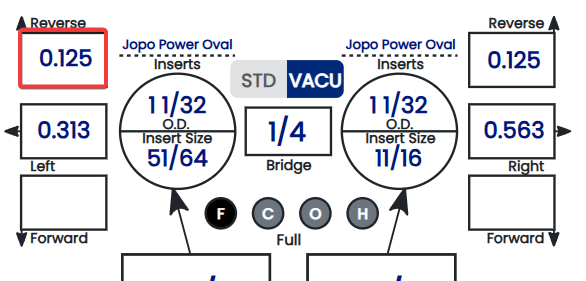
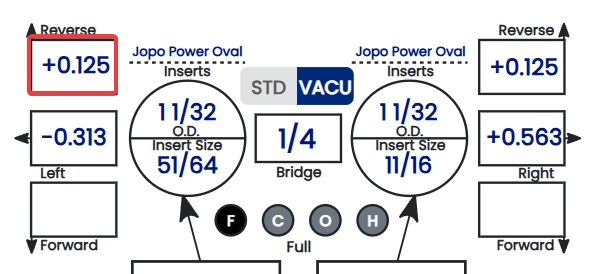
Pitch tiles are the individual display blocks within a spec sheet that show each pitch value — thumb forward/reverse, thumb lateral, and finger pitch. When this setting is enabled, each tile gains a directional arrow or symbol alongside the numeric value, giving the driller an immediate visual cue about pitch direction rather than relying on the `+` or `-` sign alone.

- ✅ Directional indicators are especially helpful for less experienced drillers who may not yet have sign conventions fully internalized.
- ✅ Useful in high-volume shops where spec sheets are read quickly under pressure.
- ✅ Reduces the risk of a misread sign causing a pitch to be drilled in the wrong direction.
- ❌ Experienced drillers who are fully comfortable with sign notation may prefer to leave this off for a cleaner spec sheet display.

**Note:** This is a display preference only — enabling or disabling it has no effect on the pitch values stored in spec sheets or transmitted to a tethered drill press. ⚠️ *Verify with your Spectre team: confirm the exact visual form of the directional indicator — whether it is an arrow (e.g. ↑ ↓ ← →), a word label (e.g. "Forward," "Right"), or a combined symbol+label.*

## 📋 How Pitch Tiles Appear With and Without This Setting

<table id="bkmrk-pitch-value-display-"><thead><tr><th>Display Off</th><th>Display On</th></tr></thead><tbody><tr><td>[![image.png](https://wiki.spectrebowling.com/uploads/images/gallery/2026-06/scaled-1680-/iTVimage.png)](https://wiki.spectrebowling.com/uploads/images/gallery/2026-06/iTVimage.png)

</td><td>[![image.png](https://wiki.spectrebowling.com/uploads/images/gallery/2026-06/scaled-1680-/image.png)](https://wiki.spectrebowling.com/uploads/images/gallery/2026-06/image.png)

</td></tr></tbody></table>

**Note:** The examples above illustrate the concept — the exact arrow style and label wording may differ in the app. ⚠️ *Verify with your Spectre team: confirm the precise visual format and whether zero pitch tiles display any indicator at all.*

## 🛠️ Enabling or Disabling Direction Indicators

1. Navigate to **Settings** from the top menu.
2. Locate the relevant settings section. ⚠️ *Verify with your Spectre team: confirm the exact section name, consistent with the navigation path confirmed for 2.4.1 and 2.4.2.*
3. Find the **Display +/- in Pitch Tiles** option.
4. Toggle the setting on or off according to your shop's preference. ⚠️ *Verify with your Spectre team: confirm whether this is a toggle, checkbox, or other control.*
5. Open any spec sheet to confirm the pitch tiles now display as expected.
6. The change takes effect immediately. ⚠️ *Verify with your Spectre team: confirm auto-save behavior, consistent with other settings in this chapter.*

[![image.png](https://wiki.spectrebowling.com/uploads/images/gallery/2026-06/scaled-1680-/u6oimage.png)](https://wiki.spectrebowling.com/uploads/images/gallery/2026-06/u6oimage.png)

## ⚙️ How This Setting Relates to 2.4.1 and 2.4.2

Settings 2.4.1, 2.4.2, and 2.4.3 form a complete pitch display configuration set. Each addresses a different layer of how pitch values are communicated to the driller:

<table id="bkmrk-setting-what-it-cont"><thead><tr><th>Setting</th><th>What It Controls</th><th>Primary Benefit</th></tr></thead><tbody><tr><td>**2.4.1** — Right pitch as positive</td><td>Sign convention for lateral pitch</td><td>Matches press readout on the lateral axis</td></tr><tr><td>**2.4.2** — Forward thumb pitch as positive</td><td>Sign convention for forward/reverse pitch</td><td>Matches press readout on the forward/reverse axis</td></tr><tr><td>**2.4.3** — Display +/- in pitch tiles</td><td>Visual directional indicator on each tile</td><td>Makes direction unmistakable at a glance</td></tr></tbody></table>

Configure all three together during initial shop setup for the most consistent and error-resistant pitch display experience.

## ☁️ Scope of This Setting

This setting is stored at the account level and syncs across all devices, consistent with 2.4.1, 2.4.2, and other settings in this chapter. ⚠️ *Verify with your Spectre team: confirm per-user vs. per-account/shop scope, consistent with the open question carried across all 2.4.x pages.*

### Related Sections

- 2.4.2 — Does your machine display forward thumb pitch as positive? Y/N
- 2.4.1 — Does your machine display right pitch as positive? Y/N
- 2.4.4 — Next setting in this chapter *(if applicable)*
- 4.x — Spec Sheet: entering and reviewing pitch values
- 1.x — Getting Started: initial shop setup checklist

**Tip:** If your shop trains new drillers regularly, leave this setting enabled by default. The directional indicators act as a built-in reminder of pitch direction until sign conventions become second nature — and they cost nothing for experienced drillers who already know what the signs mean.