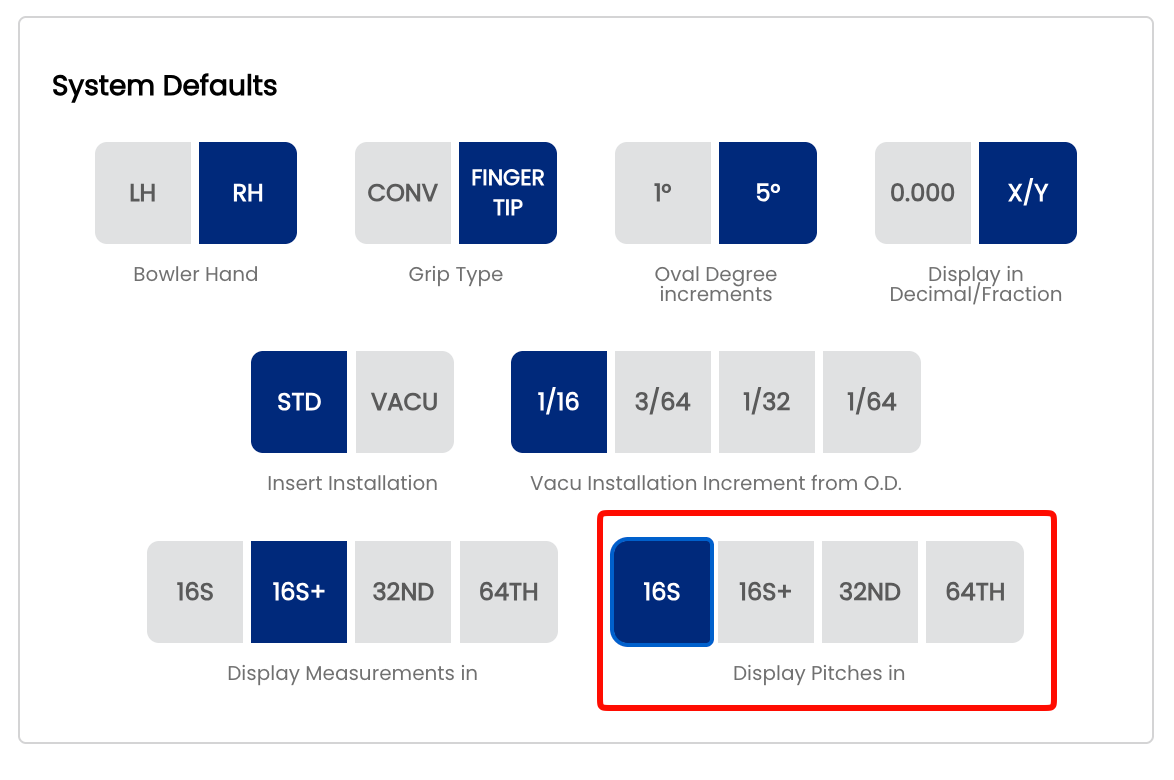
2.2.8 Display Pitches by your preferred denominator
2.2.8 display
When entering a pitch value on a spec sheet, Spectre Cloud presents a dropdown list of selectable values. This setting controls the spacing and precision of the values in that list — coarser settings show fewer values and less scrolling, finer settings show more values with greater precision. The available options are 16TH, 16TH+, 32ND, 64TH.
Note: This setting applies specifically to pitch measurements on spec sheets (forward, reverse, lateral, and combination pitches for finger and thumb holes). It does not affect span measurements or any other values. Span measurements have their own display setting — see 2.2.7.
📐 What Is Pitch?
Pitch describes the angular tilt of a drilled hole relative to the centre of the bowling ball. It is expressed as a distance measurement — the amount of offset at the surface — rather than as a degree angle. Pitch values are typically small and must be recorded precisely, since even a small difference in pitch can noticeably affect a bowler's feel and release.
- Forward pitch — hole tilts toward the bowler's palm.
- Reverse pitch — hole tilts away from the bowler's palm.
- Lateral pitch — hole tilts left or right.
📏 Understanding the Four Options
16THS — Sixteenths
The dropdown lists pitch values spaced in sixteenth-inch increments. For example: 3/16", 1/4". Values are displayed as simplified fractions. This gives 16th level precision, which is standard practice for most proshops.
16S+ — Sixteenths with half-sixteenth notation
The dropdown lists pitch values spaced in sixteenth-inch increments, with a + value added between each pair representing a half-sixteenth (one thirty-second). For example: 3/16", 3/16+", 1/4" — where 3/16+ is a shorthand way of expressing 7/32". Values are displayed as simplified fractions. This gives 32nd-level precision in a format that is easier to read and say out loud than a thirty-second fraction.
32ND — Thirty-seconds
The dropdown lists pitch values spaced in thirty-second-inch increments — the same resolution as 16S+, but displayed as simplified fractions throughout rather than using the + shorthand notation. The list will contain the same number of values as 16S+, just expressed differently. Choose this option if your drillers prefer to read standard 32nd fractions over the + notation.
64TH — Sixty-fourths
The dropdown lists pitch values spaced in sixty-fourth-inch increments, displayed as simplified fractions. The most values in the list, requiring the most scrolling. Pitch tolerances are finer than span tolerances, which is why 64TH is available here but not for span measurements. Best suited to shops fitting high-performance or highly customised bowlers where small pitch differences are intentional and meaningful.
⚙️ Changing the Pitch Display Format
- Open Spectre Cloud at
cloud.spectrebowling.comand log in. - Select Settings from the menu.
- Navigate to the System Defaults section.
- Locate the Display Pitches in field and select 16S+, 32ND, 64TH, or Decimal.
- Changes are saved automatically.
🎳 Which Format Should You Use?
| Situation | Recommended Format | Reason |
|---|---|---|
| Standard 16th precision | 16ths | 16th-level precision, standard baseline for most proshops |
| Shop wanting 32nd precision in a readable format | 16S+ | 32nd-level precision expressed in a shorthand that is easier to read and communicate than thirty-second fractions |
| Shop recording pitches in thirty-seconds, prefer standard fractions | 32ND | 32nd increment with values shown as simplified fractions — familiar and clean |
| Precision fitting, competitive or high-performance bowlers | 64TH | Maximum fractional precision — captures intentional small pitch adjustments accurately |
| Shop using digital pitch gauges or calipers | Decimal | Enter and read the same format your measuring tool outputs — no conversion needed |
🔄 Relationship to Other Display Settings
This setting works alongside the other measurement display settings in Spectre Cloud but applies only to pitch values on spec sheets:
- ✅ 2.2.3 — sets the global Decimal vs. Fractional preference. If set to Decimal, pitches display in decimal regardless of what is selected here.
- ✅ 2.2.7 — controls span dropdown precision independently. Your pitch and span display formats do not need to match.
- ❌ There is no per-sheet override — this setting applies shop-wide to all pitch dropdowns.
- ✅ Changing this setting is non-destructive — stored pitch values do not change, only the dropdown list presentation.
Tip: If your drillers work from a printed pitch reference card or pitch gauge that uses a specific format, match this setting to that format. Eliminating the mental conversion between the card and the screen reduces errors during fitting.