2.5 — Layout Preferences
- 2.5.1 Default Layout Type — VLS, 2LS, PAL (Mo Pinel), or NONE
- 2.5.1.1 VLS — Storm system for bowlers using thumb
- 2.5.1.2 2LS — Storm system for two-handed bowlers
- 2.5.1.3 PAL / Dual Angle system
- 2.5.1.4 NONE — Manual layout entry
- 2.5.2 Default Dual Angle Degree Increments — 1° vs. 5°
2.5.1 Default Layout Type — VLS, 2LS, PAL (Mo Pinel), or NONE
Default Layout Type — VLS, 2LS, PAL (Mo Pinel), or NONE
2.5.1 layout
The Default Layout Type setting controls which layout system Spectre Cloud pre-selects when a new spec sheet is created. Rather than choosing a layout method from scratch every time, your preferred system is ready to go from the moment a sheet is opened. This setting can be changed at any time and overridden on individual spec sheets without affecting the default.
🎳 The Four Layout Types
Spectre Cloud supports three active layout systems plus a no-layout option. Each system represents a different method for determining where a bowling ball's pin and mass bias are positioned relative to the bowler's track and grip center.
📐 VLS — Vertical Line System
The Vertical Line System positions the pin along a vertical line relative to the grip center, with the mass bias placed at a specified distance below the fingers. VLS is widely used in the industry and is the default layout method for many pro shops.
- ✅ Simple, widely understood, and IBPSIA-endorsed.
- ✅ Well-suited for shops serving a broad range of bowler skill levels.
- ✅ Pin distance and VAL (Vertical Axis Line) angle are the primary inputs.
📐 2LS — Two-Layout System
The Two-Layout System uses two measurements — typically pin-to-PAP (Positive Axis Point) distance and pin buffer — to define ball motion. 2LS is popular among coaches and advanced bowlers who want a more precise relationship between ball dynamics and the bowler's PAP.
- ✅ More precise control over ball motion characteristics.
- ✅ Preferred by competitive bowlers and coaches working with PAP-based fitting.
- ✅ Requires accurate PAP measurement for reliable results.
📐 Dual Angle
The Dual Angle layout system defines ball position using three values: drilling angle, pin distance, and VAL angle. It offers the most granular control over ball motion and is favored by advanced fitters and coaches who want to fine-tune skid, flip, and continuation independently.
- ✅ Highest level of precision — three input values fully define the layout.
- ✅ Widely used in competitive and coaching environments.
- ✅ Best suited for experienced fitters comfortable with all three input values.
- ❌ More complex than VLS or 2LS — not recommended as a default for shops serving primarily recreational bowlers.
📐 None
Selecting None means no layout system is pre-selected when a new spec sheet is created. The layout section of the spec sheet is left blank until the driller chooses a method manually.
- ✅ Suits shops that use different layout methods depending on the bowler or ball.
- ✅ Prevents any single method from being applied by default when the shop has no consistent preference.
- ❌ Requires a manual selection on every spec sheet — adds a step to each fitting session.
📊 Layout Type Comparison
| Layout Type | Primary Inputs | Best For | Complexity |
|---|---|---|---|
| VLS | Pin distance, VAL angle, MB position | General pro shop use; mixed skill levels | Low |
| 2LS | Pin-to-PAP distance, pin buffer | PAP-based fitting; competitive bowlers | Medium |
| Dual Angle | Drilling angle, pin distance, VAL angle | Advanced fitters; competitive and coaching | High |
| None | — | Mixed-method shops; manual selection each time | — |
Tip: Not sure which to set as your default? If the majority of your bowlers are recreational or beginner, VLS is the most accessible starting point. If you work primarily with league or competitive bowlers, consider 2LS or Dual Angle based on your fitting philosophy.
🛠️ Setting the Default Layout Type
Note: Changing the default layout type does not affect any existing spec sheets — previously saved layouts remain exactly as they were recorded.
🔄 Overriding the Default on Individual Spec Sheets
The default layout type is a convenience setting — it does not lock every spec sheet to that method. On any individual spec sheet, the layout type can be changed freely before or during the fitting without affecting the account default.
- ✅ Change the layout type on a spec sheet at any time before saving.
- ✅ The account default remains unchanged — the override applies to that sheet only.
- ✅ Cloned spec sheets carry forward the layout type of the original, not the current default. ⚠️ Verify with your Spectre team: confirm clone behavior for layout type.
🔌 Arsenal Plus Plugin
Users with the Arsenal Plus plugin have access to additional layout features including suggested layouts, layout conversion, and 3D layout rendering. The default layout type set here determines which system those suggestions and conversions are based on. ⚠️ Verify with your Spectre team: confirm how the default layout type interacts with Arsenal Plus suggested layouts and conversion tools.
☁️ Scope of This Setting
This setting is stored at the account level and applies to all new spec sheets created on any device. ⚠️ Verify with your Spectre team: confirm per-user vs. per-account/shop scope, consistent with the open question carried across 2.3.5 through 2.4.4.
Related Sections
- 2.5.2 — Next setting in this chapter (if applicable)
- 4.x — Spec Sheet: selecting and entering a layout
- 7.x — Arsenal: layouts and ball motion
- 7.x — Arsenal Plus: suggested layouts and layout conversion
- 1.x — Getting Started: initial shop setup checklist
Tip: If your shop is transitioning from one layout system to another — for example, moving from VLS to Dual Angle as your team's skills develop — update this setting to reflect the new default and leave a note in your shop's internal documentation. Bowlers with existing spec sheets will retain their original layout type in history, making it easy to compare old and new approaches side by side.
```
2.5.1.1 VLS — Storm system for bowlers using thumb
VLS — Storm system for bowlers using thumb
2.5.1a layout
The VLS (Versatile Layout System) is a ball layout method developed by Storm Bowling that determines pin and mass bias placement using a bowler's track, PAP (Positive Axis Point), and a small set of straightforward measurements. Spectre Cloud implements VLS as one of its four supported layout types, and this page explains how the system works and how it is represented within a Spectre Cloud spec sheet for bowlers who use their thumb.
Note: VLS is a Storm Bowling proprietary system. The implementation in Spectre Cloud is intended to reflect Storm's published VLS methodology. For the most current version of the VLS system, consult Storm's official fitting and drilling documentation. ⚠️ Verify with your Spectre team: confirm that Spectre Cloud's VLS implementation is up to date with Storm's current published system.
🎳 What Is VLS?
VLS is designed to make ball layouts accessible and repeatable without requiring deep knowledge of ball motion physics. It uses a bowler's track and a pin distance to position the pin relative to the VAL (Vertical Axis Line), then places the mass bias at a defined location below the fingers. The result is a layout that is easy to communicate, easy to replicate, and well-suited for pro shops serving a wide range of skill levels.
- ✅ Developed and published by Storm Bowling — widely recognised and used across the industry.
- ✅ Accessible to fitters of all experience levels — relatively few inputs required.
- ✅ Produces consistent, repeatable results when PAP and track are measured accurately.
- ✅ Suitable for the majority of thumb bowlers from recreational to competitive league level.
- ❌ Less granular than Dual Angle for fitters who need precise control over skid, flip, and continuation independently.
📐 VLS Inputs for Thumb Bowlers
For a bowler who uses their thumb, VLS requires the following measurements and values to be recorded in the spec sheet. Spectre Cloud will prompt for each of these when VLS is the selected layout type.
| Input | What It Defines | Typical Range |
|---|---|---|
| PAP Distance | Distance from the bowler's PAP to the pin | 3" – 5" |
| VAL Angle | Angle of the pin relative to the bowler's Vertical Axis Line | 0° – 90° |
| MB (Mass Bias) Position | Placement of the mass bias relative to the grip center | Defined by Storm VLS chart |
| Track | The bowler's ball track — used to orient the layout correctly | High, medium, or low track |
Note: Typical ranges above are general guidelines. Always refer to Storm's published VLS charts and the bowler's actual PAP measurement for precise values. ⚠️ Verify with your Spectre team: confirm the exact input fields Spectre Cloud displays for VLS thumb bowlers, and whether any additional fields are required beyond those listed above.
🖥️ VLS in a Spectre Cloud Spec Sheet
When VLS is selected as the layout type on a spec sheet — either as the account default (see 2.5.1) or chosen manually — Spectre Cloud displays the VLS input fields in the layout section of the sheet. Entering the bowler's PAP, VAL angle, MB position, and track produces a complete VLS layout record that is saved to the bowler's history alongside all other spec sheet data.
- ✅ VLS layout data is stored with the spec sheet and visible in the bowler's drilling history.
- ✅ When a spec sheet is cloned for a new ball, VLS inputs carry forward — review and update as needed for the new equipment.
- ✅ Arsenal Plus users can access suggested layouts and layout conversion tools based on the recorded VLS data. ⚠️ Verify with your Spectre team: confirm the extent of Arsenal Plus integration with VLS-type spec sheets.
📱 VLS vs. Thumbless Bowlers
This page covers VLS for bowlers who use their thumb. Thumbless (two-handed or one-handed no-thumb) bowlers have a different PAP location and track profile, which affects how VLS inputs are measured and entered. ⚠️ Verify with your Spectre team: confirm whether a separate page (e.g. 2.5.1.2) covers VLS for thumbless bowlers, and whether Spectre Cloud handles thumbless VLS differently in the UI.
- ✅ Thumb bowlers: PAP is typically located to the right of the track centerline (right-handed) with a standard positive axis tilt.
- ✅ Thumbless bowlers: PAP location and tilt differ significantly — do not use thumb-bowler VLS inputs for a thumbless bowler without adjustment.
✨ Tips for Accurate VLS Layouts
- ✅ Measure the bowler's PAP from a freshly thrown ball using a fresh ink or powder track — an old or smudged track will produce an inaccurate PAP and an off-target layout.
- ✅ Confirm the bowler's track type (high, medium, low) before entering layout values — track type directly affects where VLS places the pin relative to the VAL.
- ✅ Cross-reference your inputs against Storm's published VLS chart for the intended ball motion result before drilling.
- ✅ After drilling, record any observed ball motion notes in the spec sheet comments field — this builds a reference history that helps refine future layouts for the same bowler.
Related Sections
- 2.5.1 — Default layout type: VLS, 2LS, Dual Angle, None
- 2.5.1.2 — VLS: thumbless bowlers (if applicable)
- 2.5.2 — Next setting in this chapter (if applicable)
- 4.x — Spec Sheet: selecting and entering a layout
- 7.x — Arsenal Plus: suggested layouts and layout conversion
Tip: VLS is an excellent default layout system for shops that serve a broad bowler base. Its simplicity and Storm's wide brand recognition mean most bowlers — and most staff — will already have some familiarity with it, making conversations about layout choices easier on the shop floor.
```
2.5.1.2 2LS — Storm system for two-handed bowlers
2LS — Storm system for two-handed bowlers
2.5.1b layout
The 2LS (Two-Layout System) is a ball layout method developed by Storm Bowling specifically to address the unique PAP location and track profile of two-handed bowlers. Where VLS was designed with traditional thumb bowlers in mind, 2LS accounts for the significantly different axis tilt and rotation that two-handed delivery produces, providing a layout framework that is purpose-built for this growing style of play. Spectre Cloud implements 2LS as one of its four supported layout types.
Note: 2LS is a Storm Bowling proprietary system. The implementation in Spectre Cloud is intended to reflect Storm's published 2LS methodology. For the most current version of the system, consult Storm's official fitting and drilling documentation. ⚠️ Verify with your Spectre team: confirm that Spectre Cloud's 2LS implementation is up to date with Storm's current published system.
🎳 What Is 2LS?
Two-handed bowlers generate significantly higher axis rotation and lower axis tilt than most traditional thumb bowlers, placing their PAP in a different location on the ball and producing a track that behaves differently through the front part of the lane. Standard VLS inputs designed around a traditional PAP location do not translate reliably to two-handed players. 2LS was developed to give fitters a structured, repeatable layout method that works correctly for this delivery style.
- ✅ Purpose-built for two-handed bowlers — accounts for their typically higher rotation and lower tilt.
- ✅ Developed and published by Storm Bowling — a recognised standard for fitting two-handed players.
- ✅ Provides the same repeatable, chart-driven approach as VLS but calibrated for a different PAP profile.
- ✅ Growing in relevance as two-handed bowling continues to increase in popularity at all competitive levels.
- ❌ Not appropriate for traditional thumb bowlers — use VLS or Dual Angle for those fittings.
- ❌ Requires an accurate PAP measurement from the bowler's actual delivery — an estimated or assumed PAP will produce unreliable layout results.
📐 2LS Inputs for Two-Handed Bowlers
Spectre Cloud displays the following input fields when 2LS is selected as the layout type on a spec sheet. As with VLS, accurate PAP measurement is the foundation of a reliable layout.
| Input | What It Defines | Notes |
|---|---|---|
| PAP Distance | Distance from the bowler's PAP to the pin | Two-handed PAP location differs from thumb bowlers — measure from actual delivery |
| VAL Angle | Angle of the pin relative to the bowler's Vertical Axis Line | Two-handed bowlers typically have a higher VAL angle than thumb bowlers |
| MB (Mass Bias) Position | Placement of the mass bias relative to the grip center | Defined by Storm 2LS chart for two-handed delivery |
| Track | The bowler's ball track — used to orient the layout correctly | Two-handed tracks are typically lower and more consistent than traditional styles |
Note: ⚠️ Verify with your Spectre team: confirm the exact input fields Spectre Cloud displays for 2LS spec sheets, and whether the field set differs from VLS beyond the values entered.
📊 VLS vs. 2LS — Choosing the Right System
| VLS | 2LS | |
|---|---|---|
| Designed for | Traditional thumb bowlers | Two-handed (thumbless) bowlers |
| PAP profile | Standard right-of-track location (RH bowler) | Higher rotation, lower tilt — different PAP position |
| Track type | High, medium, or low track | Typically low and consistent |
| Input complexity | Low — few inputs, widely understood | Low — same structure as VLS, different calibration |
| Published by | Storm Bowling | Storm Bowling |
Tip: If a bowler switches from a traditional thumb style to two-handed, create a new spec sheet using 2LS rather than modifying their existing VLS sheets. Their historical VLS records remain intact for reference, and the new 2LS sheets reflect their current delivery accurately.
🖥️ 2LS in a Spectre Cloud Spec Sheet
When 2LS is selected as the layout type — either as the account default (see 2.5.1) or chosen manually on an individual sheet — Spectre Cloud displays the 2LS input fields in the layout section. Completed 2LS layouts are saved to the bowler's spec sheet history alongside all other fitting data.
- ✅ 2LS layout data is stored with the spec sheet and visible in the bowler's drilling history.
- ✅ Cloned spec sheets carry forward 2LS inputs — review and update for new equipment before drilling.
- ✅ Arsenal Plus users can access suggested layouts and layout conversion tools based on recorded 2LS data. ⚠️ Verify with your Spectre team: confirm the extent of Arsenal Plus integration with 2LS-type spec sheets, and whether suggested layouts account for the two-handed PAP profile.
✨ Tips for Accurate 2LS Layouts
- ✅ Always measure the bowler's PAP from a freshly thrown ball — two-handed PAP locations are highly individual and should never be estimated.
- ✅ Be aware that two-handed bowlers often have more consistent tracks than thumb bowlers — use this to your advantage when orienting the layout.
- ✅ Cross-reference your inputs against Storm's published 2LS chart for the intended ball motion result before drilling.
- ✅ If the bowler is new to two-handed delivery, consider waiting until their PAP has stabilised before committing to a reactive resin layout — early-stage two-handed bowlers can have shifting PAP locations as their technique develops.
- ✅ Record observed ball motion notes in the spec sheet comments field after the ball has been thrown — this builds a reference history for future 2LS fittings with the same bowler.
🔌 Arsenal Plus Plugin
Users with the Arsenal Plus plugin have access to suggested layouts, layout conversion, and 3D layout rendering. For two-handed bowlers, ensure that the bowler's delivery style is correctly recorded in their profile so that Arsenal Plus suggestions are calibrated for the 2LS PAP profile rather than a standard thumb bowler baseline. ⚠️ Verify with your Spectre team: confirm how Spectre Cloud identifies a bowler as two-handed within the system, and whether this affects Arsenal Plus suggestions automatically or requires a manual setting.
Related Sections
- 2.5.1.1 — VLS: Storm layout system for bowlers using their thumb
- 2.5.1.3 — Dual Angle layout system (if applicable)
- 2.5.1 — Default layout type: VLS, 2LS, Dual Angle, None
- 4.x — Spec Sheet: selecting and entering a layout
- 3.x — Bowlers: recording delivery style in a bowler profile
- 7.x — Arsenal Plus: suggested layouts and layout conversion
Tip: Two-handed bowling is no longer a niche style — many pro shops now see it regularly across all age groups and skill levels. Having 2LS configured and understood in Spectre Cloud means you are ready to fit these bowlers with the same confidence and precision as any traditional thumb bowler.
```
2.5.1.3 PAL / Dual Angle system
PAL / Dual Angle system
2.5.1c layout
The PAL (Performance Axis Layout) system — referred to in Spectre Cloud as Dual Angle — is a ball layout method that uses three measured values to precisely define pin and mass bias placement relative to a bowler's PAP. Where VLS and 2LS use a chart-driven approach with a small number of inputs, PAL gives fitters direct, independent control over three distinct aspects of ball motion. It is the most precise of the four layout types supported in Spectre Cloud and is widely used in competitive and coaching environments.
Note: The PAL system is commonly referred to as the Dual Angle layout within Spectre Cloud's interface and throughout this wiki. The two names refer to the same system — PAL is the full name, Dual Angle is the shorthand. Both terms are used interchangeably in the industry. ⚠️ Verify with your Spectre team: confirm the exact label used in the Spectre Cloud UI — whether it reads "Dual Angle," "PAL," or both.
🎳 What Is the PAL / Dual Angle System?
The PAL system was developed to give pro shop operators and coaches a layout method where each of the three input values maps directly and independently to a specific aspect of ball motion — skid length, flip potential, and continuation through the pins. By adjusting each value separately, a fitter can tune a ball's reaction with a level of precision that chart-based systems like VLS and 2LS do not offer.
- ✅ Three inputs provide independent control over three distinct ball motion characteristics.
- ✅ Widely used in competitive bowling, coaching programmes, and high-performance fitting environments.
- ✅ Works for both thumb and thumbless bowlers — inputs are derived from the bowler's PAP regardless of delivery style.
- ✅ Results are highly repeatable when PAP is measured accurately and consistently.
- ❌ More complex than VLS or 2LS — requires a fitter comfortable working with three interdependent angle measurements.
- ❌ Not recommended as a default for shops serving primarily recreational bowlers — the added precision is most valuable for bowlers who can feel and articulate subtle differences in ball reaction.
📐 The Three PAL Inputs
Each of the three PAL inputs controls a different component of the ball's motion through the lane. Spectre Cloud displays all three as input fields when Dual Angle is the selected layout type on a spec sheet.
| Input | What It Controls | Effect on Ball Motion |
|---|---|---|
| Drilling Angle | Angle from the PAP to the pin, measured relative to the VAL | Controls the flip potential and overall shape of the back-end reaction |
| Pin Distance | Distance from the PAP to the pin | Controls the length of skid — lower distance = earlier roll, higher = longer skid |
| VAL Angle | Angle of the mass bias relative to the VAL | Controls continuation through the pins and the smoothness of the transition |
Note: The three inputs interact with each other and with the ball's RG (Radius of Gyration) and differential values. Changes to one input will influence the overall reaction shape even if the other two remain constant — always evaluate the full layout as a system rather than in isolation. ⚠️ Verify with your Spectre team: confirm the exact field labels used in Spectre Cloud's Dual Angle layout section, as naming conventions can vary between implementations of the PAL system.
📊 PAL / Dual Angle vs. VLS and 2LS
| VLS | 2LS | PAL / Dual Angle | |
|---|---|---|---|
| Number of inputs | 3–4 | 3–4 | 3 |
| Input method | Chart-driven | Chart-driven | Direct angle measurement |
| Motion control | Combined — one set of inputs shapes overall reaction | Combined — calibrated for two-handed delivery | Independent — each input targets a specific motion characteristic |
| Best for | General pro shop; recreational to league | Two-handed bowlers | Competitive, coaching, high-performance fitting |
| Fitter experience needed | Low to medium | Low to medium | Medium to high |
🖥️ PAL / Dual Angle in a Spectre Cloud Spec Sheet
When Dual Angle is selected as the layout type — either as the account default (see 2.5.1) or chosen manually on an individual sheet — Spectre Cloud displays the three PAL input fields in the layout section of the spec sheet. All three values are saved to the bowler's spec sheet history alongside the rest of their fitting data.
- ✅ All three PAL inputs are stored with the spec sheet and visible in the bowler's drilling history.
- ✅ Cloned spec sheets carry forward Dual Angle inputs — always review all three values for the new equipment before drilling, as ball RG and differential will differ between models.
- ✅ Arsenal Plus users can access suggested layouts, layout conversion, and 3D layout rendering based on recorded Dual Angle data. ⚠️ Verify with your Spectre team: confirm the extent of Arsenal Plus integration with Dual Angle spec sheets, including whether 3D rendering reflects the three PAL inputs accurately.
✨ Tips for Accurate PAL / Dual Angle Layouts
- ✅ Measure PAP from a freshly thrown ball — PAL results are highly sensitive to PAP accuracy. A measurement error of even a few millimetres will shift all three motion characteristics.
- ✅ Record the ball's published RG and differential values alongside the layout in the spec sheet comments field — this context is essential when reviewing historical layouts or converting to a different ball model.
- ✅ When adjusting a layout for a new ball, change only one of the three inputs at a time where possible — this isolates the effect of each change and makes it easier to dial in the desired reaction.
- ✅ Use the spec sheet history to track how layout changes have affected ball motion over time — PAL's precision makes it especially well-suited to longitudinal fitting records.
- ✅ For bowlers new to PAL-drilled equipment, allow a few sessions before evaluating the layout — it takes time to adapt to a more precisely tuned reaction shape.
🔌 Arsenal Plus Plugin
The Arsenal Plus plugin extends Dual Angle functionality with suggested layouts, layout conversion between systems, and 3D layout rendering. For competitive bowlers with multiple balls drilled using PAL, Arsenal Plus provides a visual and analytical overview of the full arsenal's layout spread. ⚠️ Verify with your Spectre team: confirm how Arsenal Plus handles layout conversion between PAL/Dual Angle and VLS or 2LS formats, and whether the 3D rendering reflects all three PAL input values.
Related Sections
- 2.5.1.2 — 2LS: Storm layout system for two-handed bowlers
- 2.5.1.1 — VLS: Storm layout system for bowlers using their thumb
- 2.5.1 — Default layout type: VLS, 2LS, Dual Angle, None
- 4.x — Spec Sheet: selecting and entering a layout
- 7.x — Arsenal Plus: suggested layouts, layout conversion, and 3D rendering
- 3.x — Bowlers: recording PAP in a bowler profile
Tip: PAL / Dual Angle rewards investment in accurate measurement. If your shop is moving toward PAL as a primary layout method, consider standardising how PAP is measured and recorded across your team — consistent measurement technique is the single biggest factor in getting reliable, repeatable results from the system.
```
2.5.1.4 NONE — Manual layout entry
NONE — Manual layout entry
2.5.1d layout
When the None layout type is selected in Spectre Cloud, no layout system is applied to the spec sheet. Instead of being guided through a structured set of layout inputs, the driller enters layout information freely in a manual text field. This option suits shops that use a layout method not supported by Spectre Cloud's built-in systems, prefer to record layout notes in their own format, or work with bowlers whose layouts are defined externally — by a coach or ball manufacturer's rep, for example.
📋 What "None" Means in Practice
Selecting None does not mean layout information is excluded from the spec sheet — it means Spectre Cloud does not enforce a specific input structure for that information. The layout section of the spec sheet becomes a free-form record rather than a guided form.
- ✅ Full freedom to record any layout system, notation, or shorthand your shop uses.
- ✅ Useful for shops that work with manufacturer's reps or coaches who provide layouts in their own format.
- ✅ Suitable for shops in transition between layout systems — layouts can be recorded consistently while the team settles on a standard method.
- ✅ Works as a catch-all for unusual or hybrid layouts that don't fit cleanly into VLS, 2LS, or Dual Angle.
- ❌ No structured data means Spectre Cloud cannot validate inputs, auto-suggest values, or cross-reference layout history in a structured way.
- ❌ Arsenal Plus layout features — suggested layouts, layout conversion, and 3D rendering — require a structured layout type and are not available when None is selected. ⚠️ Verify with your Spectre team: confirm whether Arsenal Plus features are fully unavailable for None-type spec sheets, or whether some features remain accessible.
- ❌ Free-form entries are harder to search, filter, and compare across a bowler's history than structured layout data.
Note: If your shop uses a consistent layout method that happens to not be one of Spectre Cloud's three built-in systems, consider contacting the BowlDevs team at spectrebowling.com to request its addition. In the meantime, None with manual entry is a practical interim solution.
🛠️ Using Manual Layout Entry on a Spec Sheet
- Open or create a spec sheet for the bowler.
- In the layout section, confirm the layout type is set to None — either because it is the account default (see 2.5.1) or because you have selected it manually for this sheet.
- Enter the layout information in the free-form text field using whatever notation your shop or the bowler's coach uses. ⚠️ Verify with your Spectre team: confirm whether the None layout section is a single open text field, multiple labeled free-form fields, or something else.
- Be as descriptive as needed — since there is no enforced structure, clarity in your own notation is the only safeguard against ambiguity when the sheet is reviewed later.
- Save the spec sheet. The manual layout entry is stored in the bowler's history alongside all other spec sheet data.
✨ Tips for Consistent Manual Layout Records
Without a structured input format, the quality of manual layout records depends entirely on how consistently they are entered. A few simple conventions go a long way:
- ✅ Agree on a house notation standard with your team and apply it consistently — for example, always recording pin distance before drilling angle, in the same unit and format.
- ✅ Include the layout system name at the start of the entry if your shop uses more than one — for example,
CATS: 4.5 / 60 / 35orCoach layout: pin 4" at 45°, MB 2" below VAL. - ✅ Note the source of the layout if it came from outside the shop — for example,
Storm rep recommendationorCoach John — 2024 season. - ✅ Record the ball's RG and differential in the notes if they are relevant to understanding the layout — this context is easily lost when the layout is not linked to a structured system.
- ✅ If the bowler transitions to a structured layout system in future, keep the None-type spec sheets in their history — they provide a useful baseline for comparison.
📊 None vs. Structured Layout Types — When to Use Each
| Situation | Recommended Layout Type |
|---|---|
| Shop uses VLS for most bowlers | VLS as default — override to None for exceptions |
| Shop fits two-handed bowlers regularly | 2LS for those bowlers; VLS or Dual Angle for others |
| Competitive / coaching environment | Dual Angle (PAL) for precision fitting |
| Layout provided by external coach or rep | None — record as provided, in the coach's notation |
| Shop uses an unsupported layout system | None — contact BowlDevs to request system addition |
| Mixed shop with no consistent method | None as default until a standard is established |
| Transitioning between layout systems | None during transition; update default when ready |
🔄 Switching from None to a Structured Layout Type
If your shop decides to adopt VLS, 2LS, or Dual Angle after a period of using None, existing spec sheets with manual layout entries are not affected — they remain in the bowler's history exactly as recorded. Going forward, new spec sheets will use whichever structured type you set as the account default in 2.5.1.
- ✅ Update the account default in Settings → 2.5.1 to the new layout type.
- ✅ Existing None-type spec sheets remain accessible in the bowler's history for reference.
- ✅ For active bowlers, consider creating a new structured spec sheet for their next ball to begin building a clean layout history going forward.
☁️ Scope of the None Default
As with all layout type settings, selecting None as the account default applies to all new spec sheets across all devices. Individual sheets can be set to a structured layout type at any time regardless of the account default. ⚠️ Verify with your Spectre team: confirm per-user vs. per-account/shop scope, consistent with the open question carried across 2.3.5 through 2.5.x.
Related Sections
- 2.5.1 — Default layout type: VLS, 2LS, Dual Angle, None
- 2.5.1.1 — VLS: Storm layout system for bowlers using their thumb
- 2.5.1.2 — 2LS: Storm layout system for two-handed bowlers
- 2.5.1.3 — PAL / Dual Angle system
- 4.x — Spec Sheet: selecting and entering a layout
- 9.x — Tips and Troubleshooting: what to do if your layout system isn't supported
Tip: None is not a lesser option — it is the right choice whenever the built-in systems don't match your workflow. A clearly written manual layout entry is always preferable to forcing a bowler's fitting data into a structured system it doesn't actually fit.
```
2.5.2 Default Dual Angle Degree Increments — 1° vs. 5°
Default Dual Angle Degree Increments — 1° vs. 5°
2.5.2 layout
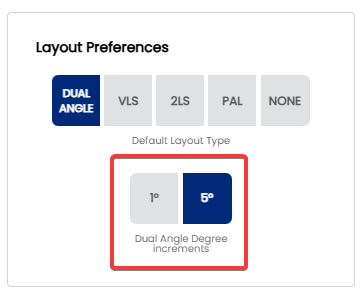
When entering drilling angle and VAL angle values in a Dual Angle (PAL) layout, Spectre Cloud lets you choose the degree increment used when adjusting angle inputs — either 1° for fine-grained control or 5° for faster, coarser adjustment. This setting determines the default step size applied across all Dual Angle spec sheets, saving you from changing it manually every session.
🔄 The Two Increment Options
| Increment | Adjustment Step | Best For |
|---|---|---|
| 1° | Each step changes the angle by one degree | Competitive and coaching environments where fine layout adjustments matter; experienced fitters working with precise PAP data |
| 5° | Each step changes the angle by five degrees | General pro shop use; shops where Dual Angle is used but high-precision tuning is not the primary goal; faster data entry |
Note: This setting controls the step size when using increment/decrement controls (such as up/down arrows or a stepper) to adjust angle values. If Spectre Cloud also allows angles to be typed in directly, any value can be entered regardless of this setting. ⚠️ Verify with your Spectre team: confirm whether angle values can be entered by direct keyboard input in addition to stepper controls, and which inputs this increment setting applies to.
📐 Why Increment Size Matters for Dual Angle Layouts
The PAL / Dual Angle system uses angle measurements to independently control skid length, flip potential, and continuation. Small changes in drilling angle or VAL angle produce measurable differences in ball motion — particularly for competitive bowlers who are sensitive to subtle reaction changes.
- ✅ 1° increments — appropriate when a bowler can perceive and articulate subtle differences in ball reaction. A 2–3° change in drilling angle can noticeably affect back-end shape for a skilled player.
- ✅ 5° increments — appropriate when layouts are being set in broad strokes and fine-tuning is not required. Faster to navigate during a busy fitting session.
- ❌ Using 5° increments in a precision fitting context may cause overshoot — stepping past the intended angle without a clean way to land on the exact value.
- ❌ Using 1° increments in a general shop context adds unnecessary steps to data entry for bowlers where a 3–4° difference in layout would have no perceptible effect on ball motion.
🛠️ Setting the Default Degree Increment
Note: Changing this setting does not alter angle values already saved on existing spec sheets. It only affects the step size used when adjusting angles on new or in-progress sheets going forward.
🔄 Overriding the Default on Individual Spec Sheets
As with other default settings in Spectre Cloud, the degree increment default can be overridden on individual spec sheets without changing the account-wide setting. If most of your work uses 5° increments but a particular bowler warrants 1° precision, switch the increment for that session only.
- ✅ Override the increment on a per-sheet basis as needed — the account default is unchanged.
- ✅ The override applies only for the duration of that fitting session. ⚠️ Verify with your Spectre team: confirm whether a per-sheet increment override persists if the sheet is reopened later, or whether it resets to the account default.
📊 Choosing the Right Increment for Your Shop
| Shop Profile | Recommended Increment | Rationale |
|---|---|---|
| Competitive / tournament pro shop | 1° | Bowlers are sensitive to fine layout differences; precision is the priority |
| Coaching or ball fitting specialist | 1° | Detailed layout records support longitudinal fitting analysis |
| General pro shop using Dual Angle occasionally | 5° | Faster entry; degree-level precision not required for most bowlers |
| Mixed shop — competitive and recreational | 1° default, override to 5° for recreational fittings | Preserves precision for competitive bowlers without slowing recreational sessions |
☁️ Scope of This Setting
This setting is stored at the account level and applies across all devices. ⚠️ Verify with your Spectre team: confirm per-user vs. per-account/shop scope, consistent with the open question carried across 2.3.5 through 2.5.x — and whether individual staff members in a multi-user shop can maintain their own increment preference independently.
Related Sections
- 2.5.1.3 — PAL / Dual Angle system
- 2.5.1 — Default layout type: VLS, 2LS, Dual Angle, None
- 2.5.3 — Next setting in this chapter (if applicable)
- 4.x — Spec Sheet: selecting and entering a layout
- 7.x — Arsenal Plus: suggested layouts and layout conversion
Tip: If you are unsure which increment to start with, 1° is the safer default — it gives you full precision without preventing faster entry, since you can always step through values quickly or type a value directly. Switching to 5° later if 1° feels unnecessarily granular for your workflow is easy to do at any time.
```